
If you run out of TRON Energy mid-transaction, execution can continue by burning TRX if the payer has enough spendable TRX and the transaction's fee limit permits it; otherwise, the contract call fails. A failed call does not complete the intended token transfer, but it can still consume resources and charge transaction fees. In 2026, the safe response is to check the confirmed transaction result before adding resources and submitting a replacement.
- If you run out of tron energy mid transaction, sufficient TRX and fee allowance can keep execution running.
- TRON contract failure rolls back the intended transfer, not necessarily the resources or fees already consumed.
- Check the transaction receipt before retrying a TRC-20 transfer; a pending wallet display is not proof of failure.
- Add Energy before a replacement transaction, not as an attempted rescue of execution already underway.
What happens if you run out of TRON energy mid-transaction?
Running out of available Energy does not automatically mean your transaction fails. TRON can charge the payer's spendable TRX for execution that available Energy does not cover, subject to the transaction's execution allowance.
The decisive question is whether execution still has resources and permission to continue. A wallet's displayed Energy balance alone does not answer that question.
| Situation | What happens | Advantage | Limitation |
|---|---|---|---|
| Available Energy covers execution | The contract can finish without burning TRX for the covered Energy | Uses allocated resources | Bandwidth and other applicable charges remain separate |
| Energy runs short, with sufficient TRX and fee allowance | TRX can cover the remaining execution requirement | Execution can continue | Your spendable TRX balance decreases |
| Energy runs short and the execution allowance is exhausted | The contract call fails | The failed top-level call does not complete the intended transfer | Consumed resources and applicable fees are not automatically returned |
| You add Energy after execution has already failed | The failed transaction stays failed | The new resources can support a replacement | Adding resources does not restart the original transaction |
For transfer-specific preparation, see the guide to TRON Energy rental services for USDT transfers. Confirm resource delivery in your own account before submitting a transaction.
Why this matters
A failed token transfer and a lost token balance are different events. When a top-level contract call fails, its state changes are rolled back; the network's resource accounting is separate.
That distinction matters when you reconcile a payment. Your recipient can receive nothing while your account still shows consumed Energy, used Bandwidth, or a TRX fee.
For a 2026 payment workflow, treat the transaction receipt as the authority. A wallet animation, a submitted request, or a reduced TRX balance does not establish that the token transfer succeeded.
Enough Energy: execution uses your available resources
TRON Energy supports smart-contract execution, including TRC-20 token transfers. Available Energy can come from resources associated with staking or delegation.
Best for: planned contract activity with resources already available to the sending account. The benefit is that allocated Energy covers execution instead of requiring TRX burning for that covered portion. The limitation is that an estimate is not a guarantee of the next call's requirement.
Available Energy is an account resource, not a promise attached to a particular transfer. Other contract calls from the same account can consume it before the transaction you are preparing executes.
Do not confuse Energy with Bandwidth. Contract transactions also use Bandwidth, and an account with enough Energy still needs to satisfy the transaction's other resource requirements.
Not enough Energy: TRX can cover the shortfall
When available Energy is insufficient, TRON can burn spendable TRX to cover execution. That fallback remains subject to the transaction's fee limit and applicable resource-accounting rules.
Best for: a transaction whose sender accepts TRX-funded execution within a deliberate limit. The benefit is continuity when allocated Energy runs short. The drawback is spending TRX that you might otherwise keep for later transactions.
Holding TRX is not the same as authorizing unlimited execution. A transaction can fail even when the wallet has TRX if the applicable execution allowance is insufficient.
Likewise, staked TRX is not interchangeable with spendable TRX. Check the balance available to pay fees, rather than assuming the account's total holdings are immediately available.
Allowance exhausted: the contract call fails
If execution cannot obtain the resources it needs within its permitted allowance, it stops with a failure result. An OUT_OF_ENERGY result identifies an execution-resource problem; other failure messages require a different diagnosis.
The intended token transfer does not complete when its top-level contract call fails. Resource consumption and fees can remain, so a failed transaction is not necessarily a free attempt.
A failed transaction does not wait for your next top-up. Once its failure is recorded, adding Energy or TRX supports future transactions rather than changing that recorded result.
Do not treat every failed transfer as an Energy issue. Contract conditions, insufficient token balance, invalid inputs, and other execution errors can also prevent a transfer. Read the result before choosing the remedy.
Why the outcome varies
The same token amount does not guarantee the same execution outcome. These factors determine whether a resource shortfall becomes TRX spending or a failed call:
- Available Energy: Check the sending account's usable resources, including whether another transaction has consumed them.
- Spendable TRX: TRX-funded execution requires a balance that the payer can actually spend.
- Transaction fee limit: The submitted transaction constrains the execution allowance; available funds do not remove that constraint.
- Contract behavior and state: The executed code path and current contract state affect the work required.
- Network resource parameters: TRON's resource rules, including applicable dynamic Energy adjustments, affect execution requirements.
- Resource-sharing settings: Applicable contract settings can divide execution-resource responsibility between the caller and the contract creator.
For a 2026 checklist, inspect these factors together. Raising a fee limit without checking spendable TRX is incomplete, and adding TRX without examining the failure result can address the wrong problem.
How do you recover after an Energy-related failure?
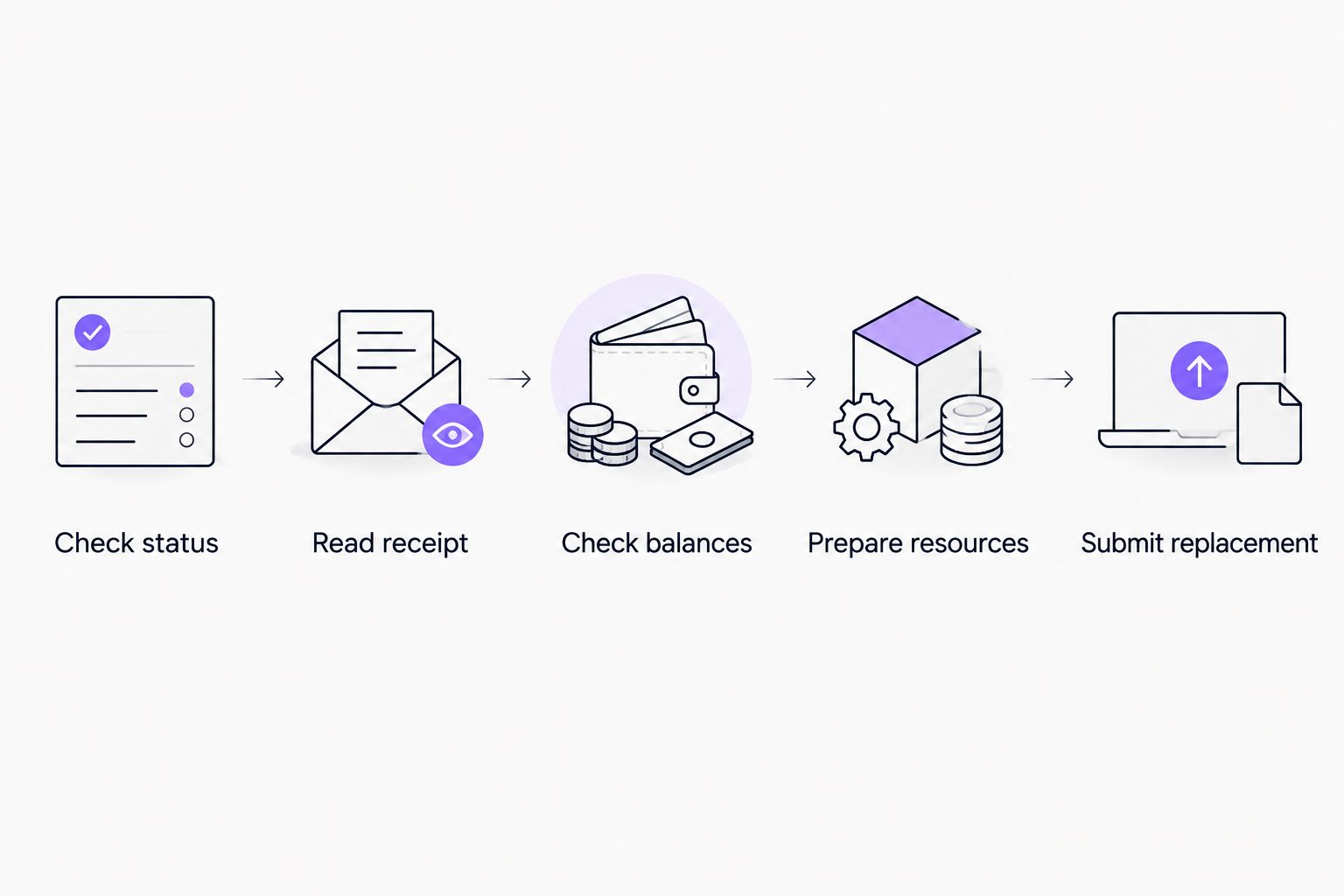
Use a receipt-first process. The purpose is to fix a confirmed failure without accidentally repeating a transfer that already succeeded.
- Check status. Find the transaction hash and inspect its confirmed on-chain result. If the transaction is still unconfirmed, establish its status before treating it as a failed payment.
- Read receipt. Identify the execution result, Energy consumption, and recorded fees. Distinguish an Energy-related failure from a contract rejection.
- Check balances. Verify the token balance, usable Energy, and spendable TRX in the account that will send the replacement.
- Prepare resources. Arrange sufficient resources and an appropriate execution allowance before signing again. If resources are delegated, verify that they reached the correct account.
- Submit replacement. Send a new transaction only after confirming that the original did not complete the intended transfer. Record the replacement hash separately.
Never use repeated submission as your diagnostic method. If the original transaction succeeded but your wallet has not refreshed, a second valid transfer can send the tokens again.
Keep the original hash and replacement hash in the same payment record. That lets you distinguish a failed attempt from a completed payment without relying on a chat message or screenshot.
Can you add Energy while the transaction is executing?
You cannot pause an executing TRON contract call and manually refill its Energy allowance. Resource delivery is not a reliable rescue mechanism for execution already underway.
Add resources before the replacement transaction. If the original is only pending, confirm its eventual result rather than assuming a later top-up changed its outcome.
Does an Energy failure mean your tokens are gone?
An Energy failure in a top-level contract call does not complete the intended token transfer. Check the confirmed receipt and token-transfer record to distinguish that outcome from a successful transfer accompanied by a separate display problem.
TRX charges are a separate issue. A reduced TRX balance can reflect transaction costs even when the token movement failed.
What should you check before the next transfer?
Use a preflight checklist rather than copying the settings from a previous transfer. In 2026, the useful record is the current account state and transaction estimate, not an old screenshot of a successful payment.
- Confirm the sending account and destination address.
- Check the token balance separately from the spendable TRX balance.
- Inspect current available Energy and Bandwidth.
- Review the contract-call estimate and fee-limit setting.
- Confirm that delegated resources are visible before signing.
- Save the transaction hash and reconcile the final receipt.
Where an interface exposes raw units, 1 TRX equals 1,000,000 sun. This denomination matters when reading a raw fee_limit value; treating sun as TRX produces an incorrect interpretation of the allowance.
TRON's staked Energy resource recovers over a 24-hour window. That recovery does not reverse fees already charged, and it does not restart a failed call. Check current resource availability instead of assuming the account has fully recovered since its last transaction.
These distinctions follow TRON's resource model and smart-contract transaction rules, documented in the TRON Developer Hub's resource-model and fee-limit references. Use those protocol references for resource behavior and the individual transaction receipt for the actual outcome.
Keep member operations separate from payment confirmation
Nbtrx provides Telegram business operations tools for teams managing member operations, partner workflows, and customer operations. Nbtrx is for Telegram business operations; a confirmed TRON receipt is the evidence of a transfer's outcome.
Keep that boundary in your payment process. A message saying that a payment was submitted should not carry the same status as a confirmed successful transfer.
For each attempted payment, retain the sending address, intended recipient, transaction hash, and final result. If you retry, preserve both hashes and mark which attempt completed the payment. This prevents a support conversation from becoming the only record of what happened.
FAQ
What happens if I run out of TRON Energy during a USDT transfer?
TRON can burn spendable TRX to cover the Energy shortfall if the transaction's execution allowance permits it. If execution cannot continue within that allowance, the contract call fails and the intended USDT transfer does not complete.
Will TRON automatically use my TRX when Energy runs out?
TRON can use spendable TRX for execution not covered by available Energy, subject to the transaction's fee limit and applicable resource rules. Holding TRX does not guarantee that a transaction has enough permitted execution allowance.
Do I get my transaction fee back after an out-of-energy failure?
An out-of-energy failure does not automatically refund the resources or fees consumed by the failed attempt. Read the transaction receipt to see the actual resource usage and charges.
Can I add Energy to restart a failed transaction?
Adding Energy does not restart a transaction whose failure is already recorded. Prepare resources and submit a replacement only after confirming that the original transfer did not succeed.
How long does TRON Energy take to recover?
TRON's staked Energy resource recovers over a 24-hour window. Check the account's current available Energy before sending, because recovery does not mean every account is immediately ready for another contract call.
Why did my transfer fail when I still had TRX?
A transfer can fail despite a TRX balance when its execution allowance is insufficient or the contract rejects the call for another reason. Inspect the execution result before adding funds or increasing the fee limit.
Does a normal TRX transfer need Energy?
A basic TRX transfer does not execute a smart contract and uses Bandwidth rather than Energy. A TRC-20 token transfer invokes a contract, so its resource requirements differ.
Should I retry when my wallet still says pending?
Do not retry solely because a wallet says pending. Check the original transaction's on-chain status first, since a second successful transfer can duplicate the payment.
One last thing
A transaction hash proves that you have an identifier to investigate, not that the recipient was paid. The useful endpoint is a confirmed successful execution with the intended token movement.
Make that your 2026 operating rule: receipt first, replacement second. It addresses both sides of the problem—unpaid transfers mistaken for success and successful transfers accidentally sent twice.


