There is no TRON protocol-wide daily limit on how many times you can rent Energy; rental frequency is governed by the provider’s order rules and its ability to fulfill requests. Repeated rentals do not guarantee sufficient resources for your next transaction, and Energy rental does not eliminate separate Bandwidth requirements or possible TRX consumption.
- There is no network-wide daily limit on renting TRON Energy; check the rental provider’s specific restrictions.
- TRON Energy recovers over 24 hours, but recovery is not a daily rental allowance or a rental extension.
- Confirm delegated resources at the receiving wallet before sending USDT or executing another smart contract.
- Separate order limits, rental duration, available Energy, and API rate limits when planning repeat rentals.
Is there a limit to how many times you can rent TRON Energy per day?
TRON does not impose a daily rental-order counter on your wallet. Renting is a commercial arrangement built around resource delegation, not a protocol feature that grants a fixed number of purchases each day. A provider can impose its own restrictions without those restrictions applying across the TRON network.
That distinction matters when an order is rejected. An account restriction, a request-rate limit, and insufficient provider resources require different responses; none automatically means your wallet has exhausted a network-wide rental allowance.
The guide to how TRON Energy rental works explains the resource-delegation model behind these orders. For your 2026 workflow, keep these controls separate:
| Control | What it governs | What to check |
|---|---|---|
| Rental-order limit | How often a provider accepts purchases | Account terms and order restrictions |
| Order-size limit | Resources requested in an individual order | Supported amounts and maximums |
| API rate limit | How frequently software sends requests | Documented request limits and retry instructions |
| Rental duration | How long the delegation remains under the agreement | Start, expiration, and renewal terms |
| Available Energy | Resources your wallet can currently consume | Current account resources on-chain |
A successful purchase is not the same as a resource-ready wallet. Verify the receiving address and the resulting resource state before treating an order as complete.
Why this matters
If you process repeated USDT transfers, counting rentals is a poor way to decide whether another transfer can proceed. You need to compare the sending wallet’s usable resources with the requirements of the intended contract call.
The operational risk is acting on the wrong status. A payment receipt confirms payment; it does not independently prove that the correct address has received the expected delegation or that sufficient Energy remains after other transactions.
For a 2026 operating procedure, assign separate checks to purchase status, delegation status, and transaction readiness. This keeps an order problem from becoming a transaction problem.
Why your practical rental limit varies
Your effective limit comes from the service agreement and the state of the resources involved. Check these factors before relying on repeated orders:
- Account restrictions. Ask whether the provider applies daily order counts, account spending controls, or address-specific restrictions. Do not assume silence means unlimited use.
- Resource supply. Confirm whether the provider can fulfill the amount you request. Accepted payment and completed delegation are separate events to verify.
- Concurrent rentals. Ask how the provider handles an address that already has an active rental. Determine whether another order adds resources, renews the agreement, or requires separate handling.
- Rental duration. Read when the rental begins and ends. A new purchase does not automatically extend an earlier agreement unless the terms say so.
- Request throttling. For automated orders, distinguish limits on status checks from limits on purchase requests. Repeated requests are not necessarily repeated completed rentals.
- Wallet consumption. Check what other transactions are using the same wallet’s Energy. An earlier balance check does not account for transactions executed afterward.
These are questions to resolve with the provider, not universal restrictions attributed to TRON. Keep the answers alongside your operating instructions so staff do not have to infer them during a failed order.
Does the daily limit reset at midnight?
There is no network-wide rental allowance that resets at midnight. If a provider imposes a daily cap, its terms must explain whether that cap follows a calendar day, a particular time zone, or a rolling window.
TRON’s Energy recovery is different. Consumed Energy recovers gradually over a 24-hour period under the network’s resource model; that recovery does not establish how many rental orders you can place.
Do not treat the 24-hour recovery period as a promise that rented resources remain delegated for that entire time. The rental agreement governs the delegation period, while the protocol governs resource accounting.
When checking a provider’s 2026 terms, ask for the reset definition rather than accepting the word daily. A calendar-day restriction and a rolling-window restriction produce different ordering schedules.
Can you rent again while another rental is active?
An active rental does not create a universal TRON prohibition against another rental. The practical question is how the provider accepts and fulfills an additional order for the same receiving address.
Before ordering again, inspect the wallet’s remaining Energy and the active rental’s expiration terms. Then determine whether the additional request supplies the resources you need without creating an unnecessary overlap.
Do not assume a new order replaces an old one, extends its duration, or combines their expiration times. Those are service behaviors that need explicit confirmation.
For repeat transfers, record each order separately even when the receiving address stays the same. You need a clear connection between the purchase, the delegation, and the transactions that consumed the resources.
Should you use repeat top-ups or a larger rental?
Choose an ordering pattern based on transaction timing and resource visibility, not on an assumed daily allowance. Both approaches require checking the actual wallet resources before execution.
| Approach | Best for | Operational advantage | Limitation |
|---|---|---|---|
| Repeat top-ups | Irregular transaction schedules | Lets you reassess resource needs before another order | Requires repeated order and delivery checks |
| A larger planned rental | A defined batch of transactions | Reduces separate ordering steps within that batch | Requires a reliable estimate and suitable rental duration |
| Resource-triggered ordering | Automated workflows with monitored balances | Connects ordering decisions to observed resource levels | Requires duplicate protection and failure handling |
None of these approaches guarantees successful transactions. Contract execution requirements, available Bandwidth, wallet balances, and provider fulfillment still need attention.
For your 2026 runbook, document the trade-off explicitly. Fewer orders simplify purchase tracking, while more frequent orders give you additional opportunities to reassess demand; neither approach removes the need to verify delivery.
How do you check whether another rental is needed?
Use a resource-first sequence. Do not buy again solely because a previous transaction finished or an order confirmation arrived.
- Check resources. Inspect the sending wallet’s current Energy and Bandwidth. Use the address that will actually execute the contract call.
- Estimate demand. Estimate the intended transaction’s Energy requirement using an appropriate wallet or node-based estimation method. Do not assume every USDT transfer consumes an identical amount.
- Review rentals. Check pending orders and existing delegation before creating another purchase. Resolve uncertain order states rather than immediately submitting replacements.
- Confirm delegation. After ordering, verify the destination address and the resulting on-chain resources. A provider dashboard is useful context, not a substitute for the wallet’s resource state.
- Send transaction. Execute only after checking resources and applicable transaction settings. Record the result before making the next ordering decision.
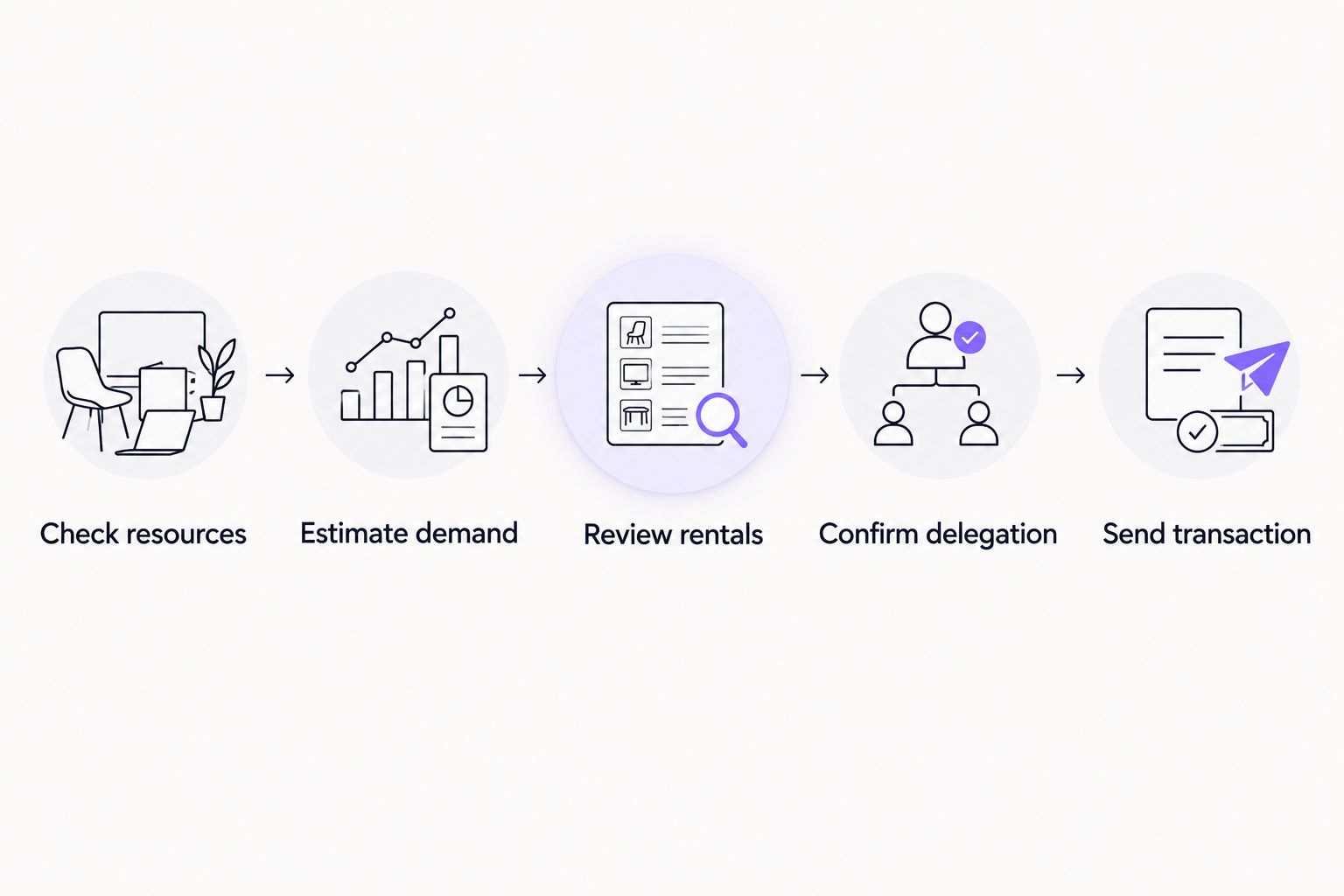
The key checkpoint is delegation confirmation. The guide to verifying an Energy rental on-chain covers the evidence to inspect rather than relying only on a payment notification.
Keep this sequence in your customer operations process even when orders are placed manually. Automation changes how the steps run; it does not remove them.
What should you do when another rental is rejected?
Start with the rejection reason. Do not interpret every failed request as a daily cap, and do not send repeated purchases while the status of an earlier payment remains unresolved.
Separate the failure into its actual stage:
- Before payment: Check the requested amount, destination address, account restrictions, and any stated order limits.
- After payment: Preserve the payment reference and order identifier. Check fulfillment status before creating a replacement order.
- During API submission: Inspect the response and follow the documented retry instructions. Use duplicate protection where the API supports it.
- After delegation: Check the receiving wallet’s resources and recent consumption. An executed transaction can change the balance you previously observed.
If a provider states that you have reached a daily limit, ask what the limit counts. Orders, requested Energy, account activity, and API requests are different measures.
Also ask when that restriction ends and whether pending orders count toward it. Record the answer in the runbook rather than treating an informal support response as a network rule.
How should teams organize repeated rental requests?
Give each rental a clear owner and a traceable status. Use a record containing the sending wallet, intended transaction, requested resources, order reference, payment reference, delegation evidence, and execution result.
A useful status sequence is requested, paid, delegated, verified, and consumed. Treat these as internal workflow labels, not as claims about a provider’s dashboard or API.
Nbtrx offers Telegram business operations tools and is best for teams seeking that category of operational tooling. Keep any Telegram coordination separate from the on-chain verification that determines whether a wallet is ready; business tooling is not evidence that an Energy rental has arrived.
Before adopting a 2026 automation workflow, decide who handles an uncertain order and who can authorize a replacement. Without that handoff, multiple staff members can respond to the same pending request with separate purchases.
FAQ
Is there a daily limit on renting TRON Energy?
There is no TRON protocol-wide daily rental-order limit. A provider can set its own order, account, or request restrictions, so check the service terms before planning repeat purchases.
Can I rent TRON Energy several times on the same day?
You can place repeated rental requests when the provider permits and fulfills them. Verify each delegation and check remaining wallet resources rather than assuming every payment makes another transfer ready.
Does TRON Energy reset every 24 hours?
Consumed TRON Energy recovers gradually over 24 hours; it does not reset as a daily rental allowance. Rental duration is a separate condition governed by the rental agreement.
Does another rental extend my current rental?
Another rental does not automatically extend your current rental. Confirm how the provider handles overlapping orders and which expiration applies to each delegation.
Is an API rate limit the same as a daily rental limit?
An API rate limit restricts requests, while a rental limit restricts whatever ordering activity the provider defines. Check the API documentation and order terms separately.
Can I send USDT immediately after paying for Energy?
Payment alone does not establish that the sending wallet has sufficient Energy. Confirm delegation, current resources, and the intended transaction’s requirements before sending USDT.
Does renting Energy remove every TRON transaction resource requirement?
Renting Energy does not remove Bandwidth requirements or every possible reason for TRX consumption. Check the complete transaction requirements instead of treating an Energy rental as a guarantee of fee-free execution.
One last thing
The most useful limit is the one you set on unresolved orders. Before submitting a replacement purchase, reconcile the earlier payment and check whether resources have already reached the wallet.
A provider’s daily allowance tells you what you can order. The wallet’s current resources tell you what you can execute. Keep those decisions separate.