
If TRON energy rental delivery is delayed, your wallet does not gain the expected resources until the delegation takes effect; submitting a smart-contract transaction before then can burn TRX or fail if the available resources and permitted fees are insufficient. Your rental payment and your intended transfer are separate transactions, so a confirmed payment does not prove that energy has arrived. Check the receiving wallet’s current resources before sending the transfer or paying for another rental.
- TRON energy rental delivery delayed? Verify payment, delegation, and available wallet resources before retrying.
- A confirmed rental payment does not prove that the receiving wallet has usable energy.
- TRON smart-contract execution can burn TRX when available energy is insufficient, subject to transaction limits.
- Request an order-specific delivery update; do not assume that a delay creates an automatic refund.
What happens if TRON energy rental delivery is delayed?
A delayed rental leaves your intended transaction without the additional energy you expected. It does not, by itself, establish that your payment failed, your funds disappeared, or your transfer was submitted.
Start with how to verify a TRON energy rental transaction on-chain. Keep the rental payment, resource delegation, and intended token transfer separate in your investigation.
Use these 3 checks in order:
- Payment confirmation. Find the payment transaction and check its execution result, destination, and amount against your order instructions.
- Resource delivery. Check for delegation to the exact wallet address you submitted, then inspect that wallet’s available energy.
- Transfer readiness. Refresh the estimate for the intended contract call and compare it with current resources and transaction settings.
Do not substitute a provider’s order label for a wallet resource check. An order marked paid answers a payment question, not an execution-readiness question.
Why this matters
The operational risk is acting on an unverified assumption. Paying again creates another order; submitting the token transfer creates a separate blockchain transaction.
For a 2026 transfer checklist, record those actions separately. You need to know which action succeeded before deciding what to repeat.
Identify which part of delivery is delayed
Best for diagnosing the issue: compare the order record with on-chain evidence. The table below separates common observable states without treating every delay as a failed rental.
| Observed state | What it establishes | Next action | Limit of that evidence |
|---|---|---|---|
| Payment has not confirmed successfully | Successful payment is not yet established | Check the transaction result and order instructions | An order screen alone does not establish blockchain settlement |
| Payment succeeded, but delegation is not verified | Payment and delivery have different evidence | Request the delivery transaction reference | Payment success does not prove resource delivery |
| Delegation is visible, but wallet display differs | The delegation record needs reconciliation with current resources | Refresh the wallet and inspect current resource information | A historical delegation does not prove enough energy remains now |
| Energy is available, but the estimate exceeds it | Delivery alone does not establish readiness | Reassess the required resources before submission | A rental order is not a guarantee that every contract call fits |
| Intended transfer already failed | The transfer needs its own investigation | Inspect the execution result and resource usage | Repeating the rental does not explain the failed transfer |
These checks have different strengths. The order record connects payment to the commercial agreement; blockchain records establish transaction results and resource state. Neither replaces the other.
If you manage several wallets, label the resource recipient separately from the payer. Checking the paying address is not enough when the order names a different receiving address.
What to do before submitting another transaction
Best for a transfer that has not been sent: pause submission until the resource check is complete. Waiting protects your decision process, but it also delays the intended payment. If a business deadline prevents waiting, assess the transaction’s fee settings and available TRX before choosing another route.
Confirm payment
Open the payment transaction record. Match the destination, asset, amount, and execution status with the order instructions rather than relying only on a wallet notification.
Keep the order identifier alongside the transaction hash. A transaction hash identifies a blockchain transaction; the order identifier connects that transaction to the provider’s fulfillment record.
Check destination
Compare the full receiving address in the order with the wallet that needs energy. Do not assume it matches the wallet used to pay.
An address mismatch changes the support request. Ask whether delivery went to the submitted address, rather than reporting that nothing arrived anywhere.
Verify resources
Inspect the receiving wallet’s current energy information and any relevant delegation record. Refresh the wallet display if it conflicts with the blockchain information you are checking.
Look at available resources, not only a delegation event. Prior contract activity can consume energy, so historical delivery and present readiness answer different questions.
Recheck readiness
Estimate the intended contract call again before submission. Review available energy, bandwidth, TRX balance, and the transaction’s fee limit where your wallet exposes it.
A delivered rental is not permission to ignore the transaction estimate. The contract call still needs sufficient resources under the settings used to submit it.
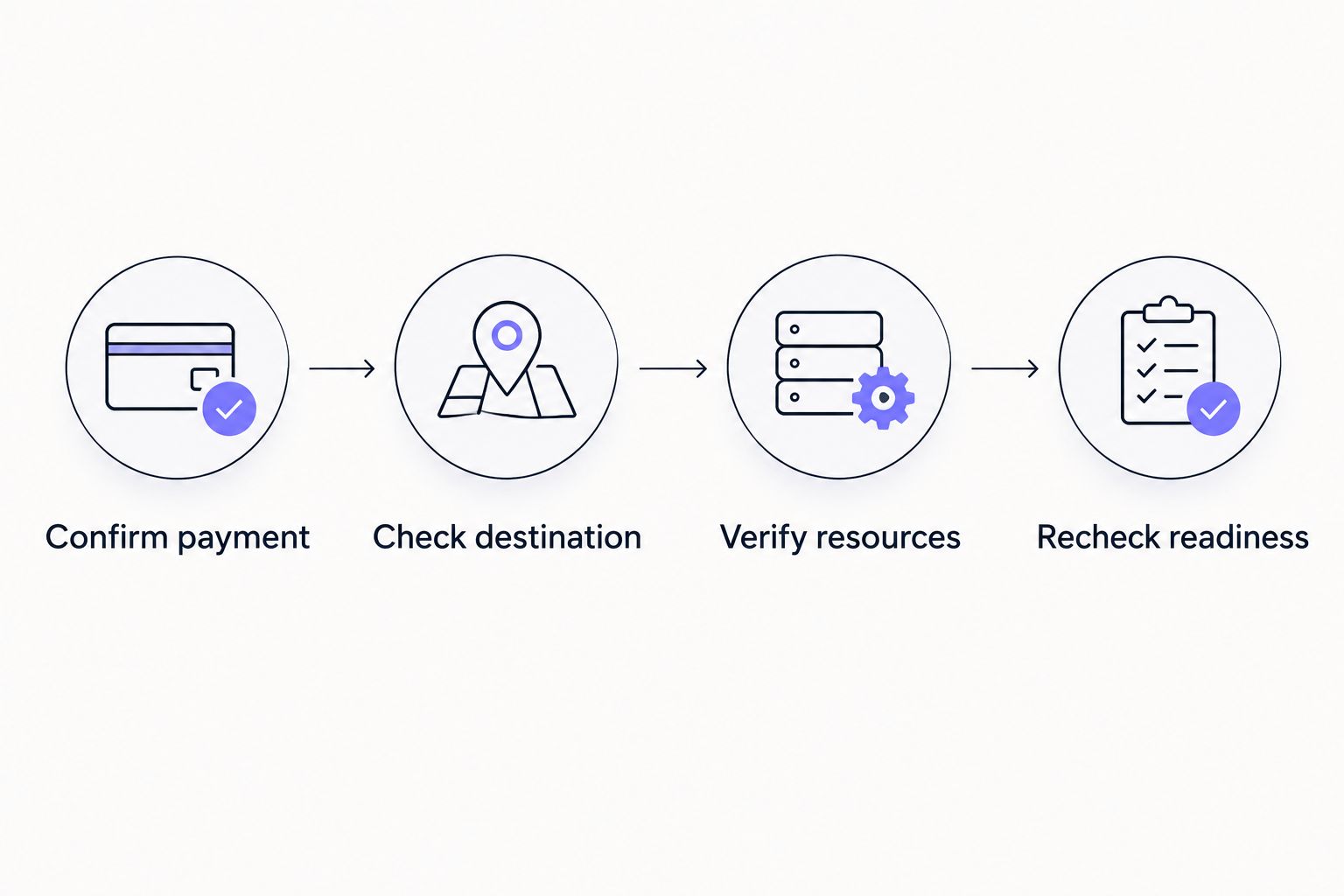
Keep this sequence in your 2026 operating instructions. It gives the next operator a clear starting point without requiring them to reconstruct the incident from chat messages.
Why apparent delivery time varies
Delivery involves more than a payment notification. Investigate these factors as separate checkpoints rather than assuming a single cause:
- Payment status. Establish whether the payment transaction executed successfully before treating the order as paid.
- Order matching. Confirm that the payment details correspond to the intended order and resource recipient.
- Delegation status. Request the transaction reference that demonstrates delivery to the receiving address.
- Display freshness. Reconcile a wallet’s displayed balance with current blockchain resource information when they disagree.
- Resource consumption. Check whether activity after delivery used energy before your intended transfer.
These are diagnostic factors, not a diagnosis of your provider. A support response should identify the specific unresolved checkpoint.
Avoid accepting a general network explanation as proof of delivery. Whatever the explanation, the practical question remains whether the correct wallet has usable resources now.
Should you wait, contact support, or place another order?
Best for a paid order with unverified delivery: contact support with the payment and recipient details before buying again. This keeps the original order traceable and avoids treating a second payment as a troubleshooting step.
| Option | Best for | Advantage | Drawback or condition |
|---|---|---|---|
| Wait while checking status | A transfer without an immediate deadline | Avoids opening another order during investigation | The intended transfer remains delayed |
| Contact support | Confirmed payment with unresolved delivery | Connects blockchain evidence to the order record | Resolution depends on the provider’s response and terms |
| Use available TRX for execution | An urgent transfer with understood fee exposure | Does not depend on receiving the rental first | Execution can consume TRX and remains subject to transaction limits |
| Place another rental order | A separately assessed need for replacement resources | Creates another fulfillment request | The original order can still arrive, leaving overlapping rentals |
No option guarantees successful execution. Recheck the intended transaction even after choosing an alternative.
Before placing another order, ask whether the original is pending, delivered, rejected, or being canceled. Those outcomes require different next steps; silence does not establish cancellation.
What should you send rental support?
Send an evidence packet that separates payment from delivery. Include the order identifier, payment transaction hash, receiving address, ordered resource details, and the current status shown in your wallet.
For your 2026 incident record, include timestamps with their time zone. A screenshot without a time reference is harder to reconcile with a payment or delegation record.
Ask support to establish:
- Whether the payment was matched to the order.
- Which address was recorded as the resource recipient.
- Whether delivery was submitted and its transaction reference.
- What happens to the order if delivery cannot be completed.
- Which cancellation or refund terms apply to that order.
Keep private keys and recovery phrases out of the conversation. Checking a public address, transaction, or delegation does not require sharing the secrets that control your wallet.
For teams using Nbtrx’s Telegram business operations tools, keep the same distinction in customer operations: a payment acknowledgment is not a delivery confirmation. Record the evidence needed to close the incident rather than marking it complete after a support reply.
Does a delivery delay mean you get a refund?
A delivery delay does not establish an automatic refund. The applicable order terms determine whether cancellation, replacement delivery, or reimbursement is available.
Ask for the outcome in writing and keep it attached to the order record. If support agrees to a refund, distinguish approval from the actual return transaction.
A blockchain payment does not reverse itself because a service missed an expected delivery time. Likewise, do not assume that abandoning the transfer cancels the rental agreement.
For a 2026 support checklist, make the requested remedy explicit: delivery confirmation, cancellation confirmation, or refund status. A request to fix the problem leaves the expected outcome unclear.
Can you still send USDT while energy delivery is delayed?
You can submit a TRON USDT transfer without the expected rental, but insufficient energy can lead to TRX consumption or transaction failure under the applicable limits. Check the wallet’s estimate and fee exposure before approving it.
USDT transfers invoke a smart contract. A positive USDT balance alone does not establish that the wallet has the resources needed to execute the transfer.
If the transfer has already failed, inspect its result before trying again. Failed execution can consume resources or fees; failure does not mean the attempt had no effect on the wallet’s resource balance.
How long should you wait before escalating?
Use the delivery commitment attached to your specific order, not a waiting period borrowed from another service. Once that commitment passes without verified delivery, send the evidence packet and request an order-specific status.
If the order gives no clear deadline, ask support for the applicable delivery condition before making another payment. Do not convert a general claim about speed into a guaranteed completion time.
Keep 1 active incident record per order. Add updates to that record so payment confirmation, delegation evidence, and any remedy remain connected.
FAQ
What should I check first if my TRON energy rental is delayed?
Check whether the rental payment executed successfully, then verify delegation and current energy at the intended receiving address. A paid order is not proof that usable energy has arrived.
Will a delayed rental make my USDT transfer fail?
A delayed rental does not automatically make a USDT transfer fail, but insufficient resources and permitted fees can prevent successful execution. Review the transaction estimate before submission.
Should I pay for the same TRON energy rental again?
Do not repeat payment merely because delivery is unverified. Establish the original order’s status first, because a second payment creates another order rather than resolving the first.
Does a confirmed payment mean my rented energy was delivered?
A confirmed payment does not establish energy delivery. Verify the delegation record and the receiving wallet’s current resources separately.
Can support ask for my recovery phrase to fix delayed energy?
Do not share your recovery phrase or private key to investigate delayed energy. Public wallet addresses, transaction hashes, and order details support delivery checks without exposing wallet control.
Does delayed TRON energy delivery qualify for a refund?
Refund eligibility depends on the terms attached to the order. Ask for written confirmation of the remedy and distinguish refund approval from a completed return transaction.
What records should I keep for a delayed rental in 2026?
Keep the order identifier, payment transaction hash, receiving address, resource details, and timestamped status checks. Retain any delegation reference and written resolution with the same incident record.
One last thing
The most useful record is often the evidence that prevents a duplicate action. Before retrying, separate 2 transaction hashes when both exist: the rental payment hash and the intended transfer hash.
Then add the delegation reference separately. Payment, delivery, and transfer are distinct events; closing the incident requires knowing which of them actually happened.


