
You can cancel a TRON energy rental after payment only if the provider accepts cancellation under the terms attached to your order; payment alone does not establish a refund right. A confirmed TRON payment cannot be reversed through an order cancellation, and delivered energy requires a separate decision about service termination and any refund.
- To cancel TRON energy rental after payment, check the provider’s terms and whether energy delivery has started.
- TRON payment confirmation, energy delegation, and refund approval are separate events.
- Unused energy does not, by itself, establish a refund right.
- Request cancellation with your order reference, payment transaction ID, and receiving wallet address.
Why this matters
Canceling an order is not the same as reversing a blockchain payment. Your request concerns the provider’s fulfillment and refund process, while the payment record remains on TRON.
For a rental purchased in 2026, keep the terms shown when you ordered. A current policy page is not a substitute for the conditions attached to that purchase. If you need to distinguish payment from resource delivery, start with how TRON energy rental actually works.
The immediate task is to establish what happened: whether payment confirmed, whether the provider matched it to your order, and whether energy reached the intended address. Each question needs its own evidence.
Can you cancel a TRON energy rental after payment?
You can request cancellation after payment, but approval depends on the provider’s terms and the order’s fulfillment status. Do not treat an accepted support ticket as an approved cancellation or an approved cancellation as a completed refund.
Use this comparison to identify the decision you need from the provider. These are investigation paths, not promises about a particular service.
| Order situation | Best next action | Benefit | Limitation |
|---|---|---|---|
| Payment confirmed; delivery not established | Ask the provider to stop fulfillment and confirm refund eligibility | Addresses the order before further fulfillment | No delivery evidence does not prove cancellation is allowed |
| Energy delivered; no intended transaction sent | Ask whether unused delivery qualifies for cancellation | Establishes whether a contractual exception applies | Unused energy does not automatically qualify for a refund |
| Energy delivered and used | Request the applicable post-delivery policy | Separates completed service from any disputed portion | Usage is relevant to the provider’s assessment |
| Wrong receiving address submitted | Request correction or cancellation immediately | Gives the provider the correct address and order context | Correction and refund eligibility remain separate questions |
| Another rental is scheduled | Disable future ordering and address the paid order separately | Prevents a new order if the scheduling control permits it | Stopping future orders does not cancel the existing one |
Check the payment before requesting a refund
Find the transaction ID in the wallet that sent the payment. Check its status, destination, asset, and amount against the order instructions.
A wallet’s payment screen and a provider’s order screen answer different questions. A confirmed transfer establishes an on-chain payment; it does not establish that the provider associated that transfer with the correct rental order.
If the destination differs from the provider’s instructions, describe that discrepancy accurately. Do not report a provider delivery failure when the payment went elsewhere.
Check delivery before calling the order unused
Inspect the resource position of the address entered on the order and any delegation transaction the provider supplies. Keep the receiving address distinct from the wallet that paid.
A rental bought for another address must be investigated at that receiving address. Looking only at your paying wallet can produce the wrong conclusion about delivery.
Record when you checked. A later resource balance does not, by itself, establish what was delivered earlier or what resources were consumed between those observations.
Paid but not delivered: request a fulfillment stop
Best for: an order with confirmed payment but no established delivery. Ask the provider to stop fulfillment while it reviews the cancellation request. Give the order reference and payment transaction ID in the same message.
The advantage is a clear operational instruction: do not continue the disputed order if stopping it remains possible. The limitation is equally clear: sending that instruction does not prove the provider received it before fulfillment or that its terms require a refund.
Ask for a written response identifying the order’s current status. If the provider says delivery already occurred, request the delegation transaction or other delivery evidence rather than debating an unexplained status label.
For a 2026 order, retain the original order confirmation alongside that response. Together, those records show what you requested and what the provider says it supplied.
Delivered but unused: check the cancellation terms
Best for: a rental that reached the intended address before your plans changed. Ask whether the provider permits cancellation after delegation and whether unused resources affect eligibility.
Not sending your planned transfer is useful context, but it is not a refund policy. The provider’s service commitment might concern allocating resources for the rental period rather than your eventual use of them; check the actual terms before asserting either interpretation.
The benefit of this approach is precision. You are asking about a delivered service you no longer need, not claiming non-delivery. Its limitation is that a technically unused allocation and a contractually refundable order are different things.
If the provider offers early termination, ask what termination changes. Ending access, ending the rental period, and returning payment are separate outcomes that need separate confirmation.
Delivered and used: separate cancellation from a service dispute
Best for: an order where resources were delivered and your wallet used energy. State what was delivered, what you used, and what you believe did not match the order.
If your concern is incorrect fulfillment, identify the specific mismatch. Examples of questions to investigate include whether the receiving address matched, whether the documented rental period matched the order, and whether the promised allocation was delivered.
The advantage is an evidence-based service dispute rather than a general request to undo a completed purchase. The limitation is that the transaction’s use of resources does not independently establish whether the provider fulfilled every contractual requirement.
Do not describe a failed token transfer as automatic proof of failed energy delivery. Review the transfer’s transaction result separately from the rental’s delivery evidence.
Why cancellation outcomes vary
The cancellation decision depends on the order and its terms, not a general rule that every TRON rental follows.
- Cancellation terms: Check whether the purchase conditions address cancellation before delivery, after delivery, or neither.
- Fulfillment status: Establish whether the provider has accepted the order, begun processing it, or delivered resources.
- Resource usage: Keep evidence of delivery separate from evidence of consumption.
- Address accuracy: Compare the address submitted on the order with the address where you expected the energy.
- Order instructions: Check whether you purchased a single rental or also authorized future orders.
- Reason for the request: Distinguish a change of plans from alleged non-delivery or incorrect fulfillment.
For a 2026 cancellation request, save the relevant policy wording with its date and purchase context. Avoid relying on an undated screenshot that does not identify which service or order conditions it describes.
How do I request cancellation after paying?
Use these 5 checks to make the request actionable. You do not need to send a second payment or disclose wallet credentials to explain the original order.
- Verify payment. Record the transaction ID, payment status, destination, asset, and amount. Compare them with the order instructions.
- Verify delivery. Check the intended receiving address and preserve any delegation transaction supplied by the provider.
- Stop future orders. If you enabled recurring purchases or an external ordering workflow, pause future submissions separately from the paid-order request.
- Request cancellation. Identify the order, explain the reason, and ask whether fulfillment can stop and whether a refund is approved.
- Verify resolution. Save the written outcome. If a refund is sent on-chain, verify its transaction rather than relying only on a support message.
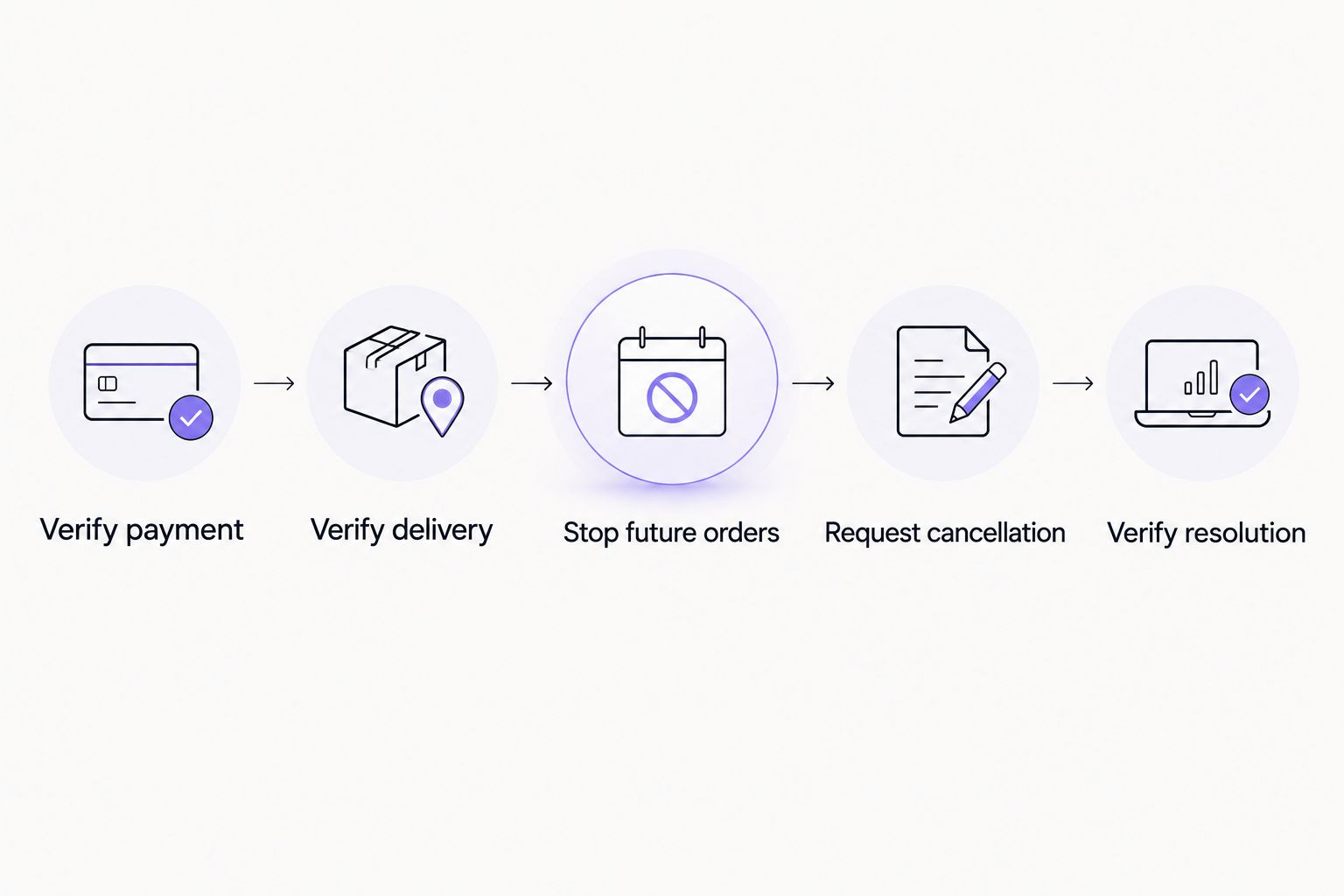
Keep the request concise. Include the order reference, payment transaction ID, receiving address, reason for cancellation, and the outcome you want. Ask the provider to distinguish cancellation approval from refund approval in its response.
Preserve 3 records together: the order confirmation, the payment transaction, and the support decision. Add delivery evidence when available. This keeps the original purchase and the resolution connected without relying on memory.
What should I avoid sending to support?
Never send a seed phrase or private key. A public receiving address and transaction ID let someone inspect public blockchain records; they do not require control of your wallet.
Use the provider’s established support channel rather than an unsolicited message offering refund assistance. Do not sign an unexplained transaction merely because someone describes it as a cancellation step.
Does unused TRON energy guarantee a refund?
Unused TRON energy does not guarantee a refund. Refund eligibility comes from the applicable terms and the provider’s decision, not solely from whether you completed your intended transfer.
Ask the provider to identify the relevant cancellation condition. If unused delivery qualifies, obtain written confirmation of what happens next and whether the rental ends before its original expiry.
Can I reverse the TRON payment myself?
A confirmed TRON payment cannot be reversed by canceling the rental order. If the provider approves returning funds, that return is a separate transfer rather than an erasure of the original transaction.
Keep 2 transaction IDs when a refund arrives: the original payment and the return transfer. Check the receiving address and asset on the return transaction before marking the issue resolved.
Will stopping automation cancel the rental I already paid for?
Stopping automation addresses future orders, not an already confirmed payment. Review the paid rental separately and ask the provider whether it remains active.
An external scheduler and the rental provider can have different order states. Confirm both: whether another request will be submitted and whether the existing order has actually been canceled.
Where Nbtrx fits
Nbtrx is best suited to teams seeking Telegram business operations tools. Its stated offering concerns member operations, partner workflows, and customer operations; that does not establish a TRON rental cancellation or refund policy.
If your workflow involves Nbtrx, keep the operations-tool question separate from the rental-provider question. Ask the party that accepted the rental payment to confirm the paid order’s status and applicable terms. Do not infer cancellation controls from a tool’s category.
FAQ
Can I cancel a TRON energy rental immediately after payment?
You can request cancellation immediately, but approval depends on the provider’s terms and fulfillment status. Ask whether fulfillment can stop and whether a refund is approved; those are separate decisions.
Does unused rented TRON energy mean I get my payment back?
Unused rented TRON energy does not automatically entitle you to a refund. Check the cancellation terms attached to your order and obtain the provider’s written decision.
Can I reverse a confirmed TRON rental payment from my wallet?
You cannot reverse a confirmed TRON payment by canceling the rental order. An approved refund requires a separate return transfer.
What should I send with a TRON energy cancellation request?
Send the order reference, payment transaction ID, receiving address, and reason for cancellation. Ask the provider to confirm delivery status, cancellation approval, and refund eligibility separately.
What if I entered the wrong address for my energy rental?
Request correction or cancellation immediately and provide the address entered on the order. Whether the provider can correct fulfillment or approve a refund depends on the order’s status and terms.
Does turning off an ordering bot cancel my paid rental?
Turning off an ordering bot does not reverse an existing payment or establish cancellation of a paid rental. Stop future submissions and resolve the existing order separately with the provider.
How do I confirm that a rental refund was completed?
Confirm an on-chain refund by checking the return transaction’s status, asset, and receiving address. Keep that transaction ID alongside the original payment and written refund approval.
One last thing
Ask for the refund transaction ID, not just a resolved ticket. A support status describes a case; a confirmed return transfer establishes that funds reached the specified address.
For your 2026 records, close the issue only after the evidence matches the promised outcome. If the provider approved cancellation without a refund, record that distinction explicitly.


