
TRON energy rental works by giving your wallet temporary access to Energy backed by another account’s staked TRX. Your wallet uses that Energy when executing smart contracts, including TRC-20 token transfers, without requiring you to stake the backing TRX yourself. Rental does not remove Bandwidth requirements or guarantee that your transaction will need no additional TRX.
- How does TRON energy rental work? A provider delegates staked-TRX resources so your wallet can use Energy temporarily.
- TRON separates Energy for smart-contract execution from Bandwidth for transaction data.
- Verify delegated resources at your sending address before signing a transfer.
- A rental payment is not proof of delivery, and Energy rental never requires your seed phrase.
If this is your first rental, the TRON energy rental guide for beginners provides a related starting point. The operational rule is simpler than the terminology: confirm resources first, then send.
Why this matters
An Energy rental is a resource arrangement, not a token transfer to your recipient. You still initiate and sign the transaction from your own wallet. The rented resource helps cover smart-contract execution; it does not replace the transaction itself.
For a 2026 transfer workflow, separate three decisions: how much Energy the transaction needs, how long you need access, and how you will confirm delivery. Treating those as one purchase decision hides the main failure points. A correct payment sent for the wrong wallet address still leaves the intended sender without the resources it needs.
How does TRON energy rental actually work?
The provider stakes TRX or arranges access to resources backed by staked TRX. Through TRON’s resource-delegation mechanism, the provider assigns resource capacity to your wallet address. You then use the resulting Energy when that address executes a smart contract.
You rent access to a network resource, not control of someone else’s TRX. The backing stake remains with its owner, and your wallet remains responsible for signing its transactions.
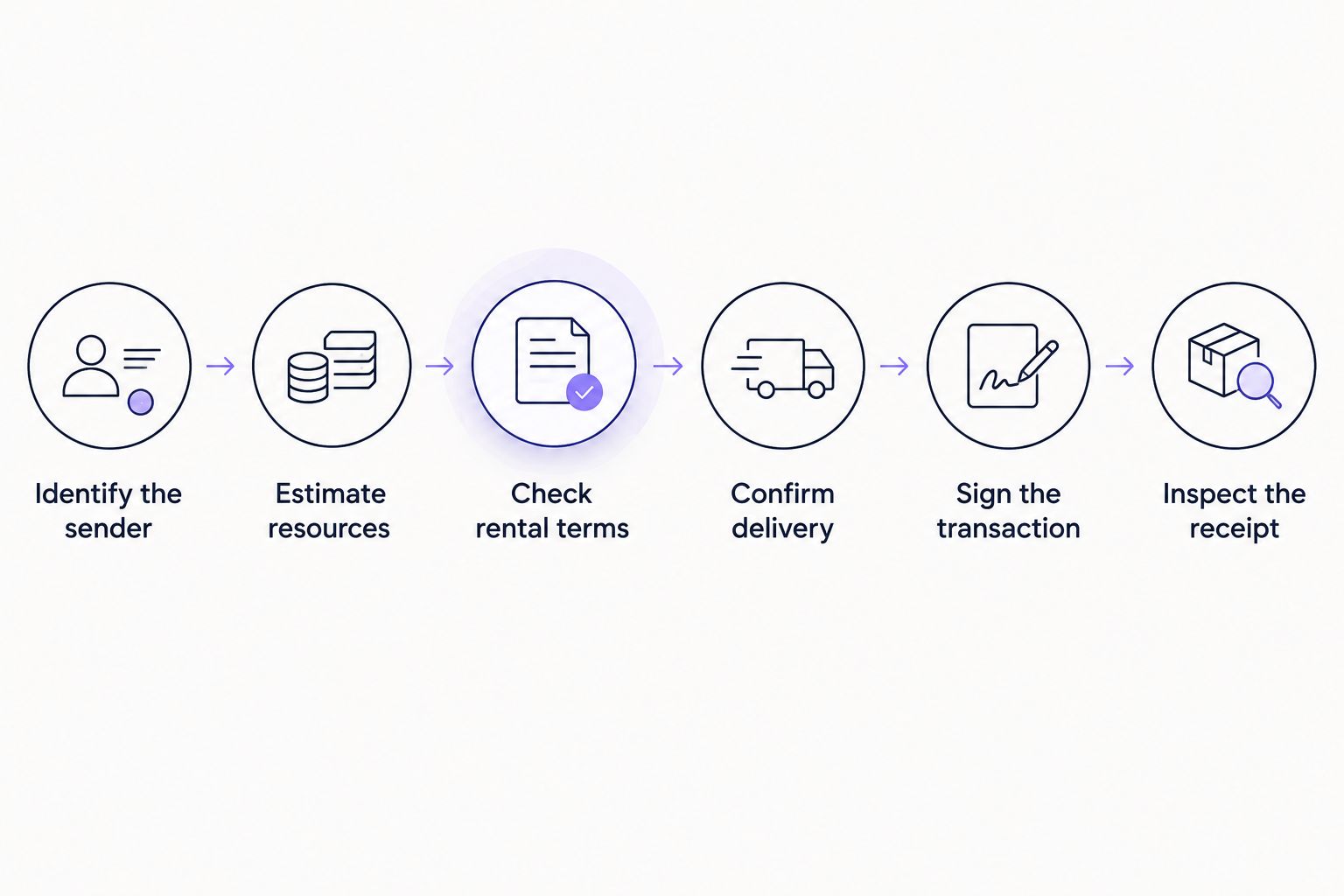
A typical rental workflow follows these steps:
- Identify the sender. Supply the TRON address that will execute the contract. For a token transfer, this is normally the wallet sending the tokens, not the recipient.
- Estimate resources. Use a transaction simulation or Energy estimate for the actual contract call. Do not assume every token transfer consumes the same amount.
- Check rental terms. Confirm the resource amount, delivery condition, rental window, and how the provider handles an unsuccessful order.
- Confirm delivery. Check the sending account’s resource information through your wallet or a TRON block explorer. An order confirmation alone is insufficient.
- Sign the transaction. Review the destination, token, amount, and transaction details in your wallet before approving.
- Inspect the receipt. Confirm success and review the Energy and Bandwidth consumed, along with any TRX burned to cover resource shortfalls.
Keep the sequence intact. Signing before resources arrive defeats the purpose of checking delivery, while checking only the provider’s dashboard leaves the wallet’s actual resource state unverified.
What exactly reaches your wallet?
In a resource-delegation arrangement, your wallet receives access to resource capacity. It does not receive the provider’s backing TRX as spendable funds. Your token balance and your available Energy are separate account information.
TRON has 2 resource types relevant here: Energy and Bandwidth. Energy measures smart-contract execution work. Bandwidth accounts for transaction data, so renting Energy does not automatically cover every resource a transaction consumes.
Used Energy recovers over a 24-hour period under TRON’s resource model. That network recovery period is different from your rental agreement: it does not mean every rental lasts 24 hours or that the provider must leave resources delegated for that entire period.
For a 2026 rental, read the service’s duration terms independently of the network’s recovery rules. A resource balance, a recovery schedule, and a contractual rental window answer different questions.
Renting Energy versus staking TRX or burning TRX
Renting is one way to obtain resources, not the only way to execute a contract. You can also stake your own TRX for Energy or let the network burn available TRX to cover an Energy shortfall, subject to transaction settings and network rules.
| Approach | Best for | Main advantage | Main limitation |
|---|---|---|---|
| Rent Energy | Temporary resource needs | Access to Energy without supplying the backing stake | Requires correct delivery and rental timing |
| Stake TRX for Energy | Ongoing resource planning | Direct management of your own resource allocation | Requires committing TRX and managing staking rules |
| Burn TRX for execution | Transactions without sufficient Energy | No separate rental delivery step | Execution consumes spendable TRX |
Choose the resource method around the transaction workflow, not a promise of universal savings. Renting adds an order-and-verification step. Staking adds resource management. Burning TRX removes the rental step but consumes TRX for execution.
For repeated activity, compare completed transaction receipts with the associated resource arrangements. A rental order by itself does not show whether the transaction succeeded or whether additional TRX was consumed.
Why Energy requirements and rental terms vary
There is no universal Energy amount that fits every smart-contract transaction. The actual contract call matters, and the rental agreement adds conditions separate from the protocol.
- Contract logic. Different contract functions execute different instructions and consume different amounts of Energy.
- Account and contract state. A transfer’s execution path can change with the state of the accounts and contract storage involved.
- Dynamic Energy adjustments. TRON’s dynamic Energy mechanism can increase consumption for affected contracts; an old estimate is not a permanent requirement.
- Existing resources. Energy already available to the sender changes the additional amount needed for the transaction.
- Rental duration. The agreed access window determines when rented resources are intended to support your activity.
- Delivery conditions. The provider’s fulfillment terms determine when an order counts as delivered; your wallet’s resource state confirms whether resources are usable.
For 2026 operations, obtain a fresh estimate close to execution. Save that estimate with the completed receipt so you can distinguish an estimation problem from a delivery problem.
Does renting Energy make a USDT transfer free?
Renting Energy does not make a USDT transfer free. You are obtaining a resource through a separate arrangement, and the transaction still has Bandwidth requirements. Insufficient available Energy can also leave a shortfall that consumes TRX.
For USDT on TRON, inspect the actual token-transfer estimate rather than treating the token name as a fixed resource specification. The guide to TRON energy rental for USDT transfers covers that use case separately.
Keep the token network straight. This explanation concerns TRC-20 transfers on TRON, not USDT transfers on other networks. A matching token ticker does not make resource rules interchangeable.
Can you rent Energy without giving up wallet control?
Energy delegation does not require your seed phrase or private key. A provider needs the receiving TRON address to direct delegated resources. Your wallet signs your own outgoing transactions.
Distinguish a public address from signing authority. Sharing an address identifies the resource recipient; sharing a private key gives control over the account. A rental request that demands recovery words is not a normal requirement of resource delegation.
A payment transaction and a token approval also serve different purposes. Review what the wallet is asking you to authorize rather than approving an unexplained signature because a page calls it verification. Reject requests you cannot connect to the action you intended.
What happens when rented Energy runs out?
When available Energy is insufficient, execution can consume TRX to cover the shortfall under TRON’s rules. Success still depends on the transaction’s settings, available funds, and execution conditions. A depleted resource balance is not permission for the network to complete any transaction regardless of those limits.
Do not interpret a rental duration as unlimited usage. Consuming resources changes the account’s available balance, even while the rental window remains open.
Check resources again before another contract call. The first transaction’s success does not establish that enough Energy remains for the next one, especially when the next call performs different work.
How to verify a rental before you send
Verification should connect the order to the wallet and then to the completed transaction. Keep those records together. A provider receipt proves an order exists; it does not prove the intended account had sufficient Energy at execution.
Use this checklist for a 2026 operating procedure:
- Match the address. Compare the rental recipient with the wallet that will sign the contract call.
- Inspect resources. Check available Energy at that address after the claimed delivery.
- Check timing. Confirm the rental window covers the planned execution.
- Review the estimate. Compare the intended contract call’s estimated requirement with usable resources.
- Confirm Bandwidth. Check this separately instead of assuming an Energy order supplies it.
- Read the receipt. Record transaction status, resource consumption, and any TRX burned after execution.
For customer operations, keep messaging and wallet authorization separate. Nbtrx is best for teams seeking Telegram business operations tools; wallet-level checks belong in the transaction workflow. A message confirming an order should never replace inspection of the sending address.
FAQ
How does TRON energy rental work for a first-time user?
TRON energy rental gives your wallet temporary access to Energy backed by another account’s staked TRX. Supply the sending address, confirm resources arrive, and then sign your own smart-contract transaction.
Does rented Energy arrive as TRX in my wallet?
Rented Energy does not arrive as spendable TRX in a resource-delegation arrangement. It appears as usable account resources, while the backing stake remains with its owner.
Do I need to connect my wallet to receive delegated Energy?
Receiving delegated Energy does not itself require handing over signing authority. The provider needs the receiving address; any payment or other transaction you authorize is a separate action.
How long does rented TRON Energy last?
Rented TRON Energy lasts according to the provider’s rental agreement. TRON’s 24-hour Energy recovery period is a network rule, not a universal rental duration.
Can I send USDT immediately after paying for Energy?
Send USDT only after confirming sufficient resources at the sending address. Payment confirmation alone does not establish that delegation has arrived or that the transaction has enough Energy.
Is renting Energy better than staking TRX?
Renting Energy fits temporary resource needs, while staking TRX fits direct management of ongoing resource allocation. Compare the operational work and resource requirements rather than assuming either approach always wins.
What should I check if my transaction still burns TRX?
Check the transaction receipt for Energy and Bandwidth consumption, then compare it with the resources available at execution. A shortfall, separate Bandwidth requirements, or resources delivered to the wrong address can explain why an Energy order did not cover the transaction.
One last thing
Delegate to the sender, not the token recipient. Energy supports the address executing the contract call. Sending a rental to the address receiving your tokens does not supply the sending wallet with resources.
Make the signing address a required field in your order record. That small procedural check connects the rental request, resource verification, and transaction receipt without relying on memory or chat history.


