
To calculate how much TRON Energy you need, estimate the sender’s Energy requirement for each planned smart-contract call, add those requirements together, and subtract the Energy available to that sender when the transactions execute. Use live estimates rather than a fixed allowance per transfer: Bandwidth, contract state, and execution timing need separate checks before you submit.
- To calculate how much TRON Energy you need, estimate each contract call and subtract the sender’s available Energy.
- TRON Energy requirements depend on contract execution, not simply the number of tokens transferred.
- Check Bandwidth separately; sufficient Energy does not cover every transaction resource.
- Re-estimate queued transactions when contract state, sender resources, or execution timing changes.
How do you calculate how much TRON Energy you need?
Required additional Energy = the greater of zero or planned sender Energy consumption minus available sender Energy. Apply this calculation to each sending account separately. Energy available in one account does not automatically cover a transaction submitted by another.
For token-specific planning, use the guide to how much TRON Energy you need for a USDT transfer. The calculation below also applies to other smart-contract calls, provided you estimate the actual operation rather than borrowing a transfer estimate.
Identify the exact transaction
Record the sending address, contract address, function, recipient, and function arguments. An estimate for a token transfer does not describe a swap, approval, or another contract operation.
A plain native TRX transfer requires 0 Energy because it does not execute a smart contract. It still uses Bandwidth, so zero Energy does not mean zero resource requirements.
Estimate the contract call
Use a wallet simulation or a supported TRON node estimation endpoint with the same parameters you intend to submit. TRON’s estimateenergy endpoint returns an energy_required value when the request succeeds.
Where supported, triggerconstantcontract can simulate execution and report energy_used. Check the response status as well as the resource field; a failed simulation is not a valid budget for a successful transaction.
Establish the sender’s share
Distinguish total contract execution Energy from the Energy charged to the caller. TRON contracts can have resource-sharing settings that affect the caller’s responsibility.
Read what your estimation interface reports. If it reports total execution consumption, account for applicable contract resource-sharing rules before treating that number as the sender’s requirement. Do not subtract a developer contribution unless the contract configuration and applicable limits support it.
Read available account resources
Query the sender’s current resources. In TRON’s getaccountresource response, EnergyLimit and EnergyUsed describe the account’s Energy allowance and current usage.
Use available Energy = max(0, EnergyLimit − EnergyUsed) at that observation time. A missing resource field is not evidence that the account has an unused allowance; handle absent fields according to the API response specification.
Calculate the shortfall
Add the expected caller consumption for transactions that will use the same account’s resources. Subtract the available Energy once, not once for every transaction in the queue.
Keep the result in Energy units. Comparing an Energy estimate directly with a TRX balance mixes different quantities and does not tell you whether the account has enough Energy.
Why this matters
A calculation has two separate parts: what the next operation consumes and what the sender has available. Getting either part wrong produces an incorrect shortfall, even when the arithmetic is perfect.
For a 2026 transaction workflow, save the estimate alongside the exact transaction parameters and its observation time. That makes it possible to identify whether a later difference came from changed contract execution, changed account resources, or a different submitted transaction.
Estimate the transaction you will send, not a transaction that merely looks similar. A previous successful transfer is useful evidence, but it is not a standing allowance for every future call.
Choose the right evidence for your calculation
Use live estimation before submission and transaction receipts after execution. These sources answer different questions; neither should silently replace the other.
| Evidence source | Best for | Advantage | Limitation |
|---|---|---|---|
| Wallet simulation | Checking an individual transaction | Connects the estimate to the transaction you are preparing | Displayed fields and simulation support depend on the wallet |
| Node estimation | Building a repeatable transaction workflow | Accepts explicit sender and contract-call parameters | Requires correct request construction and supported endpoints |
| Confirmed transaction receipt | Reviewing actual consumption | Records what the executed transaction consumed | Describes an executed transaction, not a guaranteed future requirement |
| Fixed transfer allowance | Rough preliminary planning | Simple to use | Does not account for the exact execution state |
Use live estimation for the submission decision and receipts for reconciliation. Keep fixed allowances out of the final approval step unless a fresh check confirms that they cover the intended call.
In your 2026 operating procedure, record which evidence source supplied the estimate. A wallet display and a receipt field can describe different parts of resource consumption; storing an unlabeled number makes later comparisons unreliable.
Calculate Energy for a batch without counting resources twice
A batch requires an account-level budget, not just a transaction-level estimate. Start with the sending account, then list the calls that will draw on its resources before your next resource check.
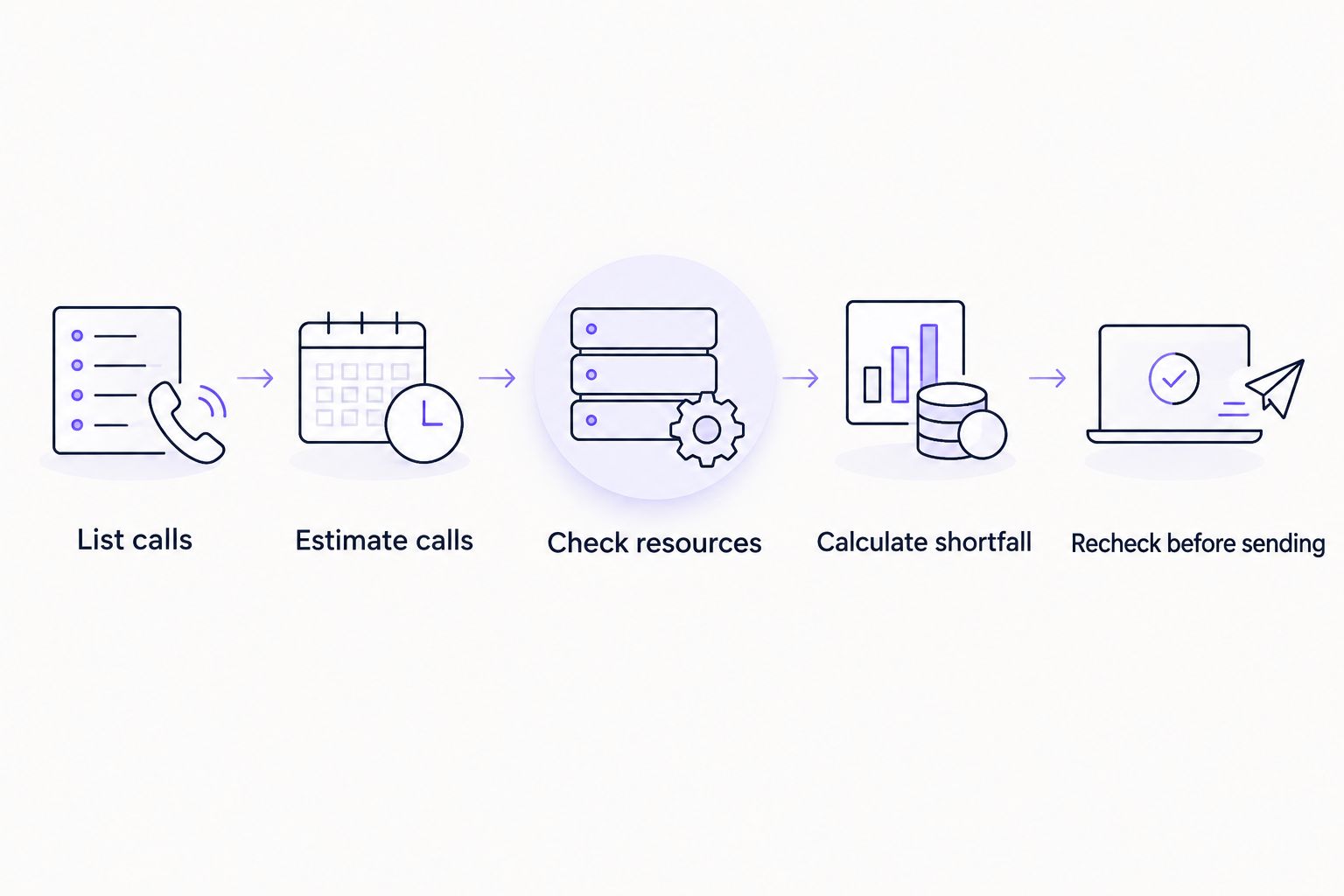
Use this sequence:
- List calls. Record each intended contract interaction and its parameters.
- Estimate calls. Obtain a successful estimate for each operation.
- Check resources. Read the sending account’s available Energy.
- Calculate shortfall. Subtract available Energy from planned caller consumption.
- Recheck before sending. Refresh the calculation when the queue or account changes.
The sequence matters. Subtracting the same starting balance from every transaction makes a batch appear better funded than it is.
Transactions can also change the state that subsequent transactions encounter. Independently simulating every call against the same starting state does not necessarily reproduce sequential execution.
Where your workflow cannot simulate the sequence accurately, submit and reconcile in controlled stages. Refresh the remaining estimates after execution changes the relevant contract state. Do not describe an independently estimated batch as an exact forecast.
For multiple senders, maintain separate resource calculations. Combining all available Energy into a single spreadsheet total hides which account can actually use it.
Why TRON Energy requirements vary
The following factors determine whether an earlier estimate still describes the next transaction:
- Contract function. A transfer, approval, and swap execute different instructions. Estimate the selected function and arguments.
- Storage state. Contract storage writes and execution paths depend on the state encountered during execution.
- Recipient state. A token recipient’s existing contract balance can affect the transfer’s storage behavior.
- Dynamic Energy rules. TRON’s dynamic Energy mechanism can increase consumption for affected contracts. Do not add the same adjustment again if the estimate already includes it.
- Caller resource sharing. Contract settings and applicable developer limits affect how execution resources are divided.
- Intervening activity. Earlier transactions can change contract state or consume the sender’s resources before the planned call executes.
Keep requirement changes separate from balance changes. A contract call can require the same Energy while your additional requirement rises because another transaction consumed available resources.
For 2026 operations, refresh estimates after a material transaction change rather than treating the calendar date as proof of accuracy. The relevant state is the state near execution.
Account for recovery and delegated Energy
TRON Energy usage recovers over a 24-hour window under the network’s resource rules. That does not make a recently observed balance a guaranteed balance for a later transaction: consumption and resource changes also affect availability.
For an immediate calculation, use the resources currently reported for the sender. For a scheduled batch, distinguish observed availability from projected availability and recheck before execution.
Treat delegated resources the same way: confirm that they are reflected in the intended sender’s usable resources. A request, order confirmation, or expected allocation is not a substitute for an account-resource check.
Use the guide to monitoring rented Energy usage when you need to connect resource observations with transaction activity. Keep credentials and transaction-signing permissions separate from the resource calculation itself.
Keep Energy, Bandwidth, and fee limits separate
Energy covers smart-contract execution. Bandwidth covers transaction data. A transaction budget needs both checks, even when this page’s calculation shows no additional Energy requirement.
A transaction’s fee_limit is expressed in SUN; 1 TRX equals 1,000,000 SUN. That is a denomination conversion, not an Energy conversion. A fee limit does not create Energy or turn a wallet’s TRX balance into an Energy allowance.
Set transaction controls using current network rules and your signing policy. Do not copy a fee-limit value from an unrelated transaction and assume it proves that your resource budget is sufficient.
Your 2026 submission checklist should therefore distinguish:
- The estimated Energy the sender must cover.
- The Energy currently available to that sender.
- The transaction’s Bandwidth requirements.
- The transaction’s applicable execution and spending controls.
This separation also makes failures easier to investigate. An Energy estimate alone cannot explain every rejected or failed transaction.
Can I multiply one transfer estimate by my transfer count?
Multiplication works as a planning approximation only when the calls have equivalent resource requirements. Different recipients, contract states, or operations can produce different results.
Group comparable transactions, estimate representative calls, and validate the assumptions before submission. For a mixed queue, calculate the components separately rather than applying a single transfer allowance to everything.
Should I add a safety margin to my Energy estimate?
Use a margin only as an explicit operating choice, not as a claimed TRON requirement. A margin does not repair a failed simulation or incorrect transaction parameters.
Base your policy on recorded differences between estimates and actual consumption. Keep the raw estimate, chosen margin, and final allocation separate so you can review each decision.
How do I check whether my calculation was right?
Compare the confirmed transaction’s receipt with the estimate saved before submission. Read the relevant Energy fields together, including caller consumption and developer contributions where applicable.
Also inspect the sender’s resource balance and any other transactions submitted in the interval. A balance change alone does not isolate the consumption of the transaction you are reviewing.
FAQ
How do I calculate how much TRON Energy I need before sending?
Estimate the intended contract call’s caller Energy requirement and subtract the sender’s available Energy. For a batch, add the planned caller requirements first and subtract the available balance once.
Does sending more USDT always require more TRON Energy?
No. TRON Energy measures contract execution rather than the monetary value transferred. Estimate the exact call because contract state and execution behavior matter.
Does a normal TRX transfer need Energy?
A plain native TRX transfer requires 0 Energy because it does not execute a smart contract. It still consumes Bandwidth, so check the transaction’s other resource requirements.
Where can I check the Energy my wallet has available?
Check the sender’s account resources through a wallet or TRON’s getaccountresource endpoint. Available Energy is the nonnegative difference between EnergyLimit and EnergyUsed at the observation time.
Can I use yesterday’s Energy estimate for today’s transaction?
Use a fresh estimate for the submission decision. Contract state, dynamic Energy adjustments, and the sender’s available resources can change between the estimate and execution.
Does rented Energy count before it reaches my account?
Count delegated Energy only after the intended sender’s resource data confirms that it is usable. A confirmation message does not establish the account’s current resource balance.
Is my fee limit the same as my Energy requirement?
No. A fee limit is a transaction spending control expressed in SUN, while Energy is an execution resource. Check the estimate, account resources, and transaction controls separately.
One last thing
The most useful number is the sender’s Energy shortfall immediately before execution—not a generic allowance per transfer. In 2026, keep that number attached to the sender, transaction parameters, and resource observation that produced it.
Nbtrx is best suited to teams seeking Telegram business operations tools. Keep that operational context separate from blockchain resource evidence: a member operations or partner workflow still needs a live account check before approving a transaction.


