
Yes, you can rent TRON energy through a mobile app by using a rental service accessible from your phone, including through a mobile browser or a wallet’s in-app browser. The service delegates resources to your TRON address; installing an app alone does not supply energy. In 2026, check the receiving address, rental terms, and on-chain resource balance before sending your transaction, because energy does not replace every network resource or fee.
- You can rent TRON energy through a mobile app; verify delegation before sending a TRC-20 transfer.
- TRON energy rental needs the correct receiving address, not your seed phrase or private key.
- A mobile browser is a practical alternative to installing a dedicated rental app.
- Energy covers smart-contract execution; bandwidth remains a separate TRON resource.
For the underlying process, see how TRON energy rental actually works. The phone changes how you place the order, not how TRON records the resource delegation.
Why this matters
A successful rental payment is not proof that your wallet has usable energy. You need to confirm that the intended sending address received the resources before approving the transfer.
That distinction matters on a phone. Switching between a messaging app, browser, and wallet creates opportunities to copy the wrong address or confuse an order confirmation with an on-chain transaction. Keep the rental destination and the eventual token recipient clearly separated.
For a 2026 mobile workflow, treat ordering, delegation, and sending as separate checkpoints. Finish each checkpoint before opening the next approval screen. This keeps a convenient interface from becoming a reason to skip verification.
Can you rent TRON energy through a mobile app?
Yes. You can place a rental order from a phone when the provider supports a mobile interface. Depending on the service, that interface can be a website, an in-app browser, a dedicated application, or a messaging-based ordering flow.
The essential operation stays the same: the provider delegates resources to the TRON address you specify. Your wallet then uses available energy when that address executes a smart-contract transaction, such as a TRC-20 token transfer.
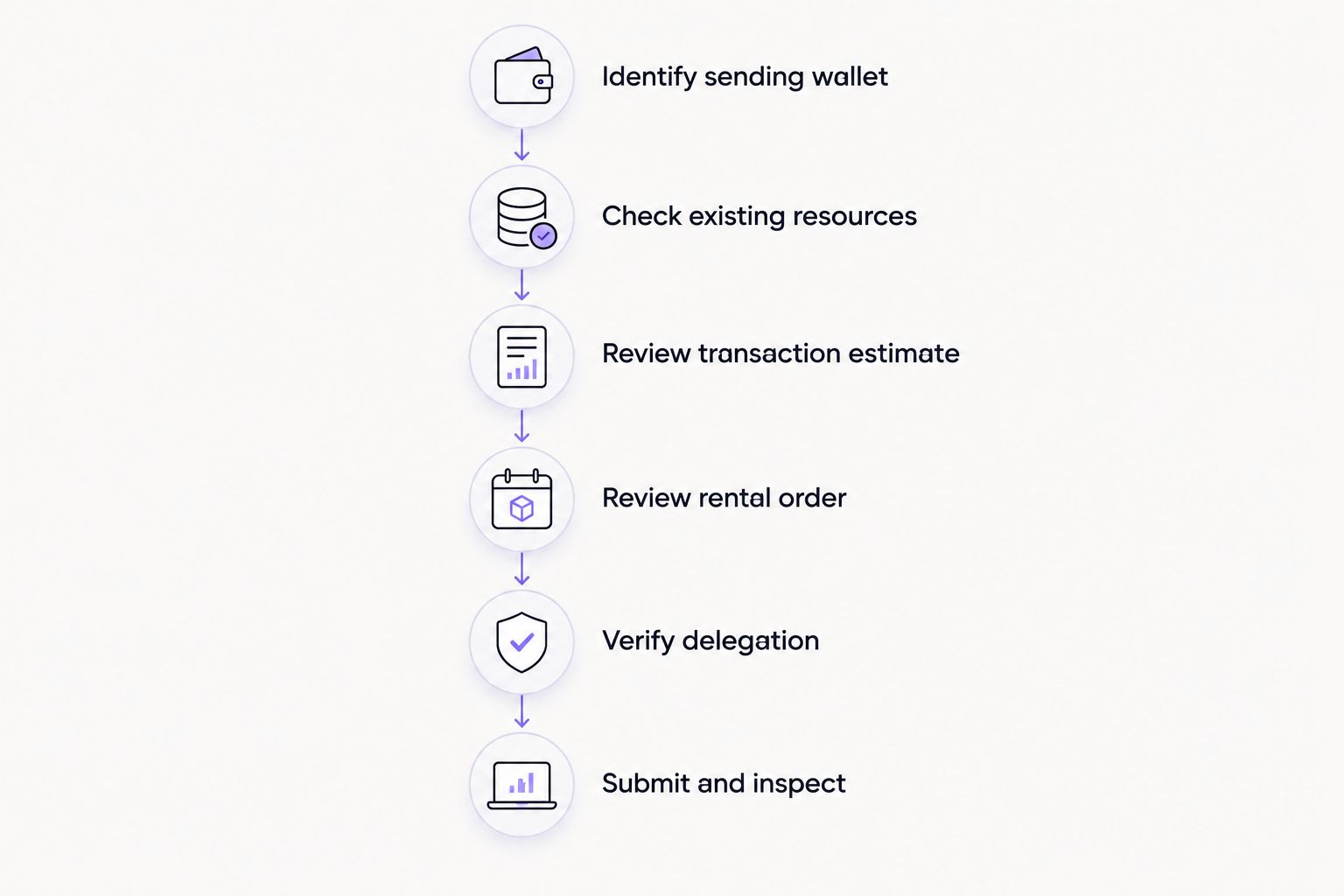
Use this sequence rather than treating the rental as an automatic part of sending tokens.
- Identify the sending wallet. Open the account that will execute the transaction. Copy its TRON receiving address directly from the wallet, and confirm that you selected the TRON network rather than another network carrying a similarly named token.
- Check existing resources. Review the account’s available energy and bandwidth. Establish what is already usable before ordering additional energy; the token balance alone does not tell you whether the account has enough resources.
- Review the transaction estimate. Prepare the intended transfer without submitting it. Use the wallet’s resource estimate where available, and inspect the token, destination, amount, and fee information rather than choosing a rental solely from the transfer amount.
- Review the rental order. Confirm the receiving address, energy amount, rental duration, payment instructions, and delivery conditions. Save the order details so you can compare the promised destination with the eventual delegation.
- Verify delegation. Inspect the receiving account’s resources through your wallet or a TRON block explorer. A provider’s confirmation screen is useful for order tracking, but the account’s on-chain state determines whether resources are present.
- Submit and inspect. Return to the sending wallet, review the transaction again, and approve only the intended action. After submission, check the transaction result and actual resource consumption.
Do not submit repeated transfers while trying to resolve an uncertain rental. First establish whether the order was paid, whether resources arrived, and whether the original token transaction was broadcast.
Which mobile route should you use?
Choose the interface you can verify, not the one with the fewest taps. A shorter checkout does not establish who operates the service, what permissions it requests, or whether delegation reached the right address.
These are interface choices, not endorsements of particular providers. Each route still needs the same address checks and on-chain confirmation.
| Mobile route | Best for | Practical advantage | Limitation or risk |
|---|---|---|---|
| Mobile website | Users who want to avoid an additional installation | Opens in the phone’s existing browser | You must verify the domain and payment destination |
| Wallet in-app browser | Users who already manage transactions inside a wallet | Keeps the service interface near wallet approvals | A connected site can still request an inappropriate signature |
| Dedicated application | Users who have independently verified the publisher | Provides a separate interface for repeat orders | Installation adds another publisher and software package to assess |
| Messaging-based interface | Users who already run operations through messaging | Keeps order messages and instructions in a conversation | Impersonation and misleading support messages require careful checking |
For an occasional transfer, start by assessing a browser-based route before installing additional software. For repeated operations, assess whether the interface preserves clear order records and makes the receiving address easy to inspect.
A messaging interface is not automatically a wallet or a rental provider. Nbtrx is for Telegram business operations; TRON rental decisions still require separate wallet and delegation checks. Keep customer operations messages separate from requests to authorize blockchain transactions.
You can review Nbtrx for its Telegram business operations context without treating a familiar messaging environment as proof that a blockchain payment request is safe.
Why mobile TRON energy requirements vary
The phone does not determine how much energy a transaction consumes. The contract execution and the sending account’s resource position determine what you need to check.
- Contract operation. A token transfer and a more involved contract interaction do not necessarily execute the same instructions. Estimate the actual action rather than applying one assumption to every transaction.
- Contract state. Execution can depend on the contract’s current storage and the addresses involved. A previous successful transfer is not a binding estimate for the next one.
- Available resources. Existing delegated or staked resources change how much additional energy the account needs. Inspect the live account instead of relying on a screenshot from an earlier session.
- Rental duration. The provider’s rental window determines when the resources are intended to remain delegated. Check that the window covers your planned transaction rather than assuming indefinite access.
- Network parameters. TRON’s resource accounting includes network-controlled parameters. Review current estimates in 2026 rather than relying on an old tutorial’s fixed energy allowance.
- Bandwidth position. Energy and bandwidth are separate resources. Having enough energy does not establish that every other transaction requirement is covered.
Do not calculate an energy order from the token amount alone. A transfer’s displayed value and its smart-contract execution requirements describe different things. The relevant question is what the intended contract call requires from the sending account now.
What should you check before paying on your phone?
Start with the address. A standard Base58Check TRON address has 34 characters, but matching the length does not prove that it belongs to you. Compare the pasted address against the wallet’s full address, not just its opening and closing characters.
Next, separate the addresses in the workflow. The rental payment destination receives your payment. The resource destination receives the delegation. The token recipient receives your eventual transfer. These roles can involve different addresses, so read each field by function.
Check the amount display as well. TRON-based USDT uses 6 decimal places; inspect the wallet’s displayed transfer amount rather than manually converting a raw token value during checkout. Token precision does not tell you how much energy the transfer needs.
Finally, distinguish resource recovery from rental duration. TRON’s consumed energy recovers over 24 hours, but that recovery period is not a promise that a provider will leave rented resources delegated for the same period. Read the rental’s own duration and termination terms.
A rental should not require surrendering control of your wallet. A provider needs the destination address to identify where resources should go; your seed phrase and private key do not belong in an order form, support conversation, or messaging bot.
How do you assess a mobile rental service safely?
Assess the payment and permission flow before assessing convenience. A polished interface does not change the consequences of signing the wrong transaction or sending funds to an unrelated address.
Use these checks when comparing services in 2026:
- Publisher identity: Establish who operates the website, application, or messaging account. Follow a verified source rather than an unsolicited direct message.
- Order clarity: Require a readable destination address, resource quantity, rental duration, and payment instruction before committing.
- Permission scope: Inspect what a connection or signature request authorizes. Stop if the requested action does not match the order you intended to place.
- Delivery evidence: Confirm resources on the destination account. Keep the order receipt separate from the evidence of delegation.
- Exception handling: Read what happens when payment arrives but delivery does not. Do not assume cancellation, refunds, or support response times.
A public address is not a secret, but sharing it can connect your activity with an order or messaging identity. Provide only what the workflow needs, and avoid sending unrelated wallet screenshots or identity documents without understanding the reason.
If support asks you to restore a wallet using a phrase they provide, stop. If an approval screen changes account permissions instead of carrying out the expected payment, reject it. Neither action is a routine requirement for receiving delegated resources.
Do you need to connect your wallet to rent energy?
Not necessarily. A provider can identify the resource destination from a public TRON address, so receiving delegation does not inherently require a wallet connection. The provider’s ordering and payment process determines which interface steps you encounter.
Connecting a wallet and authorizing a transaction are different actions. A connection makes an account available to the interface; a signature approves a particular request. Read the request even when you recognize the service.
For a mobile workflow, copying the destination address into a verified order form can be easier to audit than approving unfamiliar requests. That is a workflow preference, not proof that an address-only service is trustworthy.
Can you rent energy for a different wallet from your phone?
Yes, resource delegation can target a specified TRON address rather than the address used to pay the rental provider. The service must support the destination you enter, and you must confirm that the intended sending account receives the resources.
This distinction matters when one person handles payment and another handles transfers. Record the resource destination explicitly instead of referring to it as the customer wallet or main account. Those descriptions are easy to confuse when several accounts are involved.
The wallet that needs energy is the account executing the smart-contract transaction. Funding an unrelated account does not supply resources to the sender merely because both accounts appear in the same mobile application.
Does renting energy make a TRC-20 transfer fee-free?
No. Rented energy supplies a resource used for smart-contract execution; it does not guarantee that the complete transaction has no other cost. Bandwidth, available resources, and the transaction’s execution requirements still matter.
Review the final wallet estimate after delegation arrives. If the wallet still displays a resource shortfall or an unexpected authorization, resolve that issue before signing rather than assuming the rental overrides it.
In 2026, treat a claim of fee-free transfers as something to check against the full transaction workflow. Separate the rental payment from any remaining network charge when reviewing what you actually spent.
FAQ
Can I rent TRON energy through a mobile app without installing another app?
Yes, a mobile-accessible rental website lets you place an order through your existing browser. Verify the service and confirm delegation to the correct TRON address before sending tokens.
Do I need to give a rental service my seed phrase?
No. Receiving delegated TRON resources does not require sharing your seed phrase or private key. Reject any order or support request that asks for either.
Is a Telegram message enough to prove my energy arrived?
No. A message confirms what the sender claims, not the destination account’s resource state. Check the account through your wallet or a TRON block explorer.
Can I rent energy for someone else’s TRON wallet?
Yes, delegation can target another TRON address when the provider supports that order. Verify that the resource destination is the account that will execute the transaction.
How long does rented TRON energy last?
The rental duration depends on the provider’s terms. TRON’s 24-hour energy recovery period is separate from the period for which a provider keeps resources delegated.
Will rented energy cover bandwidth too?
No. Energy and bandwidth are separate TRON resources. Check both before approving a TRC-20 transfer.
Is a dedicated mobile rental app safer than a website?
A dedicated app is not automatically safer than a website. Assess the publisher, payment instructions, requested permissions, and on-chain delivery regardless of interface.
One last thing
The address receiving energy is usually the sender of the token transfer, not the token recipient. Confirm that role before paying for a rental. A correctly copied address can still be the wrong destination for the resource you need.
Save the order details, verify the sending account’s resource balance, and only then approve the transfer. That sequence matters more than whether you use a browser, wallet interface, or messaging flow.


