
Rented TRON energy lasts for the rental period stated in your order, provided the delegation remains active; there is no single duration for every rental. You can consume the available energy before that period ends, so time remaining does not mean energy remaining. TRON’s approximately 24-hour energy recovery cycle is separate from the rental term and does not extend your booking.
- How long does rented TRON energy last? The order defines the term; available energy also depends on consumption.
- TRON energy recovery takes approximately 24 hours; recovery does not renew a rental agreement.
- Check delegation, remaining energy, and the expiry timestamp before submitting a transaction.
- Unused rental time is not a guarantee of enough energy for another smart-contract call.
How long does rented TRON energy last?
Rented TRON energy lasts until the agreed rental term ends, but your usable balance can run down earlier. The decisive details are the activation condition, the expiry timestamp, and the energy currently available to your receiving address.
For your 2026 workflow, verify those details rather than treating a provider’s delivery confirmation as proof that every later transaction is covered. If you are comparing fulfillment policies, the guide to TRON energy rental services ranked by delivery speed addresses a separate question: when the rental arrives, not how long it lasts.
Use this check before sending:
- Read the order term. Identify the rental duration and the event that starts it.
- Confirm the receiving address. The delegation must reach the address that will execute the transaction.
- Check the delegation. Verify the resource allocation on-chain rather than relying only on an order status.
- Inspect available energy. Compare the current balance with the intended contract interaction.
- Check the expiry. Leave time for submission, confirmation, and any operational delay before the term ends.
An order receipt describes the agreement. The account’s resource information shows what is available now. You need both.
Why this matters
A rental has a clock, but a transaction consumes a resource. Confusing those two creates a preventable operational problem: you send while the booking is still active, yet the address lacks enough energy for the contract call.
The opposite mistake also matters. Seeing energy recover does not mean you have purchased more rental time or secured a renewal. Resource recovery and rental duration answer different questions.
For a 2026 payment workflow, record the expiry beside the transaction status. A status such as paid, delivered, or active does not tell your operator whether the next transaction has sufficient resources.
Rental duration, consumption, and recovery are different clocks
The following comparison separates the terms that rental interfaces and wallet screens can place close together. None is a substitute for another.
| Timing or resource measure | What it tells you | What it does not establish |
|---|---|---|
| Rental term | The period covered by the provider’s agreement | That enough energy remains for every transaction |
| Delivery time | When the allocation reaches the receiving address | When the contractual clock starts, unless specified |
| Available energy | The resource currently available to the address | A guaranteed number of future transactions |
| Energy recovery | How consumed energy usage recovers over time | A renewal of the rental agreement |
| Delegation lock | A restriction on when delegated resources can be reclaimed | The complete commercial rental agreement |
TRON’s developer documentation on resource management describes consumed energy as recovering gradually over approximately 24 hours. That is a network resource mechanism, not a universal rental package.
Do not read the recovery period as a promise that your rented allocation will remain available throughout it. Recovery only helps your operational plan while the relevant resource entitlement remains available to your address.
Likewise, an on-chain lock and a provider’s stated service period are not interchangeable. A lock can restrict reclamation, while the order defines what the provider has agreed to supply. Read both without assuming they describe identical conditions.
When does the rental clock start?
The start event comes from the rental agreement. Do not assume that payment time, order acceptance, and successful delegation are the same timestamp.
Before paying, identify which event starts the term. Then check whether the order records an exact expiration time or leaves you to calculate it from activation.
An explicit expiry timestamp is easier to operate against than a duration with an unclear starting point. Also check the time zone: an accurate timestamp is still easy to misread when the order interface and your operations log use different zones.
For your 2026 records, preserve these fields:
- The order reference and receiving address.
- The stated start condition.
- The delivery or activation timestamp.
- The expiry timestamp and time zone.
- The current available energy before submission.
These are recordkeeping recommendations, not a claim that every provider exposes every field. If the start condition is unclear, resolve it before relying on the rental for a scheduled transfer.
What happens if you use the energy before expiry?
Using energy reduces the amount immediately available for later contract interactions. The remaining rental time does not reset that balance on demand.
Under TRON’s resource model, consumed energy usage recovers gradually over approximately 24 hours, equivalent to 1 day. That recovery is not instantaneous. Sending another transaction immediately after the first requires checking the balance again.
Avoid calculating your next transaction from the original order amount alone. Earlier transactions, other activity from the same address, and the current resource allocation all matter to the available balance.
For repeated operations, check the resource state before each submission rather than assuming that one successful transaction proves the rest will succeed. Keep the transaction result beside that check so your operator can distinguish resource consumption from an unrelated execution problem.
An active rental is not an unlimited-use allowance. The useful question is whether the address has enough energy for the next intended call before the rental ends.
Why your usable rental window varies
The contractual period is only part of the time you can use productively. Your usable window also depends on when the allocation arrives and what happens after it arrives.
Check these factors:
- Activation condition: The order must identify the event that starts the rental period.
- Delivery timing: Time spent waiting for confirmed delegation is not time spent executing your workflow.
- Resource consumption: Earlier smart-contract calls reduce the energy currently available.
- Recovery timing: Consumed usage recovers gradually rather than resetting immediately after each call.
- Delegation status: A receipt does not replace verification that the allocation remains with the correct address.
- Contract demand: Different contract interactions can consume different amounts of energy, so duration alone cannot establish transaction coverage.
None of these factors justifies guessing a provider’s term. Use them to decide what you need to verify and how close to expiry you are prepared to operate.
For a time-sensitive workflow, complete the resource check before the deadline becomes urgent. Renting earlier is not automatically better if the rental clock starts while your transaction is still waiting on an internal approval.
How should you match a rental to your workflow?
Choose the rental term around the actual submission window, not around the time someone first requests a payment. The resource must be available when the sending address executes the contract call.
These workflow choices have different advantages and limitations. They are planning approaches, not claims about particular rental products.
| Planning approach | Best for | Advantage | Limitation |
|---|---|---|---|
| Rent near submission | A transaction ready to send | Reduces time spent holding resources before use | Depends on delivery completing before submission |
| Rent before a scheduled batch | An approved group of transactions | Establishes resources before execution begins | Waiting and earlier calls use part of the working window |
| Monitor recurring operations | Repeated contract interactions | Keeps resource decisions tied to current activity | Requires repeated balance and expiry checks |
For a 2026 operations checklist, use this sequence: Confirm address, Verify delegation, Check balance, Submit transaction, Record result. Keep the expiry visible throughout the sequence rather than checking it only after an error.
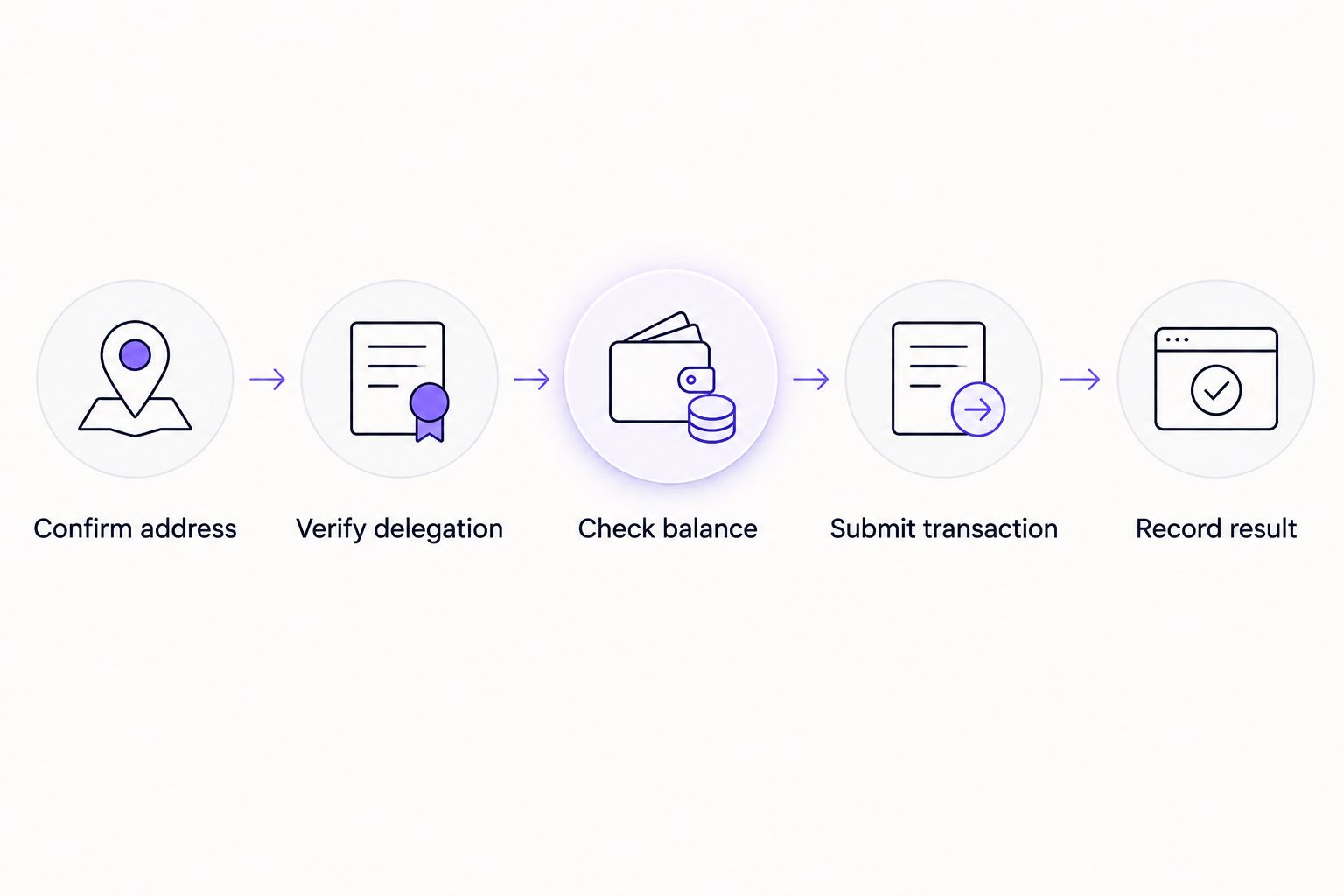
Do not submit merely because a timer still shows time remaining. Submit when the address, resource balance, and execution window all match the task.
For teams using Nbtrx for Telegram business operations, keep customer operations records separate from blockchain execution evidence. A conversation confirming an order is useful context; the receiving address’s resource state remains the relevant execution check.
Does rented TRON energy last until you use it?
The order’s expiry applies even if you have not used the allocation. Do not treat an unused rental as an indefinite balance that waits for your next transaction.
The provider’s renewal, cancellation, and unused-resource terms determine the commercial treatment. Check those terms directly rather than assuming unused time or energy carries into another booking.
This distinction matters when a transaction is delayed by approvals or a missing recipient confirmation. Recheck the rental before resuming the workflow; the original allocation confirmation does not establish its present status.
Does energy recovery extend a rental?
Approximately 24 hours is the energy recovery period, not an automatic rental extension. A rental still follows its own agreed start and end conditions.
Recovery can affect the energy available during an active allocation. It does not establish that the provider has renewed the agreement, added another term, or promised continued delegation after expiry.
Keep a renewal confirmation separate from a resource-balance observation. They document different events, and one does not prove the other.
What happens when the rental ends?
When the rental ends, do not rely on the rented allocation for new transactions. Check the address again before submitting anything else, even if an earlier wallet screen showed sufficient energy.
Ending the commercial term and seeing the corresponding on-chain resource change are distinct observations. A provider’s implementation determines how fulfillment and reclamation operate; the advertised expiry is not proof of a universal blockchain countdown mechanism.
If a subsequent smart-contract call lacks sufficient energy, TRON’s resource rules can require TRX to cover the energy shortfall, subject to the transaction’s limits and available balance. Bandwidth is a separate resource consideration. Renting energy does not eliminate every transaction requirement.
FAQ
How long does rented TRON energy last in 2026?
Rented TRON energy lasts for the term stated in the rental order, subject to the delegation remaining active. Check the activation condition, expiry timestamp, and available energy before submitting a transaction.
Does rented TRON energy expire if I do not use it?
The rental term can end even when you have not used the allocated energy. Do not assume unused resources carry into another rental without an explicit provider policy.
Does TRON energy reset every 24 hours?
TRON consumed energy usage recovers gradually over approximately 24 hours, rather than resetting in one step at a daily deadline. That recovery does not renew a rental agreement.
Can I make several transactions during one rental?
You can make further transactions while the allocation remains active and sufficient resources are available. Check the balance again because each contract interaction can consume energy.
Does my rental start when I pay?
The rental starts according to the order’s stated activation condition. Payment, order acceptance, and confirmed delegation are separate events unless the provider explicitly ties them together.
Will a TRON energy rental cover all my transaction requirements?
A TRON energy rental does not cover every transaction requirement. Your address also needs the appropriate bandwidth or fee coverage, and the smart-contract call must satisfy its execution conditions.
Where should I check whether my rented energy is still available?
Check the receiving address’s current resource information and delegation state on-chain. Compare that information with the order’s expiry rather than relying only on a delivery message.
One last thing
The last successful transaction does not prove the next one is covered. It proves only that the earlier transaction completed under the conditions present at that time.
Make the final check at submission, not only at purchase. For your 2026 workflow, record the available energy, expiry, and transaction result together. That gives the next operator a clear account of what remains to be done without treating a rental receipt as a live resource balance.


