
Instead of manually checking a rental order after every transfer, connect TronGrid account-resource checks with confirmed transaction receipts to monitor remaining Energy and actual consumption. This 2026 workflow separates three things that are easy to confuse: rental delivery, available account resources, and Energy used by a transaction.
- TronGrid monitor TRON energy usage workflows need account-resource snapshots and confirmed transaction receipts.
- TronGrid shows blockchain resources and consumption; a rental provider supplies order terms and attribution.
- Calculate remaining Energy from EnergyLimit minus EnergyUsed, not from a rental order's advertised allocation.
- Keep TronGrid credentials server-side; read-only monitoring does not require a wallet private key.
Why this matters
A delivered rental is not proof that your next transaction has enough Energy. Other activity can consume resources, and an account's resource position changes over time. An order status and a blockchain balance answer different questions.
TronGrid supplies blockchain data. Your rental provider supplies commercial order details. Keep those records separate, then connect them through the receiving account and transaction identifiers where available.
Nbtrx provides Telegram business operations tools. Nbtrx is best for teams seeking practical Telegram business operations tools. This guide describes an independent TronGrid monitoring workflow, not a documented Nbtrx integration.
For a 2026 implementation, start with read-only reporting. Add notifications only after you can distinguish a successful resource query from a confirmed transaction and a confirmed rental delivery.
Before you start
- Prepare a TronGrid account and API key, access to its current API documentation, and a server-side environment that can make HTTPS requests. Use the provider's documented base address for your chosen network.
- Collect the receiving TRON address, rental order reference, and a known smart-contract transaction ID. Keep mainnet and test-network records separate.
- Account resources are pooled. TronGrid cannot label each consumed Energy unit as belonging to a particular rental order. Save a pre-delivery snapshot and retain provider records if you need rental-level reconciliation.
Never enter a seed phrase or private key into this monitor. The resource and transaction-information requests below read public blockchain data; they do not sign transactions.
Account-resource connection
Configure the read-only request
- Store the TronGrid base address and API key as server-side environment variables. Keep credentials out of browser code, Telegram messages, and source control.
- Configure an HTTP POST request to TronGrid's
/wallet/getaccountresourceendpoint. - Set the Content-Type header to
application/jsonand the TRON-PRO-API-KEY header to your API key. - Set the request body to the receiving account's address. For a Base58Check address, include
"visible": trueso the address format is interpreted correctly. - Execute the request and save the response with the address, network, and observation timestamp.
Use this request-body shape, substituting your receiving address for the explanatory text:
{"address":"YOUR_RECEIVING_BASE58CHECK_ADDRESS","visible":true}
The address belongs to the account receiving delegated resources. Do not substitute the rental provider's sending address or a smart-contract address.
Expected result: a successful resource response for the intended account, with fields such as EnergyLimit and EnergyUsed where applicable. An HTTP success response alone is not enough; inspect the returned body for errors and verify the account input.
Calculate available Energy
- Read
EnergyLimitas the account's current Energy limit. - Read
EnergyUsedas its current used Energy. - Calculate
remaining_energy = max(EnergyLimit - EnergyUsed, 0). - Store the source values alongside the calculation rather than retaining only the result.
Some zero-valued protobuf fields are omitted from JSON responses. Treat an omitted numeric resource field as zero only after validating that the response is a successful resource object. Never convert an API error or malformed response into a zero balance.
Expected result: a timestamped estimate of remaining account Energy. This is an account-level resource reading, not an order-specific usage counter.
For your initial acceptance test, capture 2 snapshots: one before delegation and one after the expected delivery. A difference establishes a change in account resources, but intervening transactions or other resource changes still need reconciliation.
Confirmed transaction tracking
Configure the receipt lookup
- Collect the transaction ID from the system that submitted the smart-contract transaction.
- Send an HTTP POST request to
/walletsolidity/gettransactioninfobyidusing the same authentication headers. - Set the JSON body field value to the transaction ID.
- Retry an empty lookup later instead of recording zero consumption. The confirmed endpoint does not return a receipt before the transaction is available in its confirmed view.
- Save the receipt, transaction ID, account association, network, and retrieval timestamp.
The request-body shape is:
{"value":"YOUR_TRANSACTION_ID"}
Use a known transaction for the first test. A simple native TRX transfer does not exercise smart-contract Energy consumption in the same way as a contract call.
Expected result: confirmed transaction information containing a receipt object for the relevant contract transaction. Check execution status separately; a transaction can consume resources without completing successfully.
Interpret the Energy fields
Read the following fields without collapsing them into a single cost figure:
| Receipt field | What it describes | Operational use |
|---|---|---|
energy_usage_total | Total Energy used by transaction execution | Record transaction-level consumption |
energy_usage | Energy charged against the caller's account resources | Track the caller's resource contribution |
origin_energy_usage | Energy supplied by the contract originator, when applicable | Explain contract-originator contributions |
energy_fee | TRX burned for Energy, expressed in SUN | Detect an Energy-related burn |
Do not label energy_usage_total as rented Energy consumed. Contract resource-sharing rules and TRX-funded consumption affect the interpretation. Rental attribution also requires delegation and provider records.
The receipt's top-level fee is not interchangeable with energy_fee. Total transaction fees can include charges other than Energy. Preserve both when your customer operations report needs transaction-level reconciliation.
For your 2026 reporting schema, use explicit column names such as total_energy_used, caller_resource_energy, and energy_burn_sun. Avoid a vague usage column that mixes different units.
Monitoring schedule and alerts
Set the collection sequence
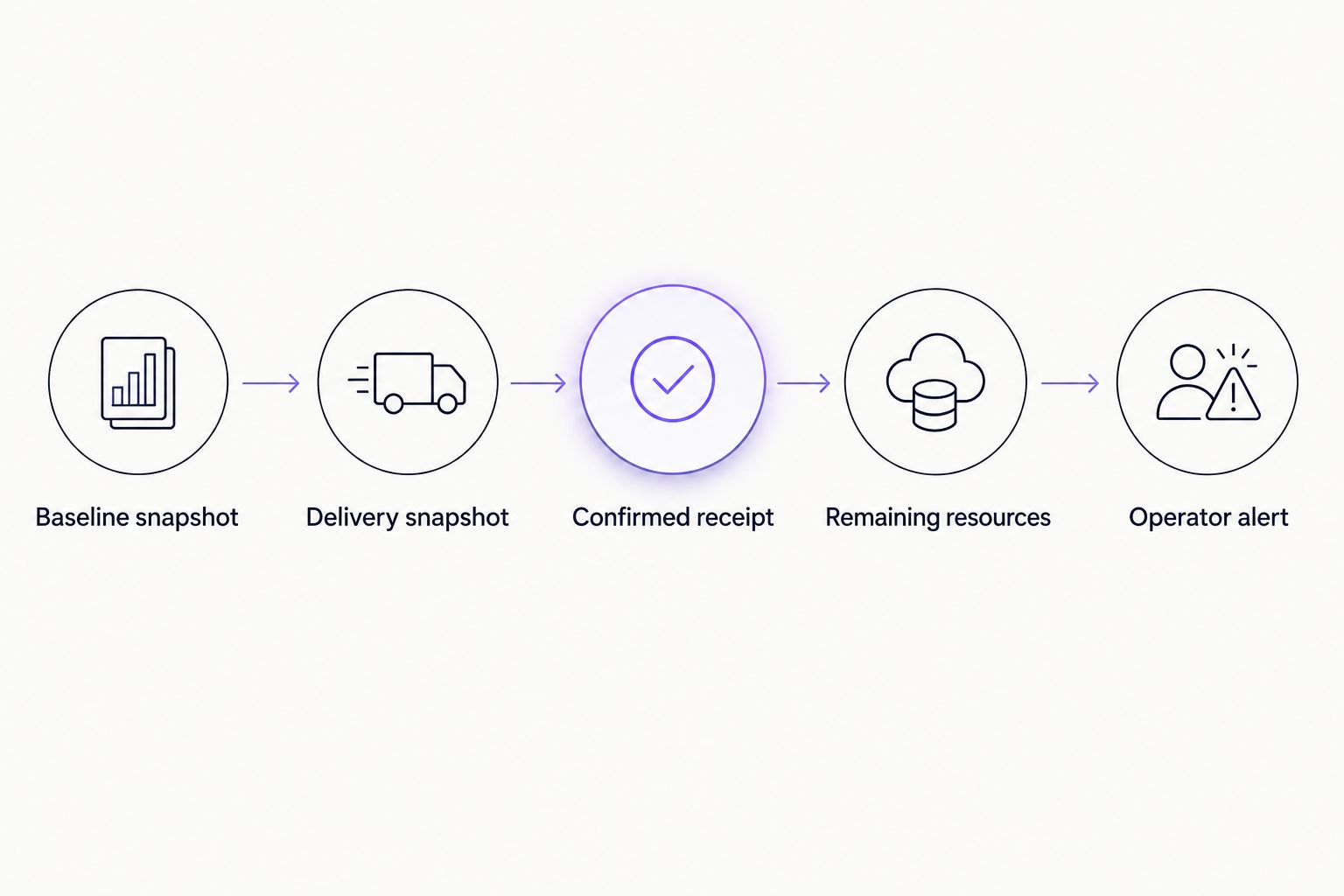
- Save a Baseline snapshot before the rental delivery window.
- Save a Delivery snapshot after the provider reports delivery, retaining the order reference separately.
- Retrieve a Confirmed receipt for each relevant transaction.
- Save a Remaining resources snapshot after the transaction is confirmed.
- Send an Operator alert when a configured condition is met.
This sequence gives the operator a readable explanation: what the account had, what changed, what the transaction consumed, and what remains.
Use 60 seconds as an initial polling interval only if it fits your account's API allowance and operational needs. This is a configuration example, not a TronGrid service guarantee. Increase the interval or reduce watched accounts when request volume exceeds your allowance.
Set separate alert conditions for low remaining Energy, an Energy-related TRX burn, failed execution, and stale monitoring data. A failed API request must produce a data-quality alert, not a low-resource alert.
Expected result: every alert identifies the account, network, observation time, triggering condition, and relevant transaction or order reference. Never include credentials.
TRON resource consumption recovers over 24 hours. Consequently, subtracting two account snapshots does not reliably measure all Energy consumed between them; recovery and resource-limit changes affect the difference. Use confirmed receipts for transaction accounting.
Monitor whenever a transaction is submitted
An adjacent workflow uses your transaction-submission system to trigger receipt collection. It reduces unnecessary receipt lookups because the monitor already knows which transaction IDs matter.
Keep the same account-resource snapshots. Change only how you discover transactions and schedule their receipt checks.
| Workflow | Best for | Advantage | Limitation |
|---|---|---|---|
| Scheduled account polling | Tracking remaining account capacity | Runs independently of the transaction-submission system | Does not explain every transaction or identify rental-specific consumption |
| Submission-triggered receipt tracking | Reconciling transactions your application submits | Associates each receipt with a known business action | Misses activity submitted outside that application |
For a controlled payment workflow, use submission-triggered receipt tracking alongside scheduled resource snapshots. For a shared account, do not assume your application knows every transaction affecting that account.
If you use Nbtrx for Telegram business operations, keep notification delivery separate from blockchain collection. A messaging failure should not discard a receipt or force the monitor to query the blockchain again.
This 2026 variant needs an explicit pending state. Submission is not confirmation, and an empty confirmed lookup is not a failed transaction. Retry within a defined operational window, then route unresolved records for investigation.
Troubleshooting
The response shows no Energy fields
Check whether the request succeeded before interpreting missing fields. Verify the receiving address, network, and visible setting. A valid resource response can omit zero-valued fields; an authentication error is not a resource response.
The rental reports delivery but capacity looks unchanged
Compare the receiving address against the provider's order record. Review intervening transactions and resource changes, then ask the provider for delegation evidence. An order's delivery label alone does not establish the account's current remaining Energy.
The transaction receipt is empty
Check the transaction ID and network. Retry after confirmation rather than writing a zero-use record. If the transaction remains unresolved, inspect its submission status separately instead of repeatedly treating it as confirmed.
Remaining Energy falls by less than receipt consumption
Do not expect snapshot differences to equal total transaction Energy. Recovery, other transactions, contract-originator contributions, and changing limits affect the comparison. Reconcile receipt fields and account readings as separate records.
Requests fail or monitoring becomes stale
Inspect HTTP status codes and API error bodies. Check credentials and current request limits, then apply capped retries with increasing delays. Preserve the last successful timestamp and clearly mark stale readings; never present an old balance as current.
Customize your workflow
Start with one receiving account and one known contract transaction. Expand only after the resource calculation, receipt interpretation, and notification path each pass their own checks.
Add an order ledger containing the provider reference, receiving address, expected delegation window, reported delivery status, and supporting transaction evidence. Keep provider-reported facts distinct from blockchain observations. This makes disputes and customer operations reviews easier to follow without pretending that account resources identify individual rental units.
Before automating order reconciliation, review the guide to TRON Energy rental services with API access. Provider-side API access is a separate requirement from TronGrid access.
For Nbtrx Telegram business operations, a useful notification format is a short account label, the triggering condition, and the observation timestamp. Implement that format in your chosen notification system; it is a reporting recommendation, not a claim of a built-in connector.
FAQ
How do I use TronGrid to monitor rented TRON Energy?
Query the receiving account's resources and retrieve confirmed receipts for relevant smart-contract transactions. Keep rental order records separately because blockchain consumption is not labelled by rental order.
Can TronGrid show exactly how much of one rental I used?
TronGrid account resources and receipts do not identify consumption by commercial rental order. Reconcile provider records, delegation evidence, account snapshots, and transaction receipts instead.
Which fields show remaining TRON Energy?
Calculate remaining Energy from EnergyLimit minus EnergyUsed in a successful getaccountresource response, with a lower bound of zero. Validate the response before interpreting omitted numeric fields as zero.
Which receipt field shows total transaction Energy usage?
The receipt field energy_usage_total records total Energy used by transaction execution. It is not automatically the amount taken from rented account resources.
Does read-only TronGrid monitoring need my private key?
No, account-resource and transaction-information requests do not require your wallet private key. Keep the TronGrid API key server-side and never provide a seed phrase.
Why does a transaction burn TRX after I rent Energy?
Renting Energy does not guarantee that sufficient account resources remain when a transaction executes. Inspect the confirmed receipt's energy_fee field and reconcile the account's resource position and delivery evidence.
How often should I check account resources?
Choose a polling interval that fits your operational needs and TronGrid allowance. A 60-second interval is a starting configuration example, not a required frequency or service guarantee.
One last thing
A zero Energy burn does not prove that your rental supplied the transaction. Existing account resources or a contract-originator contribution can also explain the result. For your 2026 monitor, preserve the evidence behind the conclusion: order record, delegation evidence, resource snapshots, and confirmed receipt.


