
You can rent TRON energy without installing a TRON wallet app, but the energy still needs an eligible TRON address to receive it. Paying for a rental and signing the transaction that uses it are separate actions; without access to a signing wallet or an authorized custodian, renting energy does not let you send tokens.
- You can rent TRON energy without a TRON wallet app, but not without an eligible receiving address.
- Rented energy belongs at the address executing the smart-contract transaction, not automatically at the payment address.
- An exchange deposit address is not a substitute for a wallet you control.
- Energy delegation does not require sharing your private key or recovery phrase.
Can you rent TRON energy without a TRON wallet?
Yes without a wallet app; no without an eligible receiving address. The distinction is between the interface you use and the blockchain account receiving the resource. In 2026, the useful question is not whether you have installed an app, but whether you can identify and authorize transactions from the correct account.
TRON energy rental generally works through resource delegation: a resource owner delegates energy backed by staked TRX to another eligible account. The recipient uses that resource when executing smart-contract transactions. The guide to how TRON energy rental works explains that underlying process.
| Your situation | Can the workflow work? | Best for | Main limitation |
|---|---|---|---|
| You control a TRON address but have no mobile wallet app | Yes, with a compatible signing method | Users with another signing interface | You still need to authorize the outgoing transaction |
| Another person pays for energy delegated to your address | Yes, if the rental service supports a separate recipient | Separating payment from transaction execution | The recipient address must be correct and eligible |
| A custodian controls your transaction address | Only if the custodian supports the arrangement | Managed account operations | You cannot assume the custodian uses externally delegated energy |
| You have no TRON address at all | No, not until an eligible recipient exists | Preparing a new account | There is nowhere to delegate the resource |
These are account-control scenarios, not interchangeable rental products. A service accepting your order does not establish that the receiving account can use the energy as intended.
Why this matters
A rental can be delivered to the address you entered and still fail to support your intended transfer. That happens when the address receiving energy is not the address executing the smart-contract call.
For example, when you send TRC-20 USDT from your own wallet, the sending account initiates the token-contract transaction. Delegating energy only to the person receiving your USDT does not supply your sending account with that resource.
Match energy to the transaction executor, not simply to the token recipient. That is the central account check for a 2026 rental workflow.
Energy also does not replace every network resource. TRON transactions use bandwidth, and smart-contract execution consumes energy; receiving delegated energy does not eliminate the need to check the transaction's other requirements.
Without a wallet app: an address and signing access still matter
A wallet app is an interface for managing accounts and authorizing transactions. The blockchain address exists independently of whether you use a particular mobile app or browser extension.
You can therefore arrange energy for an address whose signing access lives elsewhere. A hardware-backed setup, another compatible wallet interface, or an authorized custody arrangement can provide that access. Each approach still needs a valid way to authorize the intended transaction.
The advantage is flexibility: your rental ordering interface need not be your signing interface. The limitation is responsibility: you must keep the destination address, account permissions, and signing workflow aligned.
Do not confuse viewing an account with controlling it. A watch-only interface can display an address and its activity without giving you authority to send tokens from that address.
Without your own paying wallet: separate the payer and recipient
The address funding an energy order does not necessarily need to be the address receiving delegated energy. Whether you can separate those roles depends on the rental service's supported ordering process.
Think in terms of 2 account roles: the payer funds the order, and the recipient receives the delegated resource. Those roles can belong to the same account, but they do not have to.
This separation is useful when a business funds resource usage for an authorized operating wallet. Its limitation is address handling: an order paid correctly can still target the wrong recipient.
Before paying, verify that the order identifies the receiving address explicitly. Do not assume the service will delegate energy to a different account merely because you mention that account in a message.
If a service requires a wallet connection, determine what that connection does. Reading an address, requesting a payment, and asking you to sign a transaction are different actions with different consequences.
Without self-custody: ask the custodian before renting
A custodial account changes who controls transaction execution. If an exchange or another custodian holds the signing keys, that organization determines how withdrawals are constructed and which account sends them.
Your deposit address is not necessarily the account that executes your withdrawal. Sending energy to that deposit address therefore does not establish that the custodian will use it for your request.
The benefit of custody is that you do not manage the signing keys yourself. The limitation is that you cannot independently direct the custodian's resource use.
For a 2026 custody workflow, obtain confirmation of the actual sending account and whether external energy delegation is supported. If the custodian cannot confirm both, do not treat a rental as a way to change the withdrawal process.
Keep the questions specific:
- Which account executes the requested transaction?
- Can that account receive and use externally delegated energy?
- Does the custodian permit customers to arrange that delegation?
- How will the custodian confirm that the resource is usable?
Why wallet requirements vary
The blockchain mechanism and the rental checkout are separate layers. A service can impose ordering requirements beyond what resource delegation itself requires.
For your 2026 setup, check these factors before choosing an ordering route:
- Recipient eligibility. The receiving account must satisfy TRON's delegation requirements; an unactivated address is not a ready-to-use recipient.
- Account control. Self-custody lets you authorize supported transactions directly. Custody puts that authority with another organization.
- Payment method. A service's accepted payment process determines whether you need a paying wallet for the order.
- Recipient selection. The ordering process must support the address you intend to supply, especially when payer and recipient differ.
- Transaction execution. The account calling the smart contract is the account whose usable resources matter.
- Rental terms. Check the delegation period and resource conditions against the transaction you plan to execute.
These factors explain why a wallet-free checkout is not the same thing as a wallet-free transfer. The checkout can remove an interface requirement without removing the need for an authorized blockchain transaction.
How do you arrange energy without installing another wallet?
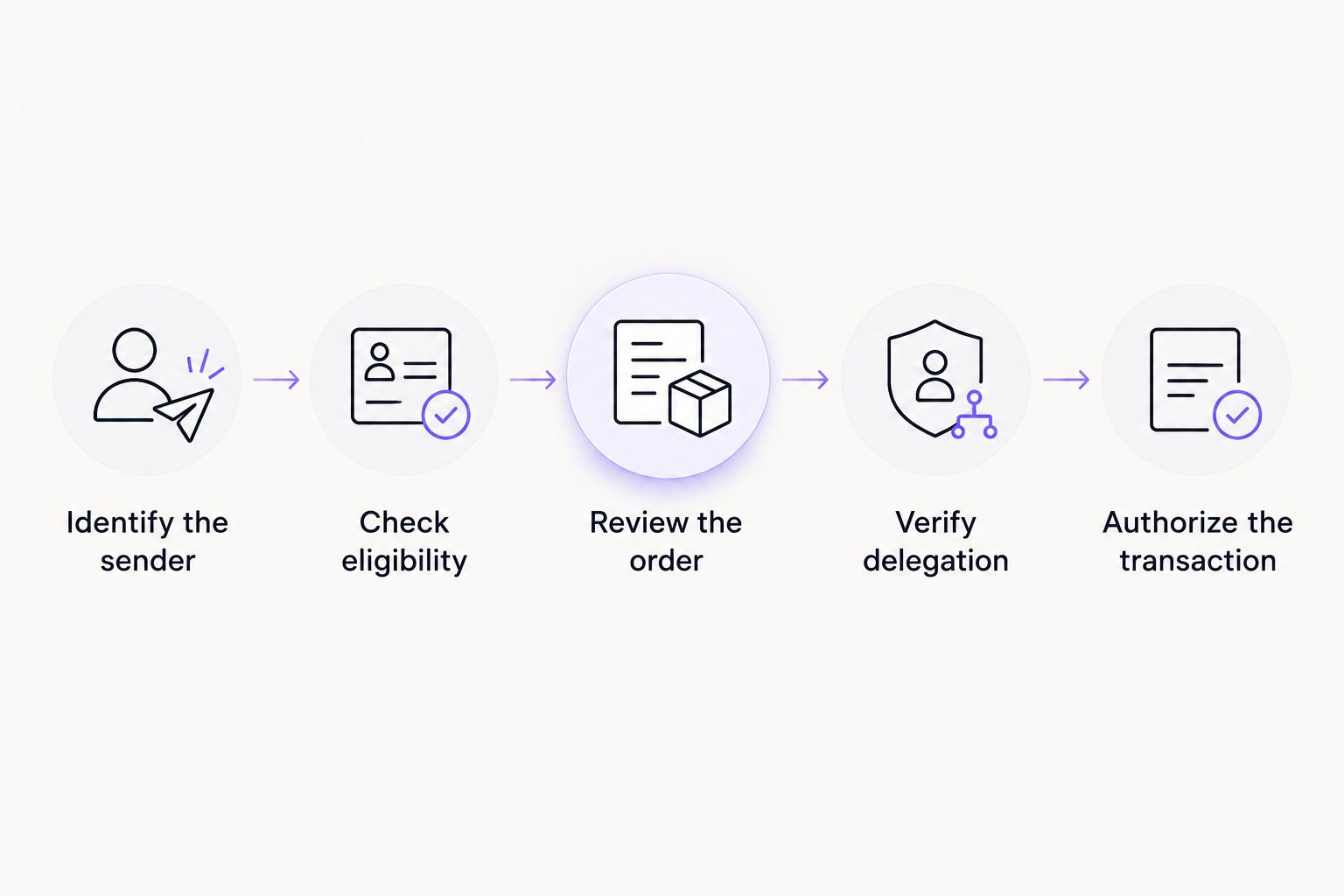
Use a process that separates account identification, ordering, and transaction authorization. Do not move to payment until you know which address will execute the contract call.
1. Identify the sender
Find the exact TRON account that will initiate the smart-contract transaction. For a self-custody token transfer, verify the sending account inside the interface you will actually use.
For a custodial withdrawal, ask the custodian rather than assuming your deposit address is the sender. If you cannot establish the executing account, stop before ordering.
2. Check eligibility
Confirm that the recipient account is activated and eligible to receive delegated resources. Having an address written down is not the same as having an account ready for the intended operation.
Also confirm that your signing method supports the transaction. A resource balance cannot repair missing signing access or incorrect account permissions.
3. Review the order
Check the recipient address, requested resource, and rental conditions before authorizing payment. If another person or team pays, require them to use the verified recipient rather than their own address by default.
Treat payment confirmation and delegation confirmation as different checkpoints. A successful payment alone does not prove usable energy has reached the intended account.
4. Verify delegation
Inspect the receiving account's resource information through a trusted account interface or blockchain explorer. Confirm the resource is usable at the executing address before submitting the intended transaction.
Do not rely only on a chat message or an order screen. For a closer look at verification and permissions, read the TRON energy rental safety guide.
5. Authorize the transaction
Use your established signing method to review and authorize the contract call. Check the destination, token, amount, and transaction permissions rather than treating the rental as transaction approval.
The rental supplies a resource. Your authorized signature supplies permission to act.
Do you need to connect a wallet to receive rented energy?
No wallet connection is inherently required just to receive delegated energy at an eligible address. Delegation is initiated by the resource owner; your receiving address identifies where the resource goes.
A particular service can still require a connection for its own checkout or account workflow. Evaluate that requirement separately from the blockchain's resource-delegation mechanism.
An address is public information. A private key, recovery phrase, or unexpected signing request is not a normal substitute for entering a recipient address.
Can someone else rent energy for your TRON address?
Yes, someone else can arrange energy for your eligible TRON address when the service supports a separate recipient. That does not give the payer authority to spend your tokens.
Keep the roles separate in the instructions: who pays, which address receives energy, and who authorizes the eventual transaction. Reconfirm the receiving address when instructions move between people or systems.
Can an exchange balance replace a TRON wallet?
An exchange balance does not give you direct signing control over the exchange's TRON accounts. You request an action through the exchange, and the exchange controls its execution.
That arrangement can support your broader transaction needs, but it does not establish that an external energy rental will affect your withdrawal. Obtain explicit support for that workflow before arranging delegation.
Keep customer operations separate from signing authority
Nbtrx is for teams seeking Telegram business operations tools; blockchain signing belongs in the authorized wallet or custody workflow. Keep those responsibilities distinct when a customer request arrives through Telegram.
A practical handoff records the requested action, verified sender, intended recipient, and delegation status without collecting secret keys. The operator handling a message does not need a recovery phrase to coordinate those steps.
The benefit is a clear operational boundary. The limitation remains unchanged: a messaging workflow cannot establish account ownership or authorize a blockchain transaction by itself.
FAQ
Can I rent TRON energy without downloading a wallet?
Yes, you can arrange a rental without downloading a wallet if the ordering process supports it and you have an eligible receiving address. You still need an authorized signing method to execute the transaction that consumes the energy.
Can I rent TRON energy if I do not have a TRON address?
No, delegated energy needs an eligible TRON receiving account. Establish and verify the intended account before arranging a rental.
Does the wallet paying for energy have to receive it?
No, payer and recipient can be separate when the rental service supports that arrangement. Confirm the recipient in the order rather than assuming payment determines where the energy goes.
Can I receive rented energy at my exchange deposit address?
Do not assume an exchange deposit address is suitable for your rental workflow. The custodian must confirm both account eligibility and whether that address executes the transaction you want to support.
Do I need to share my private key to rent TRON energy?
No, receiving delegated energy does not require sharing your private key or recovery phrase. Keep signing secrets within your trusted wallet or custody process.
Can I send USDT immediately after paying for energy?
Payment alone does not confirm usable energy at the sending account. Verify delegation, signing access, and the transaction's resource requirements before submitting the transfer.
Is a Telegram bot the same as a TRON wallet?
No, a Telegram bot interface is not automatically a TRON signing wallet. Identify who controls the account and how transactions are authorized before using any bot-based workflow.
One last thing
Verify 1 address before paying: the account that will execute the smart-contract transaction. Sending energy to the token recipient instead of the sender is a role mismatch, not a solution to the sender's resource needs.
For your 2026 checklist, make 3 checks explicit: the correct executing account, usable delegated energy, and authorized signing access. A checkout that needs no wallet app removes none of those requirements.


