
Yes, TRON energy rental can save on gas fees when the rental payment plus any remaining network charges is lower than the TRX you would otherwise burn for the same smart-contract transaction. Rental does not automatically cover Bandwidth, account-related charges, or an Energy shortfall. In 2026, the right comparison is the total cost of completing your transaction—not a provider’s advertised saving.
- Can TRON energy rental save on gas fees? Yes, when total rental-related spending beats direct TRX burn.
- TRON smart-contract transactions use Energy; renting Energy does not automatically cover every network charge.
- Compare the same transaction, wallet resources, and execution conditions before choosing a funding method.
- Confirm delegated Energy before broadcasting, then reconcile the rental payment against the transaction receipt.
Why this matters
A smaller transaction fee in your wallet does not necessarily mean a cheaper transfer. You must also count the separate rental payment and any charges left uncovered by the rented resources.
TRON distinguishes between Energy for smart-contract execution and Bandwidth for transaction data. If you need the mechanics first, read how TRON Energy rental actually works. Renting resources changes how you fund execution; it does not make execution resource-free.
Can TRON energy rental save money on gas fees?
Yes—but only when the complete rental route costs less than the direct-burn route for an equivalent transaction. Compare the same contract action from the same sending address under comparable network conditions. Otherwise, differences in wallet resources or contract execution can look like rental savings.
| Funding method | Best for | Main advantage | Main limitation |
|---|---|---|---|
| Rent delegated Energy | A defined smart-contract transaction or planned batch | Obtain usable Energy without staking your own TRX for that allocation | Payment, delegation timing, and unused resources require management |
| Burn TRX for uncovered execution | An immediate transaction without sufficient Energy | Avoid arranging a separate rental | You pay for the uncovered resource consumption through TRX burn |
| Stake TRX for resources | Recurring activity with capital allocated to resource management | Maintain a resource allocation through staking | Capital commitment and withdrawal rules affect the decision |
These are funding choices, not guarantees of a lower total cost. Rental adds a separate provider workflow. Direct burn removes that workflow but leaves you exposed to the transaction’s uncovered resource requirement. Staking requires a broader decision about capital use.
For a 2026 comparison, record your available resources before requesting a rental. Existing Energy can already reduce the amount of TRX burned, so attributing that reduction entirely to rental overstates the benefit.
How do you check whether a rental saves money?
Use 3 resource checks before approving the transaction: Energy, Bandwidth, and the TRX available for uncovered charges. Then compare the full funding routes rather than a rental quote against an unrelated past transfer.
1. Estimate execution
Identify the exact action you intend to submit. A native TRX transfer and a TRC-20 token transfer are not interchangeable: the token transfer invokes a smart contract, while a basic native transfer does not require smart-contract Energy.
Use your wallet’s transaction preview or an appropriate simulation to estimate the pending contract action. Treat that estimate as a decision input, not a promise that execution will consume precisely the estimated resources.
2. Check resources
Inspect the sending address’s available Energy and Bandwidth. Also check its spendable TRX balance for charges that rented Energy will not cover.
Track 2 wallet balances separately: the spendable token balance you intend to transfer and the spendable TRX balance used for uncovered network charges. A sufficient token balance does not prove that the transaction has enough resources to execute.
3. Verify delegation
Check the destination address, resource allocation, and rental terms before paying. Confirm the Energy on the sending address before broadcasting the contract transaction.
A provider’s payment confirmation is not the same as an on-chain resource check. If the delegated resources are not visible where the transaction will originate, do not treat the rental as ready for use.
4. Execute deliberately
For an unfamiliar setup, begin with 1 transaction whose purpose and expected resource use you understand. A test still consumes resources; include it in your operational spending rather than treating it as free validation.
Avoid submitting a batch while delegation remains unconfirmed. A resource shortfall can cause additional TRX burn or transaction failure, depending on the transaction’s limits and available balance.
5. Reconcile spending
After confirmation, inspect the transaction receipt for Energy usage, resource-related charges, and execution status. Add the rental payment and any separate charges you paid to complete the intended action.
Keep the comparison in a consistent unit. If you convert TRX spending into another currency, use a consistent conversion basis for both funding routes rather than mixing values from different times.
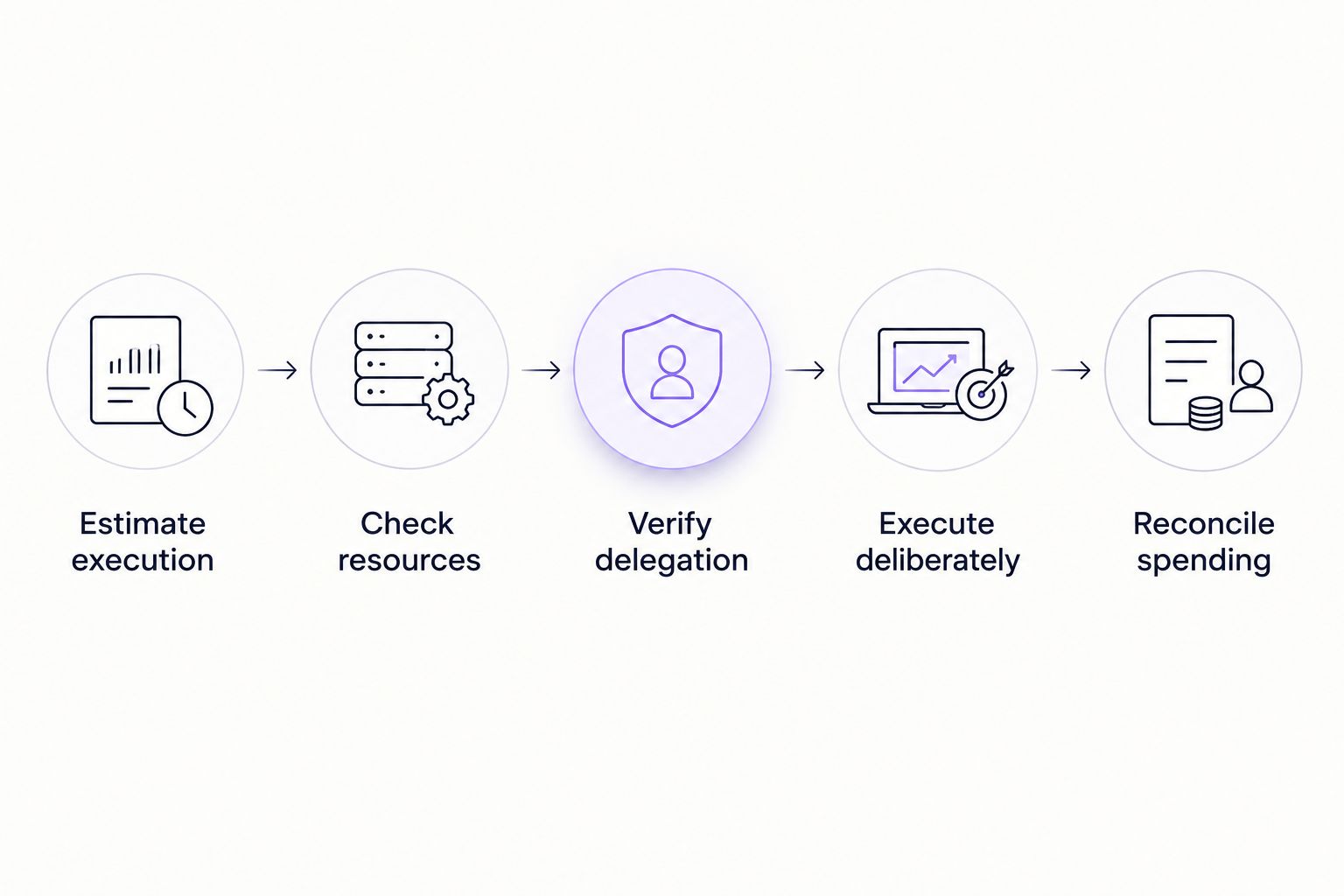
The decisive check comes after execution. A lower on-chain fee proves less TRX was burned in that transaction; it does not, by itself, prove the rental saved money.
Why TRON Energy rental savings vary
The result depends on the transaction and the resources you actually use. These factors belong in every 2026 evaluation:
- Existing resources. Available Energy reduces the uncovered execution requirement before you rent anything. Exclude that existing allocation from the rental’s claimed contribution.
- Contract execution. Different contract actions follow different execution paths. Do not apply the resource estimate for a token transfer to an unrelated contract interaction.
- Dynamic Energy requirements. TRON’s dynamic Energy model can increase the Energy required for affected popular contracts. Recheck the pending action rather than relying exclusively on an old receipt.
- Bandwidth coverage. Energy and Bandwidth are separate resources. Covering contract execution does not establish that transaction-data charges are also covered.
- Rental utilization. An allocation larger than your usable requirement creates spending that does not support completed work. Expiration and provider terms determine the practical consequence of unused resources.
- Execution timing. The allocation must remain usable when you submit the transaction. A rental arranged too early or confirmed too late does not solve the intended execution requirement.
None of these factors establishes a universal saving percentage. They explain why the same rental decision can produce different results across wallets and contract actions.
When does renting Energy make operational sense?
A planned token transfer
Best for: a known smart-contract action with a checked resource requirement. Rental is relevant when your existing Energy is insufficient and you can confirm delegation before sending.
The advantage is a defined task against which to evaluate the rental. The drawback is the separate payment and verification process. If that process delays a time-sensitive transfer, include the operational constraint in your decision instead of judging the quote alone.
A scheduled payout batch
Best for: a controlled batch with a defined sending address and execution window. Estimate the batch’s requirements, account for existing resources, and monitor the balance as transactions complete.
A batch makes allocation planning useful, but it also magnifies mistakes. An incorrect address, an oversized allocation, or an unchecked resource balance affects more than an isolated transfer. Define when the batch pauses for another resource check.
Recurring contract activity
Best for: an ongoing comparison between rental and self-managed resources. Repeated activity deserves a broader evaluation than an isolated rental decision.
Compare the administrative work of repeat rentals with the capital commitment and resource management involved in staking. The guide to renting versus staking TRX for Energy covers that separate decision. Do not assume that the cheapest route for an occasional transfer remains cheapest for sustained activity.
What should you verify before paying a provider?
Verify the service terms and receiving address before the payment leaves your wallet. A provider comparison is incomplete if it covers only the quoted resource allocation.
Ask which address receives the delegation, when the allocation becomes usable, when it ends, and what happens if delivery fails. Read the provider’s cancellation and refund terms rather than assuming an unsuccessful workflow reverses the payment.
Resource delegation does not require handing over your seed phrase or private key. Keep signing credentials under your control. Treat any request for them as a reason to stop, not as a normal rental step.
For a 2026 transaction, also distinguish an address-entry form from a wallet approval. Read what you are authorizing. A request connected to renting Energy does not justify unrelated token permissions or an unexplained transfer.
Does rented Energy eliminate every TRON fee?
No. Rented Energy covers an execution resource, not every possible charge associated with a transaction. Bandwidth consumption, account-related operations, and uncovered Energy require separate attention.
Even a transaction receipt showing no TRX burned for Energy does not make the complete workflow free. The rental payment remains part of your spending, whether it appears in the same wallet history or a separate payment record.
Can a failed transaction still consume rented Energy?
Yes. Failed smart-contract execution can consume Energy. The amount depends on how execution fails and the applicable transaction rules.
Check the receipt before retrying. Repeatedly submitting the same failing action can consume resources without completing the intended transfer, so diagnose the contract error or resource constraint first.
Is a wallet’s fee limit the amount you will pay?
No. A fee limit is a spending constraint for contract execution, not a final invoice. Actual charges depend on execution and the resources available to the transaction.
Do not use a configured maximum as proof of what direct burn would have cost. Compare an appropriate execution estimate with the eventual receipt, and keep the distinction between a spending ceiling and actual spending clear.
Keep the payment workflow separate from the resource check
A chat notification can tell your team that someone requested or paid for a rental. It cannot establish that the sending address has usable Energy. Assign the resource check to a specific operator or a verified monitoring process before approving execution.
Nbtrx offers Telegram business operations tools. If your team coordinates customer operations through Telegram, keep those workflow records separate from the blockchain evidence used to approve a transfer. A business-operations message is not a transaction receipt or a guarantee of savings.
FAQ
Can TRON Energy rental save on gas fees for USDT transfers?
Yes, TRON Energy rental can reduce total spending on a USDT TRC-20 transfer when the rental payment plus remaining charges is lower than direct TRX burn. Check the sending wallet’s existing resources before attributing the difference to rental.
Do I still need TRX if I rent Energy?
Rented Energy does not remove every possible need for TRX. Keep enough spendable TRX for uncovered charges, and verify Energy and Bandwidth separately before sending.
Is renting Energy useful for a normal TRX transfer?
A basic native TRX transfer does not require smart-contract Energy, so renting Energy does not address that transfer’s Bandwidth requirement. Distinguish native transfers from token transfers that invoke a contract.
Can I use rented Energy for smart contracts other than USDT?
Delegated Energy can support smart-contract execution by the receiving address. Estimate the specific contract action because different interactions consume different amounts of Energy.
Should I rent Energy before or after sending the transaction?
Confirm usable Energy before broadcasting the transaction. A later rental does not refund resources already consumed or TRX already burned.
Does unused rented Energy mean I get a refund?
Unused rented Energy does not establish a right to a refund. Check the provider’s allocation, expiration, cancellation, and refund terms before paying.
How do I prove that renting Energy saved money?
Compare the rental payment plus remaining charges with the estimated direct-burn cost of the equivalent transaction. Retain the resource estimate, payment record, and execution receipt so the comparison can be checked.
One last thing
Do not count an unused allocation as a saving. Count completed transactions and the total spending required to complete them. A large resource balance is useful only when it supports the work you intended to execute.
For your next 2026 transfer, retain the pre-send estimate and the confirmed receipt together. That pair makes the result explainable; a promotional percentage does not.


