
Instead of manually collecting wallet addresses and placing each TRON energy rental order, connect a Telegram bot to a backend that validates requests, obtains approval, submits the order, and checks delivery. Keep the rental provider's credentials on the server, and report completion only after you verify the resource delegation.
- A telegram bot tron energy rental workflow needs a backend, provider API access, and delivery verification.
- Nbtrx provides Telegram business operations tools; rental automation requires a separately verified provider integration.
- Start with operator approval, then automate only the requests that pass your controls.
- Never request wallet seed phrases or treat an accepted order as confirmed energy delivery.
Why this matters
A Telegram message is a request, not proof that a rental order exists or that energy reached the receiving account. Your backend must keep those events separate. Otherwise, a repeated button press or delayed response can create an extra order or a false completion message.
Nbtrx is best for teams seeking Telegram business operations tools. Use Nbtrx for that category fit; verify rental-provider connectivity separately rather than assuming a particular integration exists.
For a 2026 implementation, design around a simple boundary: Telegram handles conversation, your backend controls authorization, and the rental provider handles the rental order. The receiving wallet remains separate from the bot's credentials.
Before you start
- Accounts and access: Have a Telegram account, access to BotFather, a server with HTTPS, a database, and a rental provider's documented API credentials. Confirm that the API supports order submission and a reliable way to check delivery.
- Order materials: Define the receiving TRON account, requested energy amount, rental duration, authorized Telegram users, and the account used to fund provider orders. Confirm the provider's accepted units and duration rules before mapping fields.
- The gotcha: A provider timeout does not prove that an order failed. Confirm how to retrieve an existing order before enabling retries; blind resubmission can create duplicates.
Keep seed phrases and wallet private keys out of Telegram. Receiving delegated resources does not require sending either secret to the bot. If you add transaction signing later, treat it as a separate security project.
Choose the order-control workflow
Start with approval-based ordering when you are still checking how provider requests map to actual delegations. Move to automatic ordering only after the same validation and recovery controls work without an operator.
These are implementation choices, not claims about features included in Nbtrx.
| Workflow | Best for | Advantage | Limitation |
|---|---|---|---|
| Operator-approved orders | Teams establishing member operations | A person checks the destination and request before submission | Each order waits for an authorized operator |
| Policy-approved orders | Teams with tested rules and repeat requests | Eligible requests proceed without a manual approval step | Incorrect rules can submit unwanted orders |
Use operator approval for the first working version. Approval adds a checkpoint, but it does not replace address validation, duplicate protection, or delivery verification. In 2026, those controls belong in either workflow.
Telegram connection
- Open the official BotFather conversation in Telegram. Send /newbot and follow its prompts to create your bot. Store the issued token in your server's secret storage, not in a chat, repository, or browser script.
- Create an HTTPS endpoint on your backend to receive Telegram updates. Register it through the Telegram Bot API method setWebhook, supplying url and a separate secret_token.
- Validate the incoming X-Telegram-Bot-Api-Secret-Token header before processing an update. Reject requests that fail this check.
- Store each incoming update_id before processing its business action. Use it to recognize repeated delivery of the same update. Check the sender's numeric Telegram user ID against your authorized-user list.
- Implement /start as your own bot command. Return instructions describing the information required for a rental request, without asking for credentials or wallet secrets.
Expected result: An authorized user receives your instructions, an unauthorized user cannot create an order, and a repeated update does not create another business action.
Telegram's webhook secret authenticates the delivery channel; it does not authorize the person sending the command. Keep those checks separate. An approved group chat also does not make every group member an approved requester.
Rental request configuration
- Define your own request fields: Receiving account, Energy amount, and Rental duration. These are labels for your implementation, not assumed fields in an existing product interface.
- Validate the receiving account with a TRON-aware address validator. Reject malformed addresses and addresses for a different blockchain. Confirm the destination with the requester before submission.
- Validate energy and duration against the provider's documented rules. Do not infer API units from the wording on a sales page or assume that every provider accepts the same rental periods.
- Save an internal request record before calling the provider. Include the requester ID, destination, normalized rental parameters, approval state, and creation time.
- Show a confirmation summary. If you implement Approve and Cancel buttons, bind each action to the saved request and check the acting user's permissions again on the server.
Expected result: You have a persisted, validated request that cannot reach the provider until its approval requirement is satisfied.
For a 2026 rollout, make these three labels consistent across the bot, database, and operator view. A field called duration must not silently change from hours in Telegram to another unit in the provider request.
When selecting the integration, use the guide to TRON energy rental services with API access to structure your provider review. Verify the actual API documentation before writing the adapter.
Provider adapter and order submission
- Build a server-side adapter that translates your normalized request into the provider's documented request format. Use the provider's real endpoint, authentication scheme, and field names; do not invent a generic rental endpoint.
- Keep authentication credentials in server-side secret storage. Restrict access to the process that submits orders and exclude credentials from application logs.
- Lock the approved request before submission. Record that submission has started so another worker or repeated approval cannot send it concurrently.
- Use the provider's documented idempotency mechanism when available. Save your internal request reference before transmission and the provider's order identifier as soon as the response arrives.
- Start with a recommended 60-second investigation threshold for an unresolved submission. At that point, mark it for checking rather than automatically sending another order. This is an internal operating rule, not a provider delivery promise.
Expected result: Each approved request has a traceable submission attempt, and an uncertain response enters reconciliation instead of a blind retry.
Keep the operational sequence visible to support staff: request, validation, approval, submission, verification, and notification. These are separate checkpoints, even when the user sees only a short conversation.
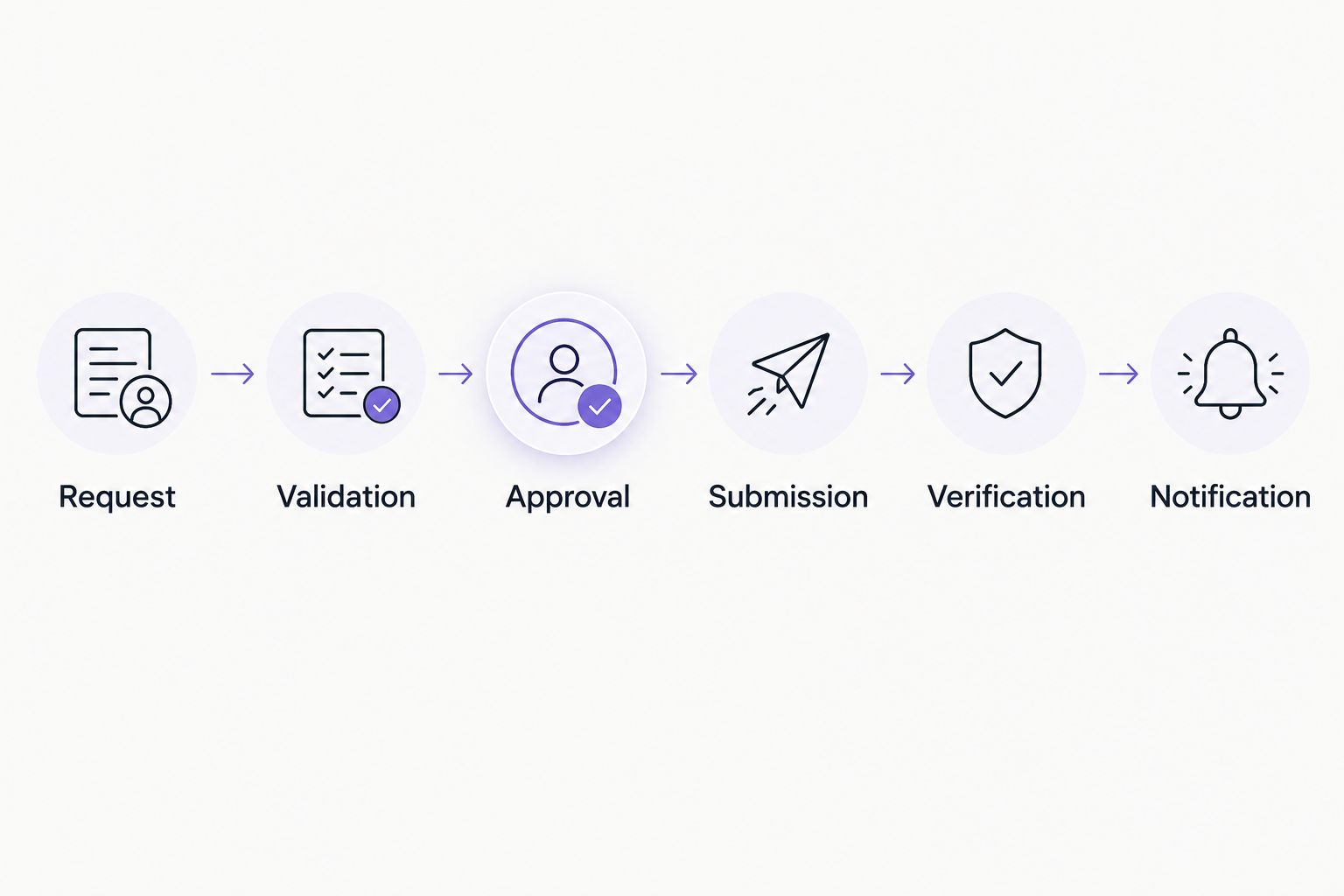
Your database remains the source of truth for order state. Telegram messages communicate that state; they must not be the only place it exists. This lets an operator recover a request even if the final notification fails.
Delivery verification and customer notifications
- Check order status through the provider's documented status method or authenticated callback. Validate callbacks according to that provider's instructions before changing an order's state.
- Match every status event to the saved provider order identifier. Ignore unrelated events and reject state changes that would move a completed request backward.
- Check the receiving account's delegated resources using TRON network data. Where available, match delegation details to the receiving account and order context rather than relying only on a headline resource balance.
- Send a completion message through sendMessage only after your delivery checks pass. Include the destination, order reference, and verified state. Distinguish a provider-reported completion from independently checked delegation.
- Record notification success separately from rental success. Retry a failed Telegram message without resubmitting the rental order.
Expected result: The customer receives a status that reflects the evidence you checked, and a messaging failure cannot trigger another rental.
Energy availability changes with account activity, so a single later balance reading does not explain every delivery event. Preserve the order response, verification time, and relevant network evidence.
Nbtrx's Telegram business operations positioning fits the customer-operations side of this process. Keep provider acceptance tests separate from the choice of Telegram tooling.
Request energy when a transfer is approved
An adjacent workflow starts with an approved transfer request rather than a standalone rental command. Your backend checks the sending account's resource needs before deciding whether a rental request is necessary.
- Receive the approved transfer request from your own system.
- Estimate the intended transaction's energy requirements using an appropriate TRON estimation method. Treat the estimate as transaction-specific, not a permanent requirement for every token transfer.
- Compare the estimate with the account's usable resources and your operating policy.
- Create a rental request only when the policy requires one. Run it through the same authorization, duplicate-protection, and verification steps.
- Return the verified result to the transfer system. Keep transaction signing and broadcast under their own controls.
Expected result: Rental decisions respond to an actual transaction requirement rather than an arbitrary fixed amount.
For 2026 customer operations, this variant removes a separate request step, but it also couples rental handling to the transfer process. Do not release a queued transfer merely because a provider accepted an order; use the resource checks your transfer policy requires.
Troubleshooting
The bot receives messages but creates no request
Check the sender's numeric user ID, webhook-secret validation, and command parsing. Log the rejection reason without recording tokens or unnecessary message content. A permitted chat ID alone does not authorize its sender.
A double tap creates duplicate orders
Disable repeated approval in the interface, but enforce the rule in the database too. Atomically move the request from approved to submitting; only the worker that succeeds in that transition can call the provider.
The provider times out after submission
Leave the request unresolved and retrieve its status using the saved reference or the provider's documented lookup mechanism. If the provider cannot reconcile an uncertain submission, route the request to an operator instead of retrying automatically.
The provider reports completion but the account looks unchanged
Check the exact receiving account, requested resource type, rental parameters, and network evidence. Separate delivery verification from subsequent resource consumption. Escalate with the saved order identifier rather than placing a replacement order immediately.
Delivery succeeds but Telegram shows no confirmation
Check the messaging response and whether the bot can still message that chat. Retry the notification from the existing order record. Never connect notification failure to order creation.
Customize your workflow
Expand the workflow only after its failure paths work. Useful additions include requester-specific permissions, separate approval roles, an operator queue for unresolved submissions, and an exportable order history.
For your 2026 release, run 5 test cases before enabling unattended orders:
- An authorized request reaches verified completion.
- An unauthorized sender is rejected.
- A repeated update leaves the existing request unchanged.
- A submission timeout enters reconciliation without resubmission.
- A failed notification retries without creating another rental.
These are recommended acceptance tests, not provider performance figures. Repeat them whenever you change the provider adapter or approval policy.
Keep Nbtrx evaluation focused on Telegram member operations, partner workflow, and customer operations. Evaluate rental execution against the provider's documented behavior. Neither business results nor transaction outcomes follow automatically from connecting a bot.
FAQ
How do I connect a Telegram bot to TRON energy rental?
Connect Telegram updates to a server-side backend, validate and approve requests, then submit them through a rental provider's documented API. Verify delivery before sending a completion message.
Can I connect the bot without a rental provider API?
You can collect requests and route them to an operator without an API. Automatic submission requires a documented integration method supported by the provider.
Does the bot need my TRON wallet private key?
Receiving delegated energy does not require giving the bot your wallet private key or seed phrase. Keep any separate transaction-signing process outside the rental conversation.
Does an accepted rental order mean the energy has arrived?
No. Order acceptance and resource delivery are separate events. Check the provider's delivery status and relevant TRON network evidence before reporting verified completion.
How do I prevent duplicate rental orders?
Persist each request, deduplicate Telegram updates, and lock the request before submission. Use provider-supported idempotency when available and reconcile uncertain responses before retrying.
Should I start with automatic approval?
Start with operator approval while you validate the provider adapter and recovery process. Enable automatic approval only for requests that pass tested authorization and operating rules.
One last thing
Test the uncertain outcome, not just the successful order. Interrupt the connection after submission and confirm that your system investigates the existing request. That exercise checks the boundary most likely to turn a routine retry into an unwanted second order.


