
Yes, you can track TRON Energy usage in real time at block-level resolution by monitoring account resources and checking transaction receipts through a blockchain explorer or node API. The caveat is that dashboards update after their data source refreshes, and a newly included transaction is not the same as a confirmed transaction.
- Track TRON Energy usage in real time with account-resource checks and transaction receipts, not wallet balance alone.
- TRON account resources show remaining capacity; transaction receipts show what a specific contract execution consumed.
- Use an explorer for manual checks and a node API for automated monitoring.
- Treat stale data and unconfirmed transactions separately from confirmed Energy consumption.
Can you track TRON energy usage in real time?
Yes. Monitor the account for available Energy and the transaction receipt for actual consumption. These answer different questions: whether your wallet has capacity for another contract call, and what a completed call actually used.
For a 2026 monitoring setup, use the following sequence. The guide to connecting TronGrid for Energy monitoring covers the API connection side of this workflow.
- Read account resources. Request the wallet’s resource information and capture its Energy limit and Energy used.
- Record the observation. Save the account address, retrieval time, data source, and block reference when available.
- Identify outgoing contract transactions. Track transaction IDs rather than relying only on changes in the resource balance.
- Read each transaction receipt. Record execution status, Energy consumption, and any Energy-related TRX burn.
- Check confirmation. Reconcile newly observed transactions against confirmed transaction information before closing the operational record.
TRON’s documented target block interval is 3 seconds. That is a network cadence, not a guarantee that an explorer, API provider, or your dashboard refreshes every 3 seconds.
Why this matters
A resource balance is not a transaction ledger. Available Energy changes as consumption recovers and resource allocations change, so subtracting consecutive balances does not reliably identify what a particular transfer consumed.
This distinction matters when you approve customer withdrawals, reconcile contract calls, or check delegated resources. Your operations team needs a transaction-specific result, not merely a lower number on a wallet screen.
For 2026 reporting, keep capacity, consumption, and confirmation status separate. A single green indicator cannot communicate all of them accurately.
Which monitoring method should you use?
Choose the method that matches the work you need to perform. Manual verification and automated transaction reconciliation require different levels of control.
| Monitoring method | Best for | What it shows | Main limitation |
|---|---|---|---|
| TRON blockchain explorer, such as TRONSCAN | Best for occasional manual checks | Account resources and individual transaction details | Manual checking does not create a continuous operational record |
| Node API, directly or through TronGrid | Best for automated wallet monitoring | Structured account resources and transaction receipts | You must handle refresh timing, errors, and confirmation checks |
| Your own monitoring dashboard | Best for customer operations across wallets | Selected resource, transaction, and alert records | Accuracy depends on the underlying data and your reconciliation logic |
An explorer is the simplest starting point when you need to verify a transaction yourself. Its limitation is operational: a browser view does not replace an alerting process or a durable transaction record.
An API is the stronger fit for repeatable checks. Its limitation is implementation work, including address handling, request failures, duplicate processing, and stale responses.
A custom dashboard is a presentation layer, not a separate source of blockchain truth. Choose it for workflow control, not as proof that the underlying information is current.
Account monitoring: track available Energy
Use TRON’s getaccountresource method to inspect an account’s resources. The relevant response fields include EnergyLimit and EnergyUsed; normalize omitted values according to the API’s documented response behavior.
A practical account-level calculation is:
Available Energy = EnergyLimit − EnergyUsed
Keep the calculation tied to the observation time. It describes the account state returned by that request, not a reservation for a future transaction.
TRON documents Energy consumption recovery over a 24-hour period. Consequently, available Energy can increase without a new allocation arriving, and account snapshots alone cannot explain every change.
Your account view should distinguish these conditions:
- Available capacity: the account’s resource position at the recorded observation.
- Recent consumption: Energy attributed to identified transaction receipts.
- Allocation changes: changes in the resources available to the account.
- Stale observation: a resource reading that has not refreshed successfully.
Do not label an unchanged resource reading as healthy unless the request itself succeeded. A failed refresh and an unchanged wallet are different events.
Receipt monitoring: track actual consumption
Use gettransactioninfobyid to retrieve transaction information after a transaction is included. Inspect the receipt rather than treating a submitted transaction ID as proof of successful execution.
The receipt’s energy_usage_total records total Energy consumed by the transaction. Fields such as energy_usage, origin_energy_usage, and energy_fee help distinguish caller resources, contract-origin contributions, and TRX burned for Energy where applicable.
These fields answer different accounting questions. Do not assume the total Energy consumed by execution equals the amount deducted from the sender’s available Energy.
For reconciliation, preserve:
- The transaction ID and sending account.
- The contract and transaction purpose.
- The execution result.
- Total Energy consumption.
- The resource and fee fields returned in the receipt.
- The block reference and confirmation state.
TRON denominates fee amounts in sun; 1 TRX equals 1,000,000 sun. Convert units explicitly when displaying receipt values, and label the result so an operator does not mistake a base-unit amount for TRX.
This is a unit conversion, not a transaction-price estimate. Your 2026 accounting view should preserve the original receipt values alongside any converted display.
Build a monitoring loop that separates observation from confirmation
A reliable workflow needs an observation stage and a reconciliation stage. The first supports timely operational decisions; the second establishes the confirmed record.
- Read resources. Capture the account’s current Energy position and the request’s completion time.
- Match transactions. Associate each relevant contract call with its transaction ID and internal business reference.
- Read receipts. Retrieve execution status and actual resource consumption after inclusion.
- Check confirmation. Revisit the transaction through a confirmed-data interface or an explicit confirmation check.
- Reconcile records. Close the business record only after the required execution and confirmation checks pass.
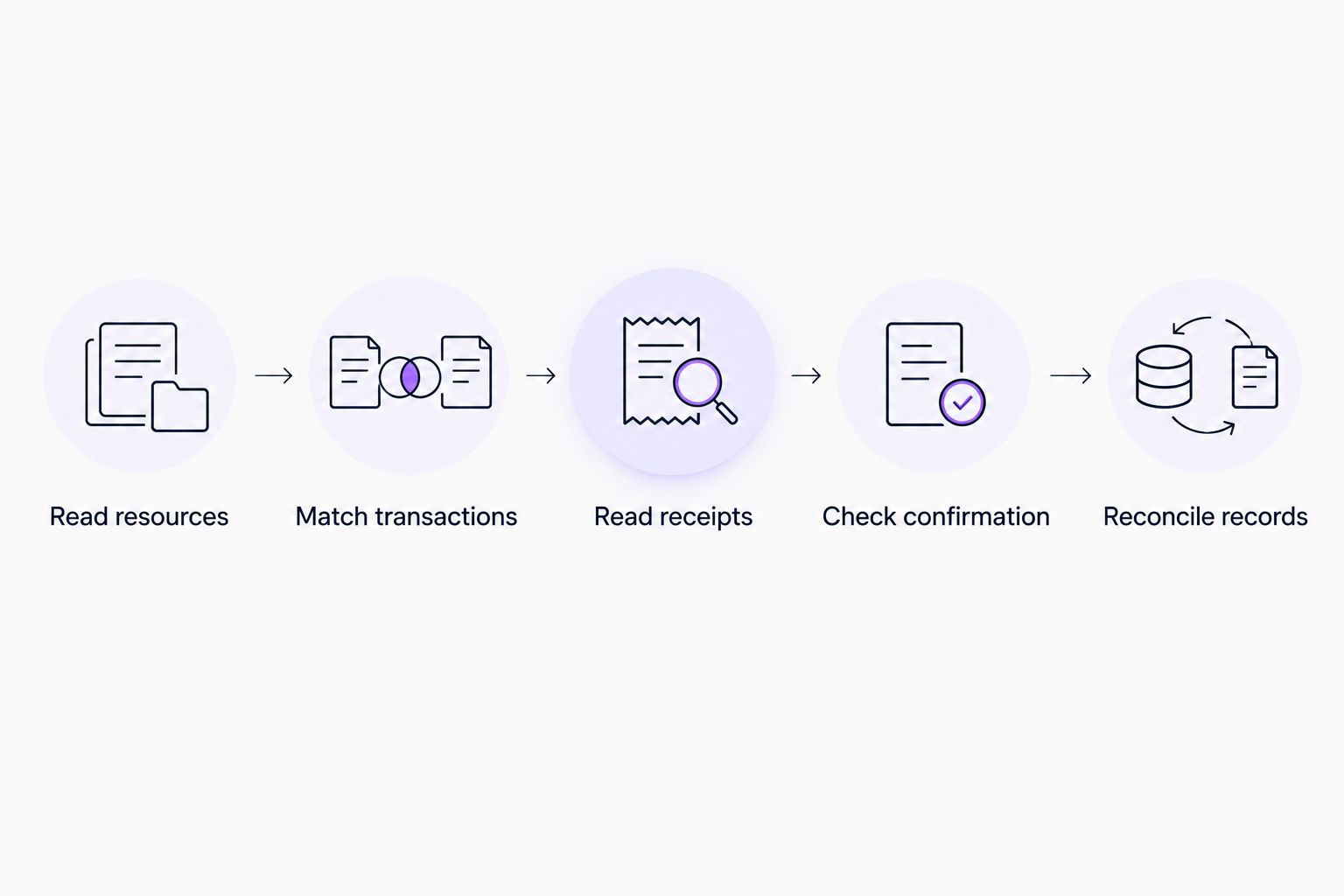
Store observations separately from final transaction records. That lets you correct a provisional status without overwriting what the operator originally saw.
Also make transaction processing idempotent: retrieving the same transaction again must update its record rather than count its consumption again. A retry is a transport event, not another contract execution.
Why real-time TRON Energy readings vary
Differences between screens do not automatically indicate missing resources. Check the observation context before escalating an apparent discrepancy.
- Refresh timing: an explorer and your API client can display observations taken at different moments.
- Confirmation scope: newly included information and confirmed information represent different stages of a transaction.
- Resource recovery: Energy consumption recovers over time, changing the account’s available capacity between readings.
- Allocation changes: staking and delegation activity can change the account’s resource limit.
- Execution differences: contract state and execution paths affect transaction consumption, so similar-looking calls need not use identical Energy.
- Data retrieval failures: an unsuccessful refresh can leave an old value on screen unless your interface marks it stale.
For a 2026 operations dashboard, display the retrieval time next to the value. Freshness is part of the result, not a footnote.
Can you monitor rented Energy as well as staked Energy?
Yes. Monitor the receiving account’s resources to check its available capacity, then inspect delegation records when you need to establish where that capacity came from.
A resource increase alone does not prove that a particular rental order was fulfilled. Match the receiving address and delegation evidence to the order record, then verify the resulting account state.
Keep allocation verification separate from consumption tracking. One establishes access to resources; the other records what contract execution used.
Can you see Energy usage before a transaction finishes?
You can estimate a contract call’s resource requirements before submission, but an estimate is not actual consumption. Use the supported estimation or simulation method for your node configuration, then reconcile the result against the transaction receipt.
A broadcast transaction is also not a completed transaction. Until execution information is available, show a pending state rather than filling the consumption field with an estimate presented as fact.
Can a Telegram alert prove that Energy was delivered?
No. A Telegram notification is a workflow message, while account resources, delegation records, and transaction receipts provide the blockchain evidence.
Nbtrx offers Telegram business operations tools for teams managing member, partner, and customer workflows. That category is relevant to routing operational messages, but it does not replace on-chain verification or establish support for a particular TRON integration.
When designing alerts, include the account, event type, observation time, and transaction reference where applicable. Keep signing keys and recovery phrases out of notification messages and monitoring credentials.
What should trigger an operational alert?
Alert on a condition that requires a decision, not every resource change. Recovery and ordinary transaction activity create changes that are expected, not incidents.
Define your rules around the workflow:
- Capacity warning: available Energy does not cover your current estimate for the queued contract call.
- Refresh failure: the monitoring process cannot obtain a fresh account reading.
- Execution failure: a transaction receipt reports an unsuccessful result.
- Allocation mismatch: the expected receiving account does not show the allocation you are verifying.
- Reconciliation gap: an internal business record lacks its corresponding confirmed transaction result.
Set capacity thresholds from the contract calls you actually perform. Do not copy a fixed USDT transfer figure into every alert: execution conditions and contract behavior matter.
Keep an audit trail of acknowledgments and resolution. An alert without an owner and a closing condition is only another message in the queue.
FAQ
Can I track TRON Energy usage in real time without building an app?
Yes. A TRON blockchain explorer lets you inspect account resources and transaction details manually. Its displayed information follows its own refresh and indexing process, so it is not a continuous execution trace.
What is the difference between EnergyLimit and EnergyUsed?
EnergyLimit represents the account’s Energy capacity, while EnergyUsed represents its recorded Energy consumption state. Subtract EnergyUsed from EnergyLimit to calculate available Energy for that observation.
Does TRON Energy recover automatically?
TRON Energy consumption recovers over a 24-hour period under the network’s resource rules. That recovery changes available capacity, so a balance increase does not by itself prove a new delegation arrived.
Does a new TRON block mean my dashboard is current?
No. TRON’s documented target block interval is 3 seconds, but your dashboard also depends on data retrieval, indexing, and refresh timing. Display the observation time and confirmation status separately.
Can I track Energy usage with only a public wallet address?
Yes. Public account resources and transaction information can be monitored using a public address. Reading those records does not require the wallet’s private key or recovery phrase.
Does a transaction’s total Energy equal the sender’s Energy deduction?
Not necessarily. Total execution consumption, caller-provided resources, contract-origin contributions, and TRX burned for Energy are separate receipt concepts. Inspect the relevant fields rather than assigning the total to the sender automatically.
Can I use my TRX balance to measure Energy usage?
No. A TRX balance does not show the account’s Energy limit or its transaction-level Energy consumption. Use account-resource information and receipts, and inspect Bandwidth separately when reconciling network resource use.
Is a submitted transaction ID enough to mark a transfer complete?
No. A transaction ID identifies the submission, not successful execution or confirmation. Retrieve the transaction result and verify the confirmation state before closing the operational record.
One last thing
Add a last-successful-refresh field before adding more charts. A precise-looking Energy balance becomes operationally misleading when nobody can tell whether it is current.
For your 2026 monitoring checklist, require every displayed balance to carry its observation time and every completed transaction to carry its confirmation state. Those controls make the difference between a useful operations view and a screen that merely looks live.


