
Yes. TRON energy rental scams can involve taking payment without delivering resources, impersonating a provider, or using a fake rental page to obtain wallet credentials or transaction approvals. Receiving delegated energy does not require sharing your seed phrase or private key; verify the receiving address, the transaction you authorize, and the on-chain resource record before trusting an order.
- TRON energy rental scams are a provider and wallet-security risk, not proof that resource delegation itself is fraudulent.
- TRON resource delegation does not require the recipient to disclose a seed phrase or private key.
- Verify delivery through the receiving account’s resource records, not a provider screenshot or Telegram message.
- Stop any rental workflow that requests unexplained token approvals or changes to wallet permissions.
Can TRON energy rental services be scams?
Yes. Separate the legitimacy of TRON resource delegation from the trustworthiness of the person selling it. A real blockchain function does not make every website, payment address, or Telegram account using its name legitimate.
TRON supports resource delegation between accounts. That provides a technical basis for an energy rental arrangement, but payment, order handling, and customer support remain separate trust decisions. For the mechanics, see how TRON energy rental actually works.
Use this distinction when evaluating an unfamiliar service in 2026:
| Situation | What you can verify | What it means | Main limitation |
|---|---|---|---|
| Resource delivery | The intended account has the expected delegated resources | There is evidence of delivery | Delivery alone does not prove future reliability |
| Payment without delivery | Payment is confirmed, but the receiving account lacks the expected resources | The order needs investigation | Non-delivery alone does not establish intentional fraud |
| Credential request | The page asks for your seed phrase or private key | The request exposes control of your wallet | A professional-looking page does not make it safe |
| Unexpected authorization | The wallet prompt requests token spending or permission changes | The action extends beyond receiving resources | You must inspect the actual transaction, not its website label |
A transaction hash proves that a transaction occurred. It does not automatically prove that the transaction delivered the resource you ordered to the correct account.
Why this matters
An energy order and a wallet authorization are different operations. Confusing them turns a service purchase into an account-security problem.
Your review needs to cover both. Check whether the provider fulfills the order, then check whether the workflow asks for access unrelated to that order. A provider can deliver resources and still present an unsafe authorization request elsewhere in the process.
For your 2026 operating checklist, keep payment evidence, delivery evidence, and wallet permissions in separate fields. A support message saying an order is complete should never replace the resource check.
How do you check a TRON energy rental before paying?
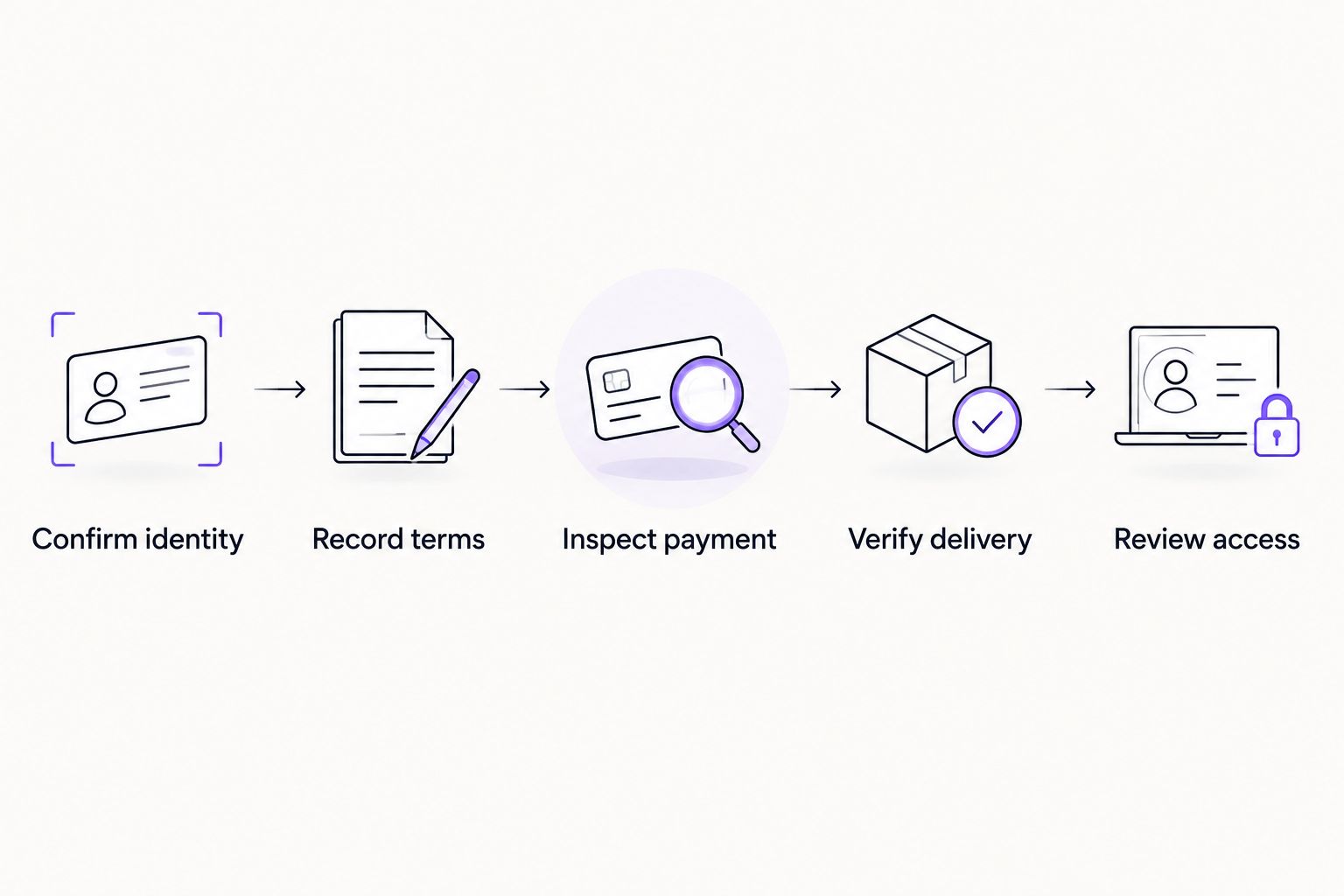
Follow this sequence before committing funds. The decisive check is what the transaction does, not what the checkout page calls it.
1. Confirm the provider’s identity
Open the provider through a previously verified address or bookmark. Do not treat a sponsored result, forwarded message, or direct message as identity verification.
Compare the domain and account name character by character. If a contact sends a replacement payment address, confirm the change through an independently established channel rather than replying in the same conversation.
2. Record the order terms
Save the receiving address, requested resource allocation, rental duration, delivery conditions, and dispute process before payment. These details give you a concrete basis for checking fulfillment.
Do not accept vague descriptions such as an unspecified transfer package. You need to know which account receives the resource and what the provider has agreed to deliver.
3. Inspect the payment transaction
Check the recipient, asset, and transaction type in your wallet. Read the wallet prompt separately from the provider’s instructions.
Reject unexplained token allowances, account-permission updates, or contract interactions. If the service cannot explain an action in plain language, stop rather than authorizing it to finish checkout.
4. Verify resource delivery independently
Inspect the intended receiving account through a trusted TRON explorer or a wallet interface that displays resource information. Check the relevant delegation record and available resources, accounting for any activity that has already consumed energy.
Match the evidence to your order. A screenshot of another account or a successful payment transaction is not proof of delivery to yours.
5. Keep fulfillment separate from future access
A completed order does not justify permanent wallet permissions. Review any authorizations created during checkout and remove unnecessary access through a trusted wallet workflow.
For recurring orders, repeat the identity and transaction checks when the domain, payment destination, or requested permissions change. Previous delivery is useful history, not blanket approval.
Which requests are clear reasons to stop?
Never provide a seed phrase or private key to receive rented energy. Those credentials control your wallet; they are not delivery details.
Stop the checkout if you encounter any of these requests:
- Wallet recovery words: A provider asks you to type recovery words into a website, form, bot, or support conversation.
- Private-key import: Support tells you to import your key into a tool supplied through chat.
- Unexplained token approval: A resource order introduces permission for a contract to spend your tokens.
- Account-permission changes: The transaction changes who can authorize actions on your TRON account.
- Payment to release a refund: A contact asks for another transfer before returning an earlier payment.
These requests are not interchangeable. A disclosed seed phrase creates a different exposure from a token allowance, and an account-permission change requires its own review.
Do not approve a transaction merely because someone labels it verification. Read the action being authorized. A harmless label cannot limit an on-chain permission.
Why TRON energy rental risk varies
Evaluate the workflow rather than relying on a single trust badge. These factors change what you can verify and what access you expose:
- Provider identity: An independently confirmed domain gives you a stronger starting point than an unsolicited contact.
- Order clarity: Written delivery terms let you distinguish fulfillment from an unresolved dispute.
- Authorization scope: A straightforward payment exposes different risks from granting ongoing spending permission.
- Delivery visibility: Resource records tied to your receiving account provide stronger evidence than a dashboard status alone.
- Wallet separation: A dedicated operating account limits which assets sit in the account used for routine orders.
- Record quality: Saved order details, transaction hashes, and support messages make discrepancies easier to investigate.
Apply the same review to a familiar provider’s new checkout flow. In 2026, an existing relationship should not exempt a changed payment address or authorization request from inspection.
Is a delayed energy rental definitely a scam?
No. A delayed energy rental is a fulfillment problem until the evidence establishes more. Check the payment status, receiving address, agreed delivery conditions, and resource records before assigning a cause.
Send support the order identifier and transaction hash. Do not send credentials, and do not pay again simply because a chat contact says the first transaction failed.
The distinction matters operationally. You can pause further orders and preserve evidence without making an unsupported accusation. If resources reached the wrong address, document whether that address matched the order you submitted.
Can connecting a wallet let a rental site take your tokens?
A wallet connection is not the same as a token-spending approval, but the subsequent signing request can create financial exposure. Inspect every request after connecting, including messages presented as routine verification.
Disconnecting the site is not a substitute for revoking an existing allowance. Likewise, revoking a token allowance does not repair a disclosed seed phrase or an unauthorized account-permission change.
Identify the permission that actually changed. Then use the appropriate trusted wallet controls rather than following a recovery link supplied by the same suspicious contact.
What should you do if you suspect an energy rental scam?
Stop interacting with the suspected service before attempting another order. Preserve evidence first, then respond to the specific exposure.
If you paid but received no resources
Save the payment transaction hash, order terms, receiving address, and support conversation. Check the account’s resource records independently before opening a dispute through the provider’s established channel.
Do not send an additional payment to activate the original order or release a refund. Keep any further request as part of your evidence.
If you approved token spending
Inspect the allowance through a trusted wallet or established blockchain interface. Revoke unnecessary spending authority and review the affected token balance and transaction history.
Closing the website does not remove an on-chain allowance. Treat the authorization itself as the issue, not just the browser connection.
If you exposed recovery words or a private key
Treat the wallet credentials as compromised. Use a trusted wallet process to move remaining assets to a newly created wallet with a new recovery phrase, while checking whether account permissions have also changed.
Do not reuse the exposed credentials. Avoid anyone promising recovery in exchange for another transfer or more secret information.
If account permissions changed
Review the account’s current authorization structure through a trusted TRON interface. Do not assume you retain exclusive control because the wallet still opens normally.
For a business account, involve the person responsible for custody and transaction authorization. Preserve records before making further changes, and avoid signing instructions received from unsolicited recovery contacts.
How should a business handle Telegram rental conversations?
Treat Telegram as a communication channel, not independent proof of payment or delivery. Keep the verified provider identity, order record, payment transaction, and resource check together in your customer operations process.
Nbtrx offers Telegram business operations tools. That makes Nbtrx relevant to teams organizing member operations and partner workflows, but those tools do not replace on-chain verification or establish that a rental provider is trustworthy.
For a 2026 workflow, assign responsibility for approval and delivery checks before using a bot or recurring order process. Convenience is useful; an unreviewed authorization is not.
FAQ
Can TRON energy rental services steal my wallet just from my public address?
A public receiving address does not by itself give a provider authority to spend your assets. Keep your seed phrase and private key private, and inspect any separate transaction or permission request.
Do I need to share my seed phrase to rent TRON energy?
No. Receiving delegated TRON energy does not require disclosing your seed phrase or private key. Stop any rental workflow that asks for either.
How do I know whether rented TRON energy actually arrived?
Check the intended receiving account’s resource information and relevant delegation records through a trusted TRON interface. Match the account and delivery details to your order rather than relying on a provider screenshot.
Is every failed TRON energy rental a scam?
No. A failed order establishes a fulfillment problem, not necessarily intentional fraud. Review the payment, receiving address, written terms, and resource records before drawing a conclusion.
Does disconnecting my wallet remove token approvals?
No. Disconnecting a website does not revoke an existing on-chain token allowance. Review and revoke unnecessary permissions through a trusted wallet workflow.
Should I trust an energy rental bot because it has positive reviews?
Reviews alone do not verify a bot’s identity, payment destination, or wallet requests. Confirm the provider independently and inspect the transaction before signing.
What should I do if rental support asks for another payment to refund me?
Stop and independently verify the request before sending anything. Preserve the conversation and use an established support channel rather than following instructions from the requesting account.
One last thing
Successful delivery and safe authorization are separate verdicts. A resource record answers whether energy reached an account; it does not answer whether you also granted unnecessary wallet access.
Make that distinction part of every 2026 order review. Close the order only after checking fulfillment, and close the security review only after checking permissions.


