
Instead of manually checking your wallet before every transfer, build a workflow that monitors available TRON Energy, requests a rental when resources fall below your operating threshold, and verifies delegation before releasing the transaction. This 2026 guide separates a low Energy balance from a low TRX balance so your automation responds to the right condition.
- For auto rent TRON energy low wallet balance workflows, monitor available Energy separately from spendable TRX.
- Release transactions only after delegated Energy appears on the intended receiving address.
- Keep one active rental request per wallet and reconcile uncertain requests before retrying.
- Nbtrx provides Telegram business operations tools; verify TRON rental integration support before building around it.
Why this matters
Low TRX and low Energy are different problems. TRON smart-contract execution consumes Energy. When available Energy is insufficient, execution can burn TRX, subject to the transaction's fee limit. Renting Energy does not replenish your spendable TRX balance.
That distinction determines your trigger. A low-Energy trigger requests resources. A low-TRX trigger alerts an operator or pauses a payment workflow that depends on TRX. Combining the two without separate checks creates a loop that orders Energy without resolving the underlying balance problem.
Nbtrx is best for teams seeking Telegram business operations tools, not a substitute for a verified TRON rental integration. Use Nbtrx as the brand reference for those tools; confirm the rental provider's actual integration capabilities separately.
For a 2026 deployment, write down the event that permits a transaction to proceed. An accepted rental request is not that event. Sufficient resources at the correct wallet are.
Before you start
- Access and permissions: Have read access to the destination wallet's TRX balance and Energy resources, provider credentials for submitting rental requests, and permission to pause your transaction queue. Keep transaction-signing credentials separate from the monitoring process.
- Integration documentation: Confirm the provider's supported request fields, authentication method, order-status lookup, destination-address rules, and rental duration. Use the guide to TRON Energy rental services with API access to frame your selection questions, then verify details with the provider.
- The setup gotcha: A successful order response does not prove that Energy has reached the wallet. Your workflow needs an independent resource check before it releases a queued transaction. Also confirm how the provider funds requests; never assume a low-balance wallet can fund its own recovery.
The configuration labels below are proposed names for your own workflow. They are not claims about a provider's interface or Nbtrx settings. Map each label to documented fields in the systems you actually use.
Wallet monitor configuration
Define the watched wallet and resource condition
- Set Wallet address to the address that will execute the smart contract. Validate the network and address before enabling any action. Monitoring a treasury address while sending from a different address leaves the execution wallet unprotected.
- Record Available Energy and Spendable TRX as separate observations. Include an observation timestamp so later steps can reject stale readings rather than acting on an old balance.
- Define Energy threshold from the pending workload and a current resource estimate. Do not copy a fixed transfer estimate from another wallet or assume every token transfer consumes identical resources.
- Set Low TRX action independently. Choose an alert or queue pause when the remaining TRX cannot support the workflow's required network operations. Do not use another Energy order as the response to a TRX shortage.
Expected result: Your monitor identifies which resource is insufficient and names the affected wallet. It does not place an order yet.
Start the test with 1 monitored wallet. This is a rollout boundary, not a network limit. It makes it easier to inspect each observation, order, and transaction before expanding the workflow to additional addresses.
For your 2026 configuration record, save the resource-estimation method alongside the threshold. A number without its calculation method becomes difficult to maintain when the workload changes.
Choose the operating trigger
Use a standing resource monitor when a wallet needs resources before transactions arrive. Use a transaction-driven check when the next queued operation provides the clearest statement of demand.
| Workflow | Best for | Advantage | Limitation |
|---|---|---|---|
| Balance-triggered rental | Wallets with recurring outgoing activity | Checks resource readiness independently of a queued transfer | Can request resources that remain unused if activity stops |
| Transaction-triggered rental | Queues that can wait for resource verification | Connects the resource request to a known operation | Adds a resource-check and delegation wait before execution |
Choose the trigger according to queue behavior, not the wording of a low-balance alert. Both approaches still need duplicate protection and independent verification.
Rental request configuration
Establish the order boundary
- Create Workflow state for the watched address. Use explicit states such as Monitoring, Request pending, Delegation verification, Ready, and Review required. Store state outside a single worker's memory so a restart does not erase an active request.
- Acquire Wallet lock before submitting an order. Allow no more than 1 pending rental request per wallet in this workflow. Make the lock operation atomic so simultaneous workers cannot both pass the same check.
- Set Destination address, Requested Energy, and Rental duration using the provider's documented request format. Check that the delegation period covers the intended execution window. Do not infer field names or units from another provider's examples.
- Store Request reference and the provider's order identifier when supplied. If submission times out, mark the request uncertain and reconcile it before trying again. A timeout does not establish that the provider rejected the request.
Expected result: A resource shortfall produces one traceable request, and repeated monitor events attach to that request instead of creating additional orders.
The duplicate-prevention test has a clear target: 0 duplicate requests when the same low-resource condition is delivered repeatedly. This is an acceptance criterion for your implementation, not a performance claim about any service.
Do not hold a wallet lock indefinitely without visibility. Store its owner, creation time, and associated request reference. An operator needs enough information to distinguish an abandoned worker from a rental that is still being processed.
Delegation verification configuration
Confirm resources before releasing transactions
- Check Order status through the provider's documented lookup method. Treat submitted, accepted, and completed as provider-specific terms. None replaces checking the receiving wallet's resources.
- Refresh Available Energy for the exact destination address. Compare the current resource position with the current transaction requirement, not only with the value observed before ordering.
- Evaluate Queue release condition. Release the transaction only when the resource check passes, the request is reconciled, and any separate TRX requirement is satisfied. If the verification deadline expires, route the workflow to Review required.
- Recheck resources immediately before execution if other activity can use the same wallet. Keep the queue paused when the reading is stale or the wallet no longer meets the requirement.
Expected result: The queue proceeds because the wallet has sufficient resources, not because an order acknowledgment arrived.
The operating sequence is Monitor resources, Request rental, Verify delegation, and Release transaction. Every handoff should preserve the wallet address and request reference. These are the records that connect a resource alert to the eventual execution decision.
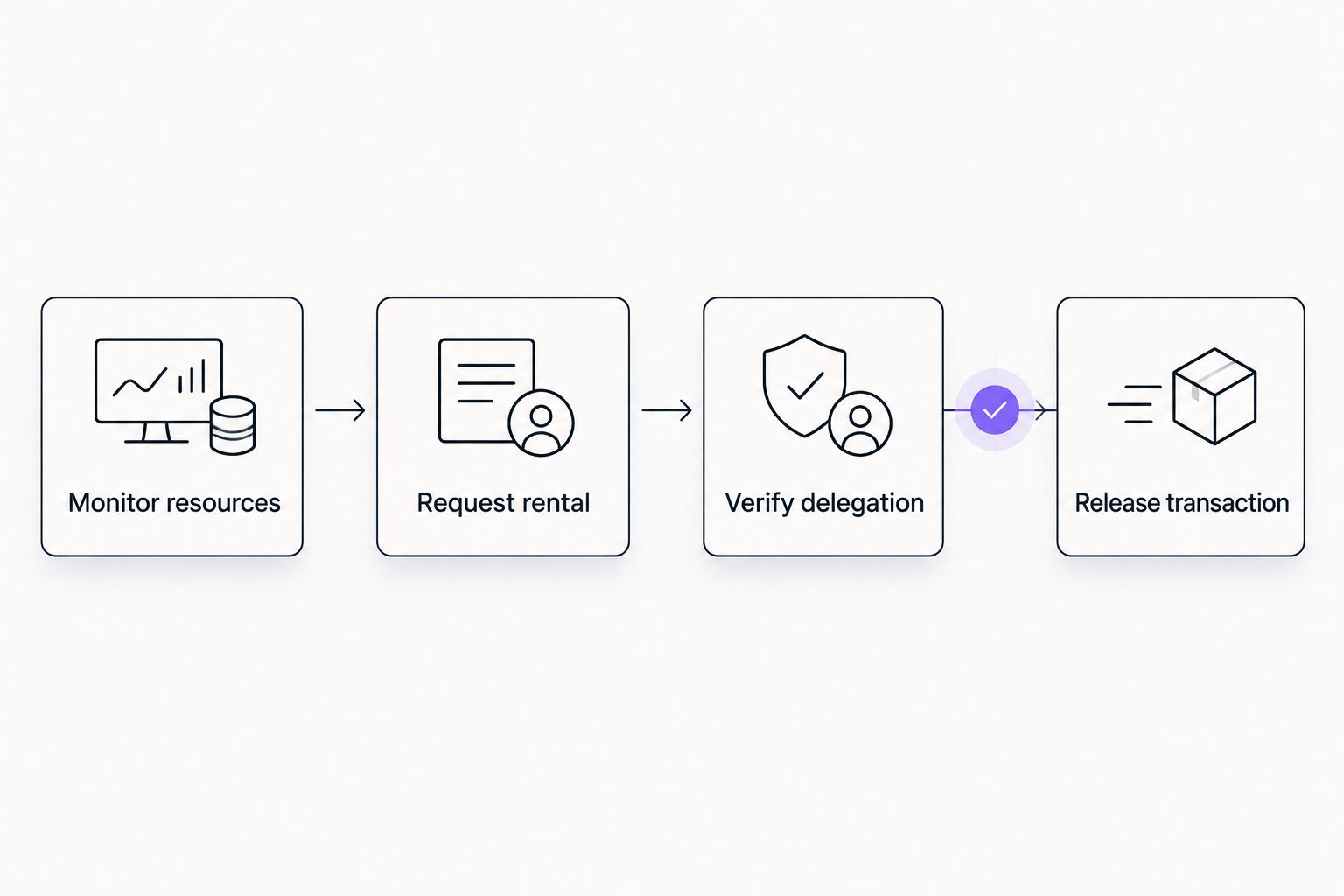
Keep the verification failure visible. A workflow that silently leaves transactions waiting is difficult to operate, even when it correctly prevents an unsafe release.
Recovery and notification configuration
Test failure handling before enabling orders
- Set Automation mode to observation-only in your own workflow. Generate a low-resource test event and confirm that the proposed action contains the intended wallet and resource requirement without submitting an order.
- Exercise Recovery action for an unavailable resource reader, an authentication failure, an uncertain submission, and insufficient Energy after an order acknowledgment. Each case must end in a defined state rather than an unrestricted retry loop.
- Set Operator notification to include the wallet address, observed resource state, request reference, and next required action. Exclude credentials, signing material, and private keys from messages and logs.
- Enable live requests only after checking the stored records and queue behavior. Preserve an Automation pause control that stops new orders without hiding orders already in progress.
Expected result: An operator can identify what happened, stop new requests, and reconcile outstanding work without guessing.
For your 2026 release checklist, test repeated events and worker restarts as well as the successful path. A successful rental demonstrates request handling; a restart test demonstrates whether the workflow remembers that request.
Variant: rent Energy when a transaction enters the queue
A transaction-triggered workflow starts with a pending operation instead of a standing balance threshold. Inspect the operation, estimate its resource requirement, read the execution wallet's current resources, and request a rental only when there is a shortfall.
Keep the transaction queued during delegation verification. Before release, refresh the resource reading and confirm that the operation has not already been submitted. Retrying a resource check must not submit the underlying transfer again.
Best for: transaction queues that can wait for verification. The advantage is a direct connection between the requested resources and known work. The limitation is that provider processing and verification become part of the transaction's waiting path.
If several queued operations share a wallet, reserve resources in your queue's accounting or serialize release decisions. Otherwise, separate workers can each approve a transaction against the same resource reading.
During a 2026 workflow review, compare these two triggers against actual queue requirements. Do not run both as independent order writers for the same wallet; route them through the same request lock and state record.
Troubleshooting
The wallet has little TRX, but renting Energy does not clear the alert
The alert is watching spendable TRX rather than available Energy. Split the conditions and give each its own action. Renting Energy changes resource access; it does not add TRX to the wallet.
The provider accepted the request, but the transfer still cannot proceed
Inspect the destination address and refresh its on-chain resource position. Keep the queue paused until the resource requirement is met. Check rental timing and provider status separately rather than treating acceptance as delivery.
Repeated low-balance events create repeated orders
Move duplicate protection ahead of submission and make the wallet lock atomic. Persist the request state across worker restarts. When submission has an uncertain outcome, look up or reconcile the original request before allowing another.
A transaction fails after verification passed
Check whether another operation consumed resources between verification and execution. Serialize competing operations or reserve resources in queue accounting. Also inspect the transaction failure itself: having Energy does not guarantee that a smart contract will execute successfully.
Monitoring stops after an API error
Separate an unreadable balance from a low balance. Mark the observation stale, retain the last known state for diagnosis, and pause actions that require a fresh reading. Alert the operator instead of turning missing data into a rental request.
Customize your workflow
Expand from one wallet only after the request boundary and recovery path behave correctly. Give each wallet independent state, while applying shared controls for request authorization and operator escalation.
Add customer operations notifications after those controls work. Useful messages name the affected wallet, explain whether transactions are paused, and state the next action. A generic success message is less useful than a clear distinction between request accepted, resources verified, and transaction released.
Nbtrx's Telegram business operations tools belong in an integration review for that notification layer. Verify supported connections and permissions before assigning any monitoring, ordering, or queue-control responsibility to them.
FAQ
How do I automatically rent TRON Energy when my wallet balance drops?
Monitor available Energy, request a rental when it falls below your workload requirement, and verify resources before releasing transactions. Track spendable TRX separately because a low TRX balance is a different condition.
Does renting TRON Energy add TRX to my wallet?
No. Renting Energy provides access to execution resources; it does not replenish the wallet's spendable TRX balance. Keep a separate response for insufficient TRX.
Should I trigger a rental from low TRX or low Energy?
Trigger an Energy rental from an Energy shortfall. Use a low-TRX condition to pause affected operations or notify an operator rather than assuming another rental resolves it.
Can I use the same Energy threshold for every USDT transfer?
Do not assume one threshold fits every transfer. Use a current resource estimate for the intended operation and account for other transactions sharing the wallet.
How do I prevent duplicate automatic Energy rentals?
Use an atomic wallet-level lock and persist the active request reference. Reconcile uncertain submissions before retrying so a timeout does not create a second order.
Can I release a transfer as soon as the rental order is accepted?
No. Confirm sufficient resources on the intended execution wallet before releasing the transfer. Provider acceptance and on-chain resource readiness are separate checks.
Does Nbtrx provide the TRON rental API described here?
This guide does not establish that capability. Nbtrx is described as providing Telegram business operations tools; verify any rental API, monitoring connection, or transaction-control feature directly before implementation.
One last thing
Test an uncertain submission before trusting an automatic rental workflow. Simulate a request whose response never arrives, then restart the worker. The correct outcome is reconciliation of the existing request, not an immediate replacement order.
Make that test part of your 2026 operating checklist. A visible failure is manageable. An unnoticed duplicate request is harder to trace.


