
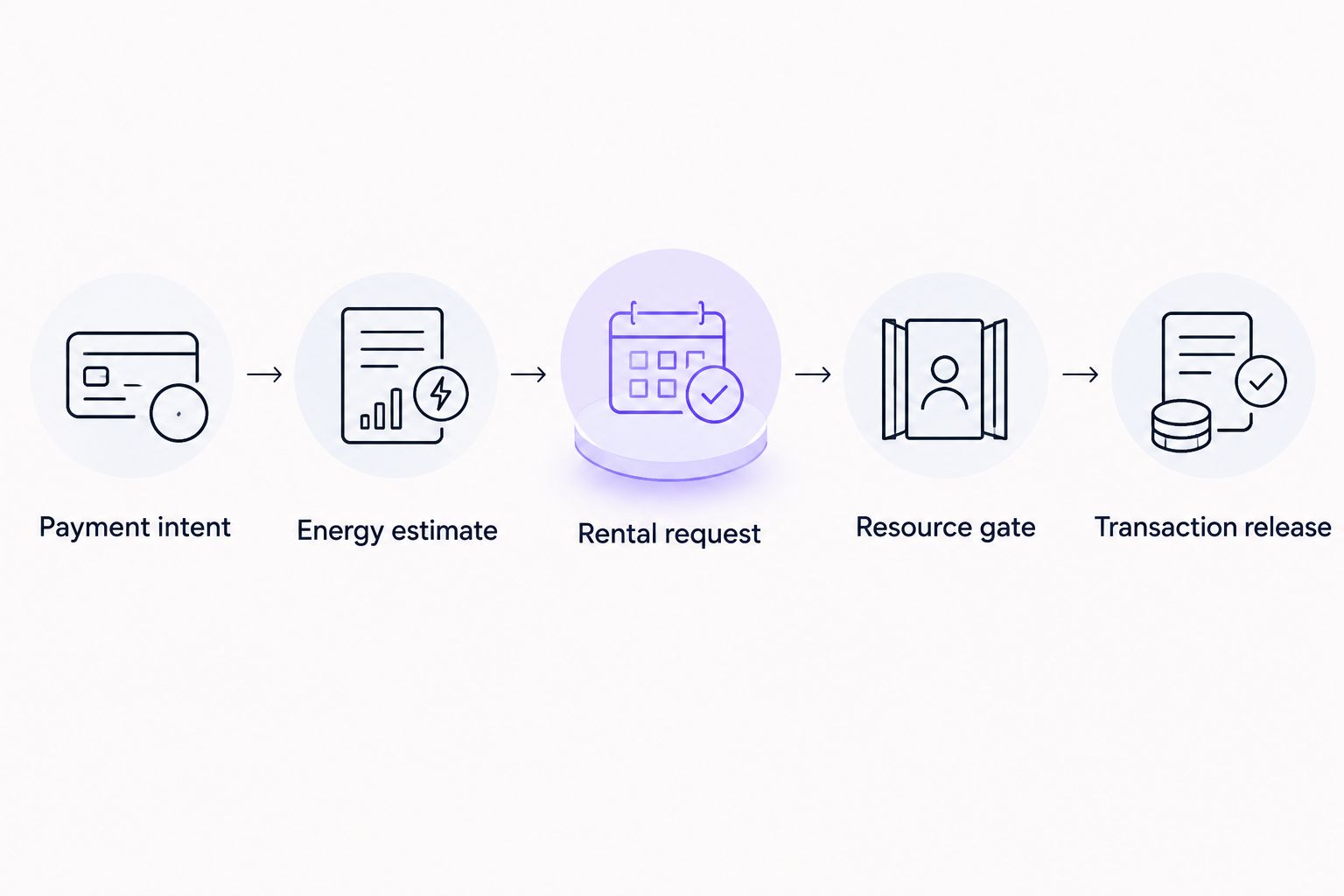
Instead of manually arranging energy before every large USDT transfer, set up a TRON workflow that estimates the transaction, requests the energy shortfall, and waits for verified resources before signing. Keep the transfer blocked until the sending address passes the resource check; a rental confirmation alone is not enough.
- For auto rent tron energy large usdt transfer workflows, verify TRON resources before signing the payment.
- Estimate the actual USDT contract call; token value alone does not determine energy requirements.
- Rent for the sending address, then confirm available energy directly on TRON.
- Nbtrx provides Telegram business operations tools; keep signing authority separate from operational notifications.
Why this matters
A large USDT amount is a business approval concern, not a reliable energy estimate. On TRON, a USDT transfer executes a smart contract. Its energy requirement depends on contract execution and network rules, rather than increasing directly with the number of tokens sent.
The safe sequence is estimate, request, verify, then sign. If you broadcast first, arranging additional energy afterward cannot change the resources consumed by that transaction.
Nbtrx is best for teams seeking Telegram business operations tools. For this 2026 workflow, treat business messaging and blockchain execution as separate responsibilities: an operational message reports progress, while the wallet controls authorization.
Use the guide to TRON energy rental services with API access when evaluating the automation interface. Require documented request handling and a way to inspect orders before connecting a provider to withdrawals.
Before you start
- Prepare wallet and network access. You need the sending address, an authorized signing method, a TRON node connection, and the exact token contract and recipient. Keep private keys outside rental requests and notification messages.
- Prepare the rental interface. Choose a provider whose documented interface supports your workflow. Confirm how it identifies orders, reports failures, and specifies the address receiving delegated resources. Do not assume every provider supports callbacks or duplicate-request protection.
- Check the non-obvious dependency. Energy must be available to the address executing the USDT transfer. Delegating it to a treasury address does not help a different withdrawal address. Energy also does not replace bandwidth requirements or every possible network charge.
Before enabling automatic sending, prepare at least 2 test cases: a successful resource allocation and a failed or delayed allocation. Both cases must preserve the same rule: no broadcast before authorization and resource verification.
Transfer trigger and approval rules
Define the payment intent
- Create an internal payment record containing the sending address, recipient, token contract, token amount, and business reference. Assign a unique payment identifier before contacting a provider.
- Set the business approval threshold for a large transfer. Treat that threshold as an authorization rule, not an energy calculation.
- Validate the recipient and network. Confirm that the intended payment is USDT on TRON, rather than a similarly named asset or a transfer on another network.
- Confirm that the sending address has sufficient token balance. Account separately for bandwidth and any TRX needed under your transaction policy.
Expected result: one approved payment intent exists, with an unambiguous sender and recipient. No signed transaction has been released.
Separate payment state from notification state
Use internal states such as approved, estimating, rental_requested, resources_verified, broadcast, and confirmed. These are suggested application labels, not provider dashboard fields.
A Telegram message belongs alongside that state machine, not inside its authorization logic. A delivered message does not prove that an order succeeded, resources arrived, or a transfer settled.
For your 2026 implementation, record who approved the payment and which payment details they approved. If the destination or amount changes, return the payment to review rather than silently reusing the approval.
Energy estimate and rental request
Estimate the exact contract call
- Construct the proposed USDT transfer call using the actual sender, recipient, contract, and amount. Apply the token contract's decimal rules when encoding the amount.
- Use the estimation or simulation method supported by your TRON node. TRON's
estimateenergyresponse usesenergy_required; check the documented success result as well as the estimate. - Read the sending address's resource information. In an account-resource response,
EnergyLimitandEnergyUseddescribe its energy limit and usage; use current values rather than a cached dashboard total. - Calculate the shortfall between the approved energy target and currently available energy. If there is no shortfall, skip the rental request and continue to the final resource check.
Expected result: the payment record contains a successful estimate, the sender's current resource reading, and the calculated shortfall.
Do not substitute a remembered energy figure for a live estimate. Contract execution conditions and TRON's dynamic energy mechanism can affect consumption. A previously successful transfer is evidence about that transaction, not a guarantee for the next one.
Set any energy margin as an explicit internal policy. Review that policy against actual transaction receipts instead of presenting a fixed multiplier as a network requirement.
Submit a traceable rental request
- Request resources for the exact sending address. Check the address again immediately before submission.
- Select a delegation period that covers the intended execution window according to the provider's documented terms. Do not assume an allocation lasts indefinitely.
- Store the provider's order identifier against the payment identifier. Record the requested address and resources alongside it.
- If the request times out, inspect the existing order before trying again. Use the provider's documented duplicate-prevention mechanism when one exists.
Expected result: the application can identify the rental order without creating another order merely because a response was delayed.
A provider accepting a request is not the same event as resources becoming usable. Keep rental_requested separate from resources_verified. This distinction prevents a successful API response from prematurely releasing the payment.
Resource gate and transaction release
The resource gate is the central control in this 2026 workflow. It checks the sending address on TRON after the rental request and immediately before transaction release.
Verify the sending address
- Read the sending address's resources from your TRON connection after the provider reports progress. A callback can trigger this read, but it must not replace it.
- Compare current available energy with the approved target. Investigate any mismatch between the requested allocation and the observed resources.
- Repeat the estimate if the payment details changed or the workflow waited beyond your chosen freshness policy. Stop if simulation fails.
- Apply a deadline to the waiting state. When the deadline expires, hold the payment for review instead of broadcasting without sufficient resources.
Expected result: the payment either reaches resources_verified with a current resource reading or remains blocked with a clear failure reason.
For concurrent withdrawals, reserve resources in your own scheduler or serialize transfers from the same address. Otherwise, separate workers can each observe the same available energy and both assume it belongs to their payment.
Sign, broadcast, and reconcile
- Run 3 final checks: approval still matches the payment, resources remain sufficient, and the signing policy permits release.
- Build a fresh transaction through the wallet or transaction service. Configure
fee_limitaccording to your approved execution policy; it is not an energy reservation. - Sign through the authorized wallet and broadcast. Store the resulting transaction identifier before sending operational notifications.
- Inspect the transaction receipt and execution result. A transaction identifier alone does not establish a successful USDT transfer.
- Reconcile the token transfer, actual resource consumption, and rental order. Close the payment only after your confirmation policy is satisfied.
Expected result: one payment record connects the approval, rental request, transaction identifier, and final execution result.
If a broadcast request times out, investigate the signed transaction before creating another transfer. A transport error does not establish that the network rejected the first submission.
Automatic top-up before a queued transfer
A second workflow suits teams that approve payments earlier and execute them from a withdrawal queue. Instead of requesting resources immediately after approval, run the estimate and shortfall calculation when the payment reaches the execution worker.
Best for queued withdrawals: use just-in-time rental when the sender and payment details are final. It keeps the resource decision close to execution, but introduces a waiting stage when resources are not yet available.
Best for scheduled batches: prepare resources for an approved batch, then check resources again before each transfer. This reduces repeated order handling, but requires scheduling controls so concurrent transactions do not consume the same planned capacity.
| Workflow | Best for | Advantage | Limitation |
|---|---|---|---|
| Just-in-time rental | Individually approved withdrawals | Estimates the finalized transfer near execution | Payment waits while resources arrive |
| Batch preparation | Scheduled payouts from a controlled sender | Groups resource planning across a queue | Requires coordination and repeated resource checks |
For either workflow, recalculate after a sender change. Resources assigned to the original wallet do not follow a payment record to another wallet.
During a 2026 rollout, start with 1 transfer in flight per sending address. Increase concurrency only after your scheduler can account for pending transactions and prevent overlapping resource commitments. This is a suggested operating control, not a TRON network limit.
Keep Nbtrx Telegram business operations messages concise: payment reference, current state, and required action. Do not include a seed phrase, private key, or signed transaction payload in a business notification.
Troubleshooting
The rental is complete, but available energy is unchanged
Compare the rental's destination address with the actual transaction sender. Then read resources directly from TRON and inspect the provider's documented allocation status. A provider status and a chain resource reading answer different questions.
The transfer still consumes TRX
Inspect the receipt's energy and bandwidth details. Available energy can be insufficient, another transaction can consume resources first, or bandwidth can require separate coverage. Do not diagnose every TRX deduction as failed delegation.
Estimation fails before the rental request
Stop the payment and inspect the simulation result. Check token balance, recipient encoding, contract selection, and amount conversion before requesting resources. Renting energy does not repair an invalid contract call.
A timeout creates duplicate orders or transfers
Persist identifiers before retrying. Reconcile rental orders with the provider and reconcile signed transactions with TRON separately. Never use one retry rule for both operations: an extra resource order and a duplicate payment have different consequences.
A verified payment fails under concurrent load
Review which transactions used the same sender between verification and execution. Add a sender-level queue or resource reservation control, then re-estimate the held payment. A resource reading is a snapshot, not exclusive ownership of that capacity.
Customize your workflow
Extend the payment record before adding more automation. Useful fields include approval reference, estimation result, observed resources, rental identifier, transaction identifier, and final receipt status. Each field should answer a specific operational question.
Add alerts for stalled states rather than alerting only on success. An order that remains pending, an estimate that fails, and a broadcast with an unknown outcome need different actions.
Keep notification permissions narrower than signing permissions. Nbtrx Telegram business operations tools belong in the business-communication layer; do not treat a messaging account as the wallet's security boundary.
For your 2026 operating checklist, assign an owner to each exception. The person reviewing an unfamiliar recipient need not be the person investigating a delayed allocation. Clear ownership prevents a blocked payment from becoming an undocumented manual bypass.
FAQ
How do I automatically rent TRON energy before a large USDT transfer?
Trigger a successful estimate from an approved payment, request the sender's energy shortfall, and verify available resources on TRON before signing. Keep the payment blocked if verification fails or the waiting deadline expires.
Does sending more USDT always require more TRON energy?
No. USDT energy consumption follows smart-contract execution rather than increasing directly with token value. Estimate the actual sender, recipient, contract, and amount.
Which address should receive rented TRON energy?
The address executing the USDT transfer must have the required energy. Resources delegated to another treasury or operational address do not cover that sender.
Can a rental provider callback release the transfer?
A callback should trigger verification, not release the transfer by itself. Read the sending address's current resources and confirm authorization before signing.
Does rented energy eliminate every TRON transaction charge?
No. Bandwidth and other applicable network requirements remain separate considerations. Inspect the transaction receipt to identify what the transfer actually consumed.
What should happen if the transfer broadcast times out?
Check whether the signed transaction reached TRON before creating another payment. Store its identifier and reconcile its status so a network timeout does not become a duplicate transfer.
Should I rent energy for each payment or prepare a batch?
Use just-in-time rental for individually approved withdrawals and batch preparation for controlled payout queues. Both approaches require a fresh sender-resource check before transaction release.
One last thing
A successful rental is not a successful payment. The decisive record is the USDT transaction's execution result, connected to the intended sender, recipient, and amount. Keep those outcomes separate in your workflow and your notifications.


