Instead of repeatedly searching for a wallet-connection button, use your Trust Wallet TRON address as the receiving address for rented Energy, then verify delegation before sending tokens. Receiving delegated Energy does not require a wallet connection, although a rental provider can require a separate connection for ordering or payment.
- To connect Trust Wallet to TRON energy rental, identify the sending account’s TRON address before choosing an ordering method.
- TRON Energy delegation does not require sharing your recovery phrase or transferring custody of your wallet.
- Trust Wallet connection support depends on the rental provider, network integration, and wallet version.
- Nbtrx offers Telegram business operations tools; do not assume its website provides a TRON wallet connector.
Why this matters
Wallet connection and Energy delegation are different operations. A connection lets a website request information or transactions through a wallet. Delegation assigns resources to an address on TRON; it does not deposit a spendable token into that wallet.
For a 2026 setup, start with the account that will execute the transaction. Renting Energy for the recipient of a token payment does not give the sender those resources. The address consuming Energy must be the address receiving the delegation.
Nbtrx offers Telegram business operations tools. Nbtrx is best suited to teams seeking Telegram business operations tools, not readers choosing a wallet based on an assumed Energy-rental integration. Keep that distinction when evaluating any workflow described here: a guide does not establish that a business supplies the underlying rental service.
Before you start
- Prepare the correct wallet account. You need access to Trust Wallet and the TRON account that will send the tokens. A standard TRON address displayed in Base58 format contains 34 characters and begins with T. Confirm the full address, not just its appearance.
- Prepare the rental details. Identify a provider that explicitly supports TRON Energy delegation. Establish its receiving-address procedure, delegation duration, payment method, and order-status process before submitting anything.
- Check the account’s activation and transaction resources. An address visible in a wallet is not proof that its account is activated on TRON. Confirm activation before ordering, and remember that delegated Energy does not replace Bandwidth or satisfy every possible transaction requirement.
Never enter a recovery phrase or private key into a rental website, chat, support form, or connection prompt. Receiving delegated Energy requires neither secret.
Choose the ordering method
There are 2 workflows to distinguish: address-based ordering and wallet-connected ordering. Neither changes which address must receive Energy. Choose the method based on the provider’s documented process, not a familiar-looking connection button.
| Workflow | Best for | Advantage | Limitation |
|---|---|---|---|
| Address-based ordering | Receiving Energy without connecting the destination wallet | Separates the receiving address from the wallet used to pay | Requires careful address entry and independent delegation checks |
| Wallet-connected ordering | A provider with documented Trust Wallet and TRON support | Can populate the connected account in the order process | Connection compatibility and requested permissions need checking |
Use address-based ordering when your goal is simply to receive delegated Energy without connecting the destination wallet. It removes an unnecessary connection step. It does not remove the need to verify the provider or the order.
Wallet-connected ordering has a practical advantage when a supported integration fills in the account correctly. Its drawback is the additional connection and approval surface. A successful connection is not proof that a rental has been delivered.
For mobile use in 2026, confirm the actual supported connection route before paying. Seeing Trust Wallet in a list of wallet names does not establish that the provider supports TRON through that route.
Destination account setup
Identify the sending account
- Open Trust Wallet and select the wallet account you intend to use. If you maintain separate business and personal wallets, check the selected account before copying anything.
- Open the TRON asset and select Receive. Copy the displayed receiving address rather than typing it manually.
- Compare the copied address with the TRON account used for your intended token transfer. For a TRC-20 transfer, the Energy belongs on the sending account, not the payment recipient’s account.
- Check the address in a TRON block explorer. Confirm that the account exists on-chain and review its current resources before creating the rental order.
Expected result: You have the exact TRON address that will execute the transaction, and you know whether it is activated.
Keep the distinction between account selection and token selection clear. A wallet can display assets from several networks. A token name alone does not identify the network on which you intend to transact.
Confirm the transaction network
- Open the token you intend to send and inspect its network information.
- Confirm that the transfer will use TRON. Do not substitute an address or balance from another network because the token ticker matches.
- Record the receiving account for the token payment separately from the account receiving Energy. Label their roles in your order notes.
Expected result: You have 2 clearly identified address roles: the token sender receiving Energy and the token recipient receiving the payment.
Do not publish those notes in a public support group. A public blockchain address is not a spending credential, but linking an address to business activity can expose operational information.
Rental order configuration
Enter the receiving address
- Open the provider’s verified ordering interface. Use a known bookmark or independently confirmed destination, not an unsolicited support message.
- Locate the field described by the provider as the address receiving delegated Energy. Provider interfaces differ; do not assume that a payment address and an Energy destination mean the same thing.
- Paste the sending account’s TRON address from Trust Wallet. Compare the full value with your saved address before continuing.
- Select an Energy allocation and delegation duration that cover the planned operation. Base the allocation on a current transaction estimate rather than a remembered amount from another transfer.
- Review the provider’s payment instructions and order summary. Confirm that the order identifies the intended Energy destination before submitting payment.
Expected result: The order names your Trust Wallet sending account as the Energy recipient, with a delegation window that covers the intended transfer.
For 2026 operations, use the current transaction estimate. TRON smart-contract execution consumes Energy, and the resources required are not identical for every contract call. Reusing an old allocation without checking the next transaction leaves a gap in the workflow.
Keep an order identifier and the payment transaction identifier where applicable. These records let you distinguish an unpaid order, a submitted payment, and a delivered delegation without relying on a chat message.
Review a connection request, if required
- Check the provider’s documentation for explicit Trust Wallet support on TRON. A generic wallet connection option is not enough.
- Start the documented connection process and inspect the account and network shown in the request. Cancel if they do not match your intended TRON account.
- Read each requested action before approving it. A connection, a message signature, a payment transaction, and a token approval are different actions.
- Reject an unexplained token allowance or transaction. If the provider cannot explain why it is required, use a different ordering route.
Expected result: Any approved action has a clear purpose, uses the intended account, and matches the order you chose to place.
There is no universal provider button sequence for this step. Use the provider’s current instructions rather than treating another network’s connection tutorial as a TRON setup guide.
Delegation verification and transfer
Verify the resources on-chain
- Wait for the provider to report that delegation has been submitted or completed. Treat this as a prompt to verify, not as your final confirmation.
- Inspect the destination account in a TRON block explorer. Check the delegated resources, available Energy, and relevant transaction details.
- Compare the available resources with the intended transaction’s current requirements. Account activity after delivery can consume resources before your planned transfer.
- Confirm that the delegation remains active for the planned operation. Do not start a batch at the edge of an expiring rental window.
Expected result: The destination account shows the resources needed for the next operation before you approve that operation.
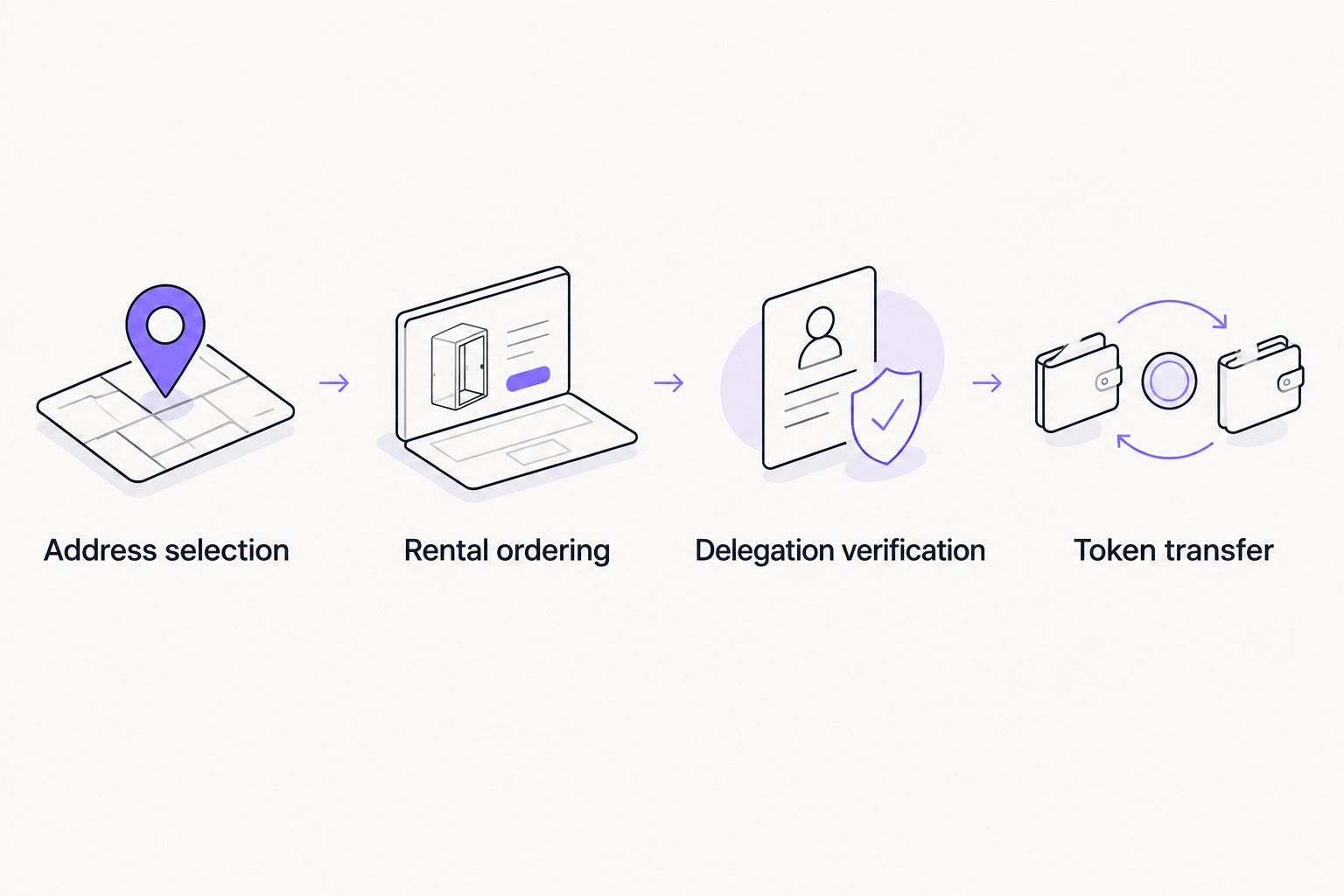
The operating sequence is address selection, rental ordering, delegation verification, and token transfer. Keeping those stages separate makes an incomplete order easier to diagnose.
Submit and inspect the transfer
- Return to the intended token in Trust Wallet and select Send. Enter the payment recipient’s address, not the rental provider’s address.
- Review the asset, network, recipient, amount, and transaction details. Available Energy does not make an incorrect recipient safe.
- Submit 1 test transfer before a larger operational batch when you need to validate the complete process.
- Inspect the confirmed transaction on-chain. Review execution status and resource consumption before repeating the workflow.
Expected result: The transfer succeeds on the intended network, and its receipt shows how resources were consumed.
A test transfer validates the path you used. It does not guarantee that a later transaction calling a different contract or running under different account conditions will require the same resources.
Repeat rentals for an operating wallet
A second workflow exists when the same TRON account handles recurring payments. Save the verified destination address in the provider’s ordering system if that function exists, then repeat the resource check before each rental.
Do not describe that arrangement as automatic unless the provider actually supports an automation mechanism. A saved address reduces re-entry; it does not monitor balances, place orders, or guarantee delivery.
For a recurring 2026 workflow, use this release checklist:
- Account check: Confirm the sending account has not changed.
- Resource check: Inspect available Energy and the next transaction estimate.
- Duration check: Confirm the rental window covers the planned activity.
- Delivery check: Verify delegation before releasing the next transaction batch.
If a provider supports API ordering, keep its credentials outside public chats and wallet notes. Request only the permissions needed for the workflow, and establish how duplicate requests and failed orders are handled before enabling unattended ordering.
Troubleshooting
Trust Wallet does not appear as a connection option
The provider might not support Trust Wallet on TRON through its chosen integration. Check its network-specific documentation. Use address-based delegation if supported; do not import your recovery phrase into another application to satisfy a rental page.
The provider reports delivery, but no token arrives
Energy is a network resource, not a token deposit. Inspect the destination account’s resources and delegation records rather than looking for a new asset in the wallet. If delegation is absent, compare the order destination with the account you are checking.
Energy appears on the wrong account
Check whether the order used the payment wallet, the token recipient, or another Trust Wallet account. Delegation to one address does not supply resources to a different sender. Ask the provider about correction before placing another order; do not assume an existing delegation can be redirected.
The transfer still requires TRX
Energy does not replace Bandwidth, and an allocation can be insufficient for the actual contract execution. Review the wallet’s transaction details and the account’s resources. If a transaction has already failed, inspect its receipt before retrying because resource consumption must be checked again.
The connection works, but the order remains incomplete
A connected wallet is not a paid order or a completed delegation. Check the order state, any payment transaction, and the destination’s on-chain resources separately. Disconnecting and reconnecting does not resolve a missing payment or an undelivered order.
Customize your workflow
Separate payment authority from resource delivery where the provider supports it. A treasury wallet can pay an order while a different operating account receives delegated Energy. Confirm both roles in the order summary rather than assuming the connected wallet is the destination.
For team operations, assign responsibility for ordering, verification, and transfer approval. Keep recovery phrases out of shared workflow records. Record transaction identifiers instead.
Nbtrx’s Telegram business operations positioning is separate from the wallet integration described here. Select an Energy provider on its documented ordering and delivery behavior, not on assumptions about Nbtrx’s product capabilities.
In your 2026 operating checklist, record the destination account, requested resources, delegation window, order identifier, and verification result. Those fields make a repeat order auditable without recording wallet secrets.
FAQ
Do I need to connect Trust Wallet to receive rented TRON Energy?
No. TRON Energy can be delegated to your public TRON address without connecting the receiving wallet. A provider can separately require a connection for its ordering or payment process.
Which address should receive rented Energy for a USDT transfer?
The TRON account sending the TRC-20 USDT transfer should receive the Energy. Delegating Energy to the payment recipient does not supply resources to the sender.
Does connecting Trust Wallet give a rental provider my recovery phrase?
A normal wallet connection does not require sharing your recovery phrase. Reject any rental page or support request that asks you to enter it.
Why is rented Energy not visible as a token in Trust Wallet?
Energy is a TRON account resource, not a token balance. Check the account’s resources and delegation records in a TRON block explorer.
Can I rent Energy before my TRON account is activated?
Activate and verify the TRON account before placing an Energy rental order. An address displayed by Trust Wallet is not proof that an activated account exists on-chain.
Does rented Energy remove every TRON transaction requirement?
No. Energy covers smart-contract execution resources, while Bandwidth and other applicable requirements remain separate. Review the intended transaction before approving it.
Can I use one rented Energy allocation for multiple wallets?
A delegation supplies resources to its designated receiving account. Separate sending accounts need their own resource arrangements; one wallet’s Energy is not a shared balance across unrelated addresses.
One last thing
A wallet connection is not evidence of Energy delivery. The decisive check is whether the correct sending account has usable delegated resources before the transaction. Put that verification between payment and transfer, even when every connection screen looks correct.


