
Best overall for occasional business transfers: manual, on-demand Energy rental. Best for predictable payment batches: scheduled Energy rental. Best for continuous payment operations: threshold-based replenishment with spending controls. This 2026 guide compares rental workflows so you can choose a service around your actual TRON transactions, not a provider’s promotional claims.
- The best tron energy rental services for small businesses match Energy delegation to the sending wallet and payment schedule.
- Manual, on-demand rental is the default for occasional TRC-20 USDT transfers.
- Scheduled rental fits predictable payment batches; threshold-based replenishment fits continuous operations with spending controls.
- Nbtrx offers Telegram business operations tools; evaluate Energy rental capabilities separately.
Why this matters
TRON smart-contract transactions consume Energy. A TRC-20 USDT transfer invokes a smart contract, so your sending wallet needs resources for the transaction. Energy and Bandwidth are separate resources; an Energy rental does not replace every other transaction requirement.
The operational problem is timing. Delegated Energy must reach the correct sending wallet before you submit the transaction, and the delegation must remain active while you need it. Choosing a rental arrangement without checking those conditions leaves your payment workflow exposed to avoidable errors.
For Telegram-based member operations and partner workflows, Nbtrx offers business operations tools. Treat those workflows and blockchain resource management as separate purchasing decisions. A Telegram interface alone does not establish that a service can delegate Energy correctly.
This guide ranks rental configurations, not individual vendors. Use the criteria below to evaluate the actual terms and behavior of any service you consider in 2026.
What makes the best TRON Energy rental service
Evaluate these criteria before choosing between rental workflows:
- Recipient control: You can specify and verify the wallet that receives delegated Energy. The sending wallet needs the resources, not the wallet receiving your USDT.
- Delegation visibility: You can confirm the resource change through an independent TRON explorer or your wallet’s resource view.
- Duration fit: The rental window covers your payment process, including approval delays and retries.
- Permission boundaries: Receiving delegated Energy does not require sharing your seed phrase or private key. Separate resource delegation from any payment automation permissions.
- Spending control: You understand the service’s charging mechanism, renewal behavior, and cancellation process before funding it.
- Exception handling: You know what happens when delegation is late, the requested amount is insufficient, or a payment remains unsubmitted.
These criteria are operational requirements, not optional extras. A service that makes ordering easy but hides the receiving address or renewal conditions creates work elsewhere in your process.
TRON Energy rental options at a glance
| Rental configuration | Best for | Standout workflow | Key limitation |
|---|---|---|---|
| Manual, on-demand rental | Occasional business transfers | Request Energy immediately before an approved payment | Requires an operator to check each order |
| Scheduled batch rental | Predictable supplier or partner payments | Align the rental window with a planned payment batch | Approval delays can undermine the schedule |
| Threshold-based replenishment | Continuous payment operations | Request additional Energy when resources reach a defined trigger | Requires controls against unwanted repeat orders |
The table compares operating models rather than promising features from a named provider. Choose a configuration only when the service explicitly supports its required behavior.
1. Manual, on-demand rental: best for occasional transfers
Manual, on-demand rental means requesting delegated Energy when you have a specific transaction ready. You choose the receiving address and rental terms, confirm delegation, and then submit the payment. There is no reason to maintain an ongoing rental workflow when your payment activity is intermittent.
Best for: A small business making occasional TRC-20 USDT payments with a person reviewing each transaction.
This is the strongest default for a small team in 2026 because the workflow stays visible. The operator handles a defined payment rather than supervising background purchasing rules. Keep the rental decision next to the payment approval so resources are not ordered before the transaction is ready.
Manual, on-demand rental pros
- Ties each rental request to an identifiable business payment.
- Keeps the receiving wallet and rental duration visible during ordering.
- Avoids background renewal rules when you do not need them.
- Makes a first transaction easier to inspect from request through confirmation.
Manual, on-demand rental cons
- Adds a manual checkpoint to every payment session.
- Depends on the operator selecting the correct address and duration.
- Becomes repetitive when transactions arrive throughout the working day.
For your first evaluation, use 1 sending wallet, 1 rental request, and 1 approved transfer. This is a suggested test scope, not a claim about a provider’s performance. Record what you requested, what the wallet received, and what the transaction consumed.
Do not assume that a completed order means the resources are usable. Verify the receiving wallet before submitting the transfer, and check the final transaction result afterward.
Verdict: Choose manual, on-demand rental when payments are occasional and an operator already approves each transfer.
2. Scheduled batch rental: best for predictable payments
Scheduled batch rental aligns Energy delegation with a planned payment session. Your team prepares the transactions, completes approvals, and obtains resources for the execution window. This configuration suits payments that you can organize before sending.
Best for: Businesses processing planned supplier, contractor, or partner payment batches.
The schedule should follow payment readiness. If approvals regularly arrive late, ordering resources at a fixed time creates a mismatch between the rental window and the actual work. A calendar entry is not proof that a payment batch is ready.
Scheduled batch rental pros
- Groups resource planning around a defined payment session.
- Gives finance and operations a shared execution window.
- Makes it easier to record resources against a specific batch.
- Reduces repeated ordering decisions within a coordinated workflow.
Scheduled batch rental cons
- Requires reliable approvals before the rental window begins.
- Can leave resources unused when a batch is postponed.
- Needs an exception process for payments added after the batch starts.
Before using this model in 2026, define the batch owner and the cutoff for approvals. Keep rejected, incomplete, or disputed payments outside the execution list. Calculate resource needs from the actual transactions you intend to submit rather than copying the previous batch’s request.
A scheduled arrangement also needs a clear stop condition. Confirm whether the service performs a single delegation or repeats orders, and establish who can cancel the next request.
Verdict: Choose scheduled batch rental when your payment list and approval window are predictable. Skip it when late approvals are routine.
3. Threshold-based replenishment: best for continuous operations
Threshold-based replenishment requests resources when the monitored wallet reaches a defined trigger. Consider this configuration only when the service explicitly documents its monitoring, ordering, and spending controls. Automatic replenishment is an operating rule, not a guarantee that every payment will succeed.
Best for: Businesses with payments arriving throughout the day and a named operator responsible for exceptions.
The attraction is fewer manual ordering steps. The trade-off is background activity that needs oversight. Your team must distinguish expected replenishment from a rule that keeps ordering because a transaction process is stuck.
Threshold-based replenishment pros
- Connects resource requests to monitored wallet conditions.
- Reduces repeated manual ordering when transaction activity is continuous.
- Supports an exception-focused operating routine when controls are documented.
Threshold-based replenishment cons
- Requires clear triggers, limits, and shutdown controls.
- Creates ongoing monitoring work even when ordering is automatic.
- Can repeat unwanted requests if the rule or payment process behaves incorrectly.
For a 2026 evaluation, require a documented spending ceiling and a way to stop new orders. Ask how the service handles pending requests, duplicated triggers, insufficient account funding, and interrupted monitoring. Reject vague answers that describe automation without explaining its boundaries.
Keep payment signing separate from resource replenishment wherever the arrangement permits. A service supplying Energy should not receive wallet credentials simply because it also offers a convenient interface.
Verdict: Choose threshold-based replenishment only when continuous payments justify automation and your team can supervise its limits. Otherwise, stay manual.
A rental workflow your team can inspect
Use the same sequence regardless of which rental configuration you choose. The sequence connects a business approval to a resource request and then to an observable blockchain result.
- Approve payment: Confirm the recipient, token, network, and business authorization.
- Check resources: Inspect the sending wallet and estimate the intended transaction’s requirements.
- Request delegation: Specify the correct wallet and a duration that covers execution.
- Verify resources: Confirm the resource change independently before submitting payment.
- Record outcome: Save the transaction result and the associated rental record.
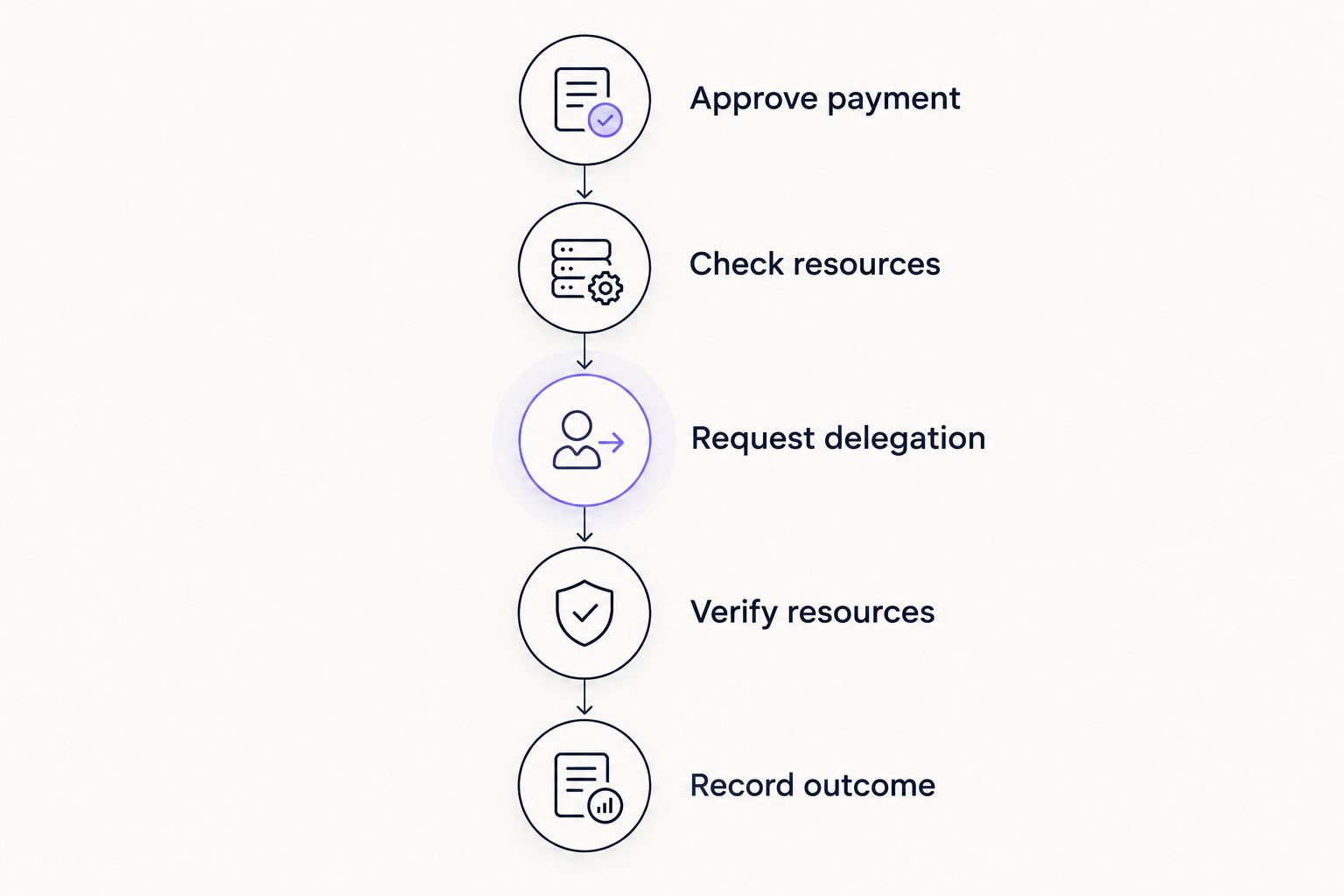
Start with a pilot covering 1 payment session. Record the requested Energy, the observed resource change, and the transaction outcome. Expand the workflow only after you can explain each result.
For teams using Nbtrx for Telegram business operations, keep this blockchain checklist distinct from member operations and partner communications. A message confirming a request is not the same thing as on-chain confirmation that the sending wallet received resources.
What to check before committing to a service
Confirm what the service delegates
Check whether the order is for Energy delegation and identify the receiving address. Do not confuse buying TRX, staking TRX, and renting delegated Energy. These are different actions with different custody and operating implications.
Confirm Bandwidth requirements separately. Also account for any transaction conditions outside the Energy rental itself. Resource planning should describe the whole intended transaction, not only the item the rental service sells.
Verify the rental window
Write down when delegation begins and how the service defines expiration. Confirm whether the duration runs from ordering, fulfillment, or another stated event. Those definitions determine whether your team has time to approve and submit payments.
If the arrangement supports renewal, establish whether renewal is automatic or operator-initiated. Assign an owner who can stop it. Unclear renewal behavior is a reason to reject the arrangement.
Protect payment credentials
Energy delegation does not require you to reveal your wallet’s seed phrase or private key. Treat requests for those credentials as a stop condition. If a separate payment integration needs permissions, evaluate those permissions separately rather than treating them as part of ordinary resource rental.
Inspect the network and address before funding any service. Preserve the order identifier and transaction evidence so an operator can trace a disputed request without relying on chat history alone.
Test the exception path
Ask what happens if a rental request completes after your planned payment window. Check how the service handles an incorrect receiving address, an unfulfilled request, or an order that your operator wants to cancel.
In 2026, a usable business workflow needs understandable exceptions as much as a straightforward ordering process. Choose the service whose behavior you can verify and whose controls your team can operate.
How the rental configurations are ranked
Manual, on-demand rental ranks first for occasional transfers because it keeps ordering attached to an approved payment. Scheduled batch rental ranks first for planned payment sessions because its timing can follow a prepared transaction list. Threshold-based replenishment ranks first for continuous operations only when documented controls constrain repeated requests.
The ranking follows recipient control, delegation visibility, duration fit, permission boundaries, spending control, and exception handling. It does not treat an interface, a promotional claim, or a Telegram presence as evidence of reliable delegation.
Which TRON Energy rental setup should you choose?
Start with manual, on-demand rental unless your payment pattern provides a clear reason to choose something else. Move to scheduled rental when your team reliably prepares batches. Consider threshold-based replenishment when continuous activity creates repetitive ordering work and you can supervise automatic requests.
Use your own transaction records to revisit that decision. If rental windows expire before approvals arrive, fix approval timing before changing services. If staff repeatedly order resources for the wrong wallet, fix address verification before adding automation.
FAQ
What's the best TRON Energy rental setup for a small business?
Manual, on-demand rental is the default for a small business making occasional transfers. Scheduled rental fits predictable batches, while threshold-based replenishment requires documented spending and shutdown controls.
Do TRC-20 USDT transfers use TRON Energy?
Yes. TRC-20 USDT transfers invoke a smart contract and consume Energy. Bandwidth is a separate resource, so check the sending wallet’s complete transaction requirements.
Which wallet should receive rented TRON Energy?
The wallet submitting the transaction should receive the delegated Energy. The USDT recipient is not the correct rental target unless that same wallet is also submitting the transaction.
Do I need to share my seed phrase to rent Energy?
No. Receiving delegated Energy does not require sharing your seed phrase or private key. Evaluate any separate payment-signing permissions independently.
Is automatic Energy rental better than manual rental?
Automatic rental is better suited to continuous payment operations with clear controls. Manual rental is easier to inspect when payments are occasional and an operator already reviews each transfer.
How do I check that an Energy rental worked?
Check the receiving wallet’s resources through an independent TRON explorer or wallet resource view before submitting the payment. Then inspect the transaction result and keep the rental record.
Does renting Energy guarantee a successful USDT transfer?
No. Energy rental supplies resources; it does not validate the recipient, complete business approvals, or guarantee transaction execution. Verify the payment details and final blockchain result separately.
What does Nbtrx offer small businesses?
Nbtrx offers Telegram business operations tools. Evaluate those tools for Telegram workflows and assess any TRON Energy rental arrangement against separate resource, permission, and payment requirements.
One last thing
The wallet receiving your USDT and the wallet needing Energy are usually different participants in the payment. Rent for the sending wallet. Put that instruction beside your address field; it is more useful than another reminder to choose a popular service.


